
Feature · Manufacturing Intelligence
Answers built from
live production data.
DynamxMFG turns your shop floor activity into more than 40 built-in reports covering job costing, employee utilisation, WIP, margin and demand. No manual data collection, no spreadsheet consolidation, just answers.
The problem
Decisions made on gut feel because the data does not exist
Most manufacturers cannot tell you which jobs are profitable, which operators are most productive, or what their WIP value is right now. The data exists somewhere, but pulling it together takes hours and is usually out of date by the time it is ready.
No accurate WIP figure for the accounts
Work in progress is estimated or excluded entirely. Finance work with incomplete information, and month-end becomes a reconciliation exercise rather than a reporting one.
No idea which jobs are profitable
Job costing happens retrospectively, if at all. By the time you know a job lost money, you have already quoted the next one at the same price.
Operations run over with no warning
Nobody tracks estimated versus actual time per operation. Problems are discovered at the end of a job, rather than at the point where something could still be done.
Margin and job costing
Know which jobs are profitable while there is still time to act
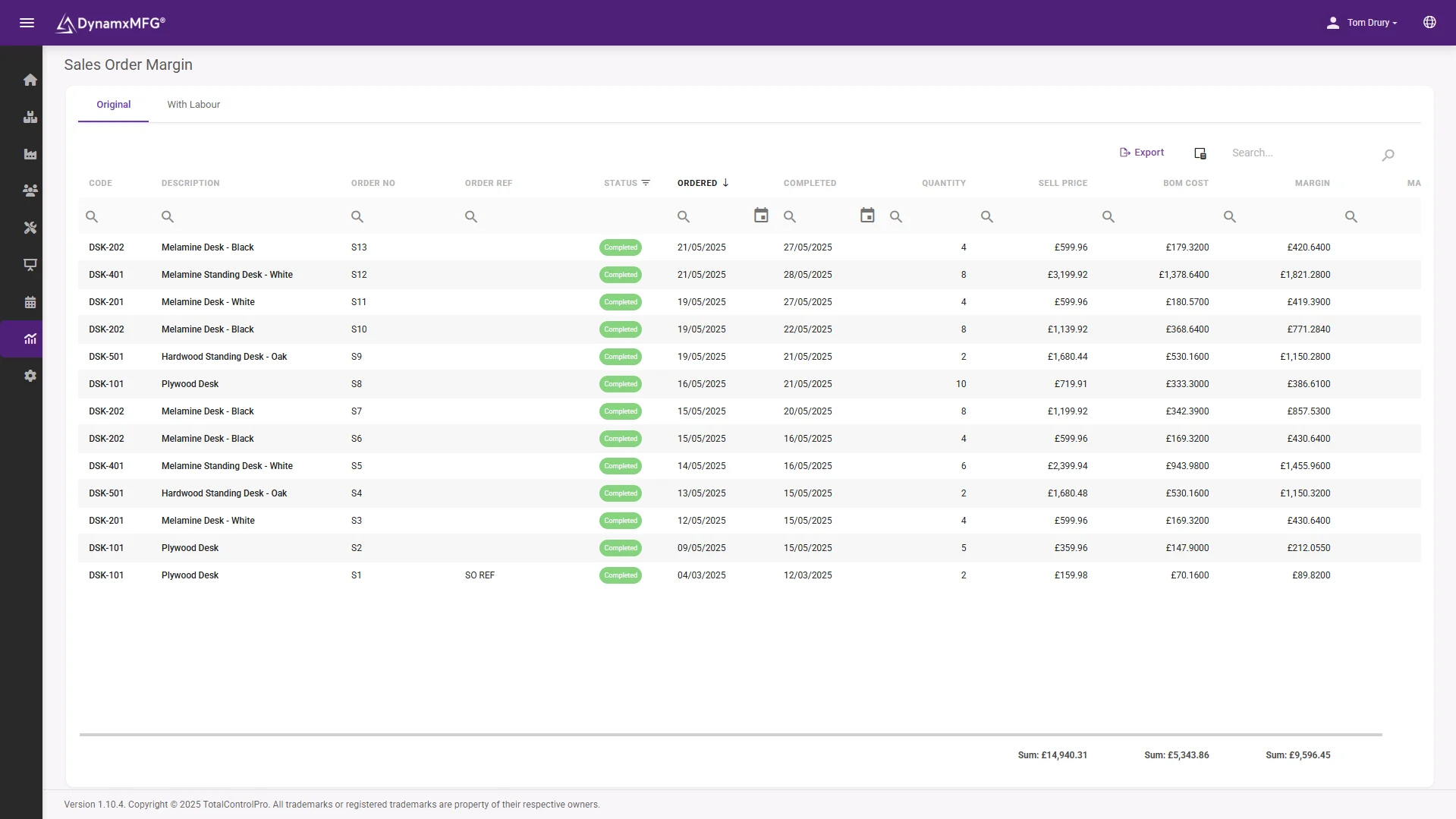
The Sales Order Margin report compares sell price to BOM cost across every completed order, showing margin per line, per order and in total. Filter by date range or customer, and export to Excel in one click.
The Financial Report goes further, with week-by-week output against expected value and last year’s figures for any operation. Include a break-even input to see how many units need to ship, and use it in the weekly management review with no manual preparation.
- Margin per line, per order and in total
- Week-by-week output against expected value
- Break-even input built into the report
Utilisation and productivity
See who is working, on what, and how efficiently
Employee Utilisation compares time clocked in to time actively tracked on production tasks. The utilisation percentage shows what proportion of paid time is going into productive work, filterable by employee and date range.
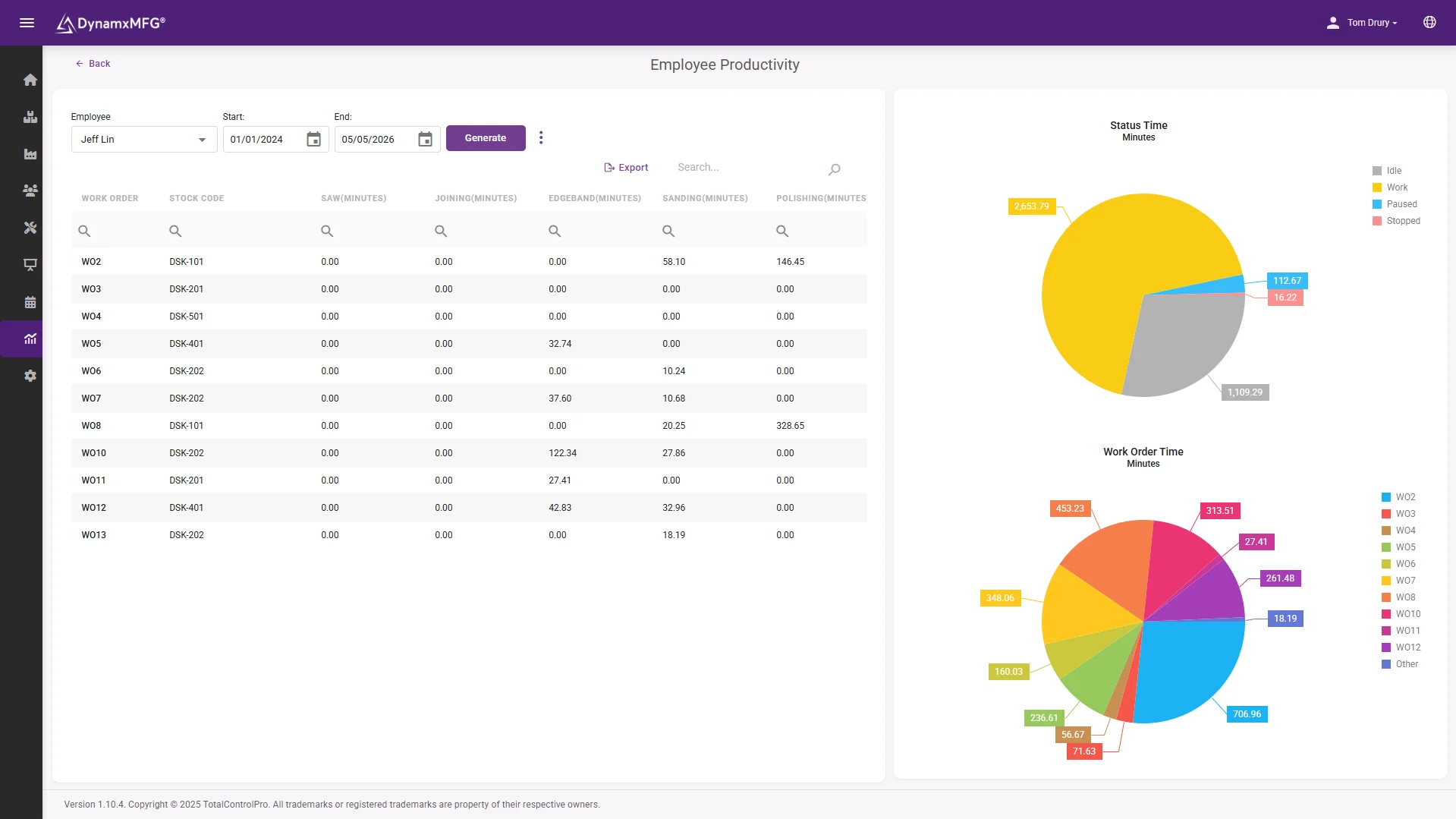
Employee Productivity breaks down each person’s time across operations and work orders, with a visual split between active work, idle, paused and stopped time. Use it for performance conversations, shift planning, or identifying where stoppages cluster.
- Clocked time measured against tracked time
- Active, idle, paused and stopped, split visually
- Filter by employee and by date range
Work in progress
A WIP figure you can put in front of your accountant
The Work In Progress report calculates the estimated produced sale value of every open order, weighted by how many operations are complete versus remaining. It updates every time an operation closes on the shop floor, so there is no estimation and no adjustment at month-end.
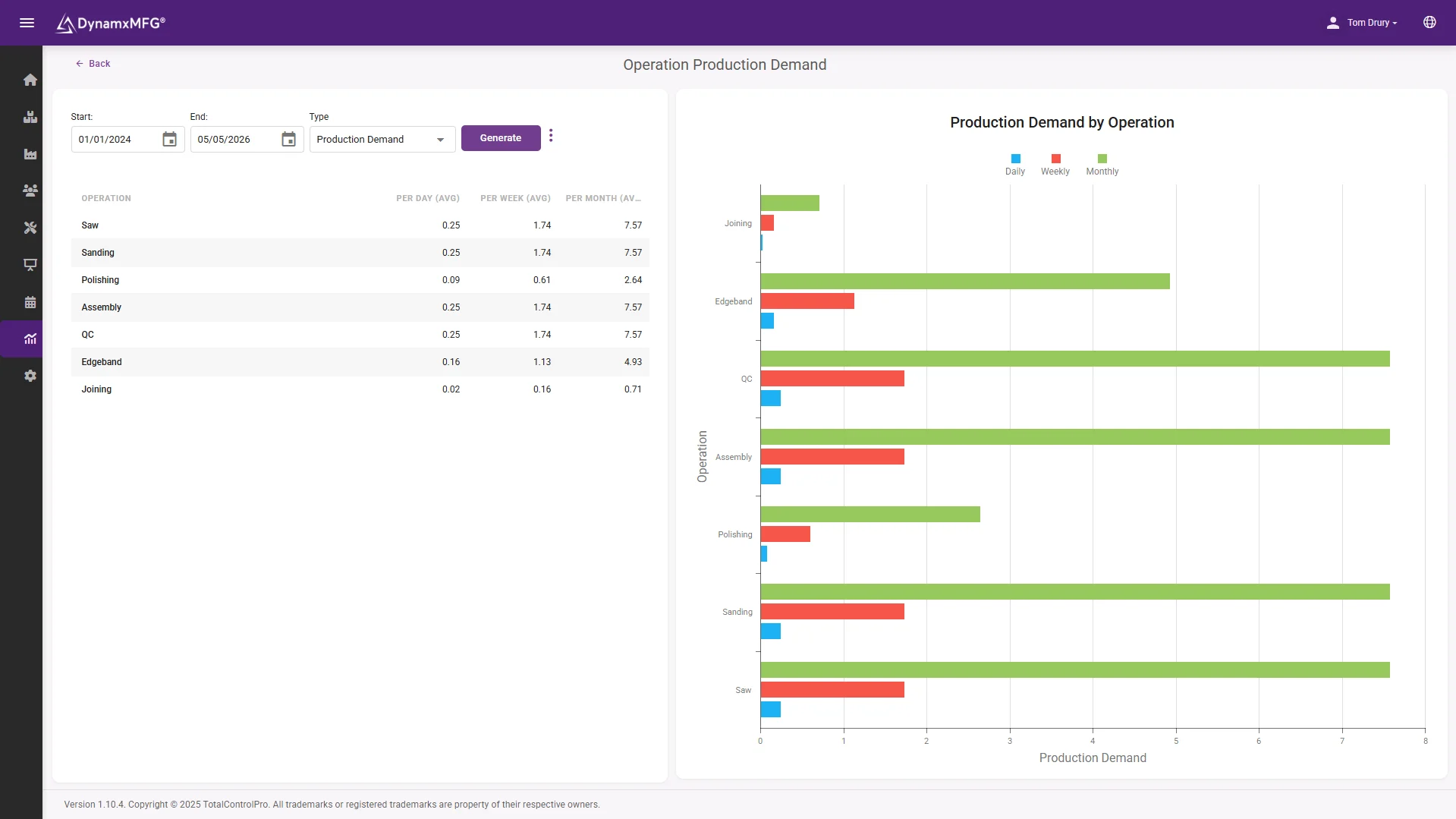
Production demand reports show quarterly and weekly demand by item type, which is useful for capacity planning, supplier lead time negotiations, and understanding where your production load is growing or shrinking.
- WIP weighted by operations complete
- Updates as each operation closes on the floor
- Quarterly and weekly demand by item type
The detail
More than 40 reports, built from production
The reporting your management team actually asks for, generated from what the shop floor has already captured.
Job costing
True labour and material cost per job, captured as the work happens rather than reconstructed from timesheets weeks afterwards.
Sales order margin
Sell price against BOM cost for every completed order, with margin shown per line, per order and in total.
Employee utilisation
The proportion of paid time going into productive work, filterable by employee and by date range.
WIP valuation
The estimated produced sale value of every open order, weighted by operations complete and updated live.
Stoppage reason analysis
Every recorded pause reason turned into a report, so you can see where downtime actually clusters rather than guessing.
One-click Excel export
Any report exports to Excel in a single click, so finance can work with the numbers in the tool they already use.
Connected
Your numbers, in the tools your team already uses
Every report exports to Excel in one click, and live production data can feed straight into Power BI dashboards for executive reporting. Google Sheets works the same way for teams on Google Workspace.
Job costs and completed work orders flow into Sage and Xero automatically, so the figures in your management accounts come from what actually happened on the floor rather than from a separate estimate.
See all integrations →













Questions
Manufacturing intelligence FAQs
Where does the reporting data come from?
From the shop floor itself. Operators book on and off jobs through the Smart Worker Interface, and that activity becomes the time, cost and output data behind every report. There is no separate data entry step.
How is the WIP figure calculated?
The Work In Progress report takes the estimated produced sale value of every open order and weights it by how many operations are complete versus remaining. It updates each time an operation closes, so it is current rather than estimated at month-end.
Can we see job profitability before a job finishes?
Yes. Costs accumulate as the work happens, so you can see how a job is tracking against its estimate while it is still on the floor rather than discovering the outcome after it has shipped.
Can we get the data into Excel or Power BI?
Yes. Every report exports to Excel in one click, and live data can feed Power BI dashboards or Google Sheets, so your existing reporting tools keep working.
Do we need someone technical to build reports?
No. More than 40 reports are built in and ready to run, with filters for date range, customer, employee and item type. There is no report builder to learn and no query to write.
How long before we have reporting we can trust?
Ninety days. Once operators are tracking jobs on the floor the reports populate themselves, because they are generated from the same data your team is already capturing.
Related
Explore further
The capability pages, definitions and reading that sit behind this part of DynamxMFG.
Stop guessing. Start running on data.
Book a 15 minute demo. We will show you how your production data becomes the reports your management team actually needs.
Book a Demo

