
Industry · Electronics & PCB Assembly
BOM control for builds
that never stand still.
DynamxMFG keeps the spec, the stock and the traceability in step when revisions land mid-build. Modify BOMs after release, kit against live demand, and capture which components went into which build automatically.
Sound familiar?
When the BOM changes, the chaos starts
The friction in fast-moving electronics and PCB assembly is rarely the assembly itself. It is keeping every build on the right revision, with the right parts, and being able to prove it afterwards.
BOM changes mid-build
A revision lands while jobs are in progress, and keeping every build on the right spec becomes a manual scramble.
Kitting errors stall the line
Wrong or short kits mean operators stand idle, and a single missing component holds up the whole build.
Component traceability is manual
Tracing which batch went into which build is slow, error-prone work that nobody wants to do under pressure.
Side by side
Spreadsheets and generic tools vs DynamxMFG
Generic tools assume the spec holds still. In electronics the revision changes mid-build, and stock, kitting and traceability all have to keep up.
| DynamxMFG | Spreadsheets and generic tools | |
|---|---|---|
| Dynamic BOM control | Change a BOM after release, snapshots protect live jobs | Re-issue the sheet and hope everyone reads it |
| Component and reel traceability | Batch and serial captured at goods-in, carried to build | Traced by hand through delivery notes |
| Kitting shortages | Shortfalls raise purchase demand when the order is released | Found by the operator at the bench |
| Test and rework records | Results and rework logged against the individual build | Kept on separate test logs |
| Stock and allocation accuracy | Stock moves as jobs consume and kits are picked | Corrected at the next stock count |
What you get
Everything an electronics manufacturer needs. Nothing it does not.
DynamxMFG is built for builds that change, from BOM release through kitting and assembly to a component-level record of what was fitted.
Dynamic BOM and Works Orders
Design and manufacturing bills of materials sit in one place. Release a works order and it takes a snapshot of the spec, so a revision landing tomorrow does not disturb jobs already on the line. Push the change to open orders when you choose.
Replaces: BOM spreadsheets, revision emails, printed parts lists
Kitting and Stock Allocation
Pick lists are released to the kitting team before a job reaches the line. Pickers pick, transit and confirm each item, so parts are staged at the bench before the operator starts. Shortfalls raise purchase demand at release rather than at the bench.
Replaces: Kitting spreadsheets, manual stock checks, shortage lists
Component and Batch Traceability
Batch and serial numbers are captured at goods-in and carried through allocation and consumption. Every finished board has a component-level record behind it, so a recall, a warranty claim or a customer audit is answered from the system rather than from paperwork.
Replaces: Reel logs, delivery note folders, manual trace exercises
Assembly and Test Capture
Operators track each stage from a tablet or scan station on the line. Test results, pass or fail outcomes, scrap and rework are recorded against the individual build as they happen, so the office sees the true state of the line without asking.
Replaces: Test logs, rework tickets, progress spreadsheets
Kitting
The right parts, kitted on time
Design BOM and Manufacturing BOM live in one place, connected to FIFO costing, purchase orders, allocations and stock locations, all driven by live production demand.
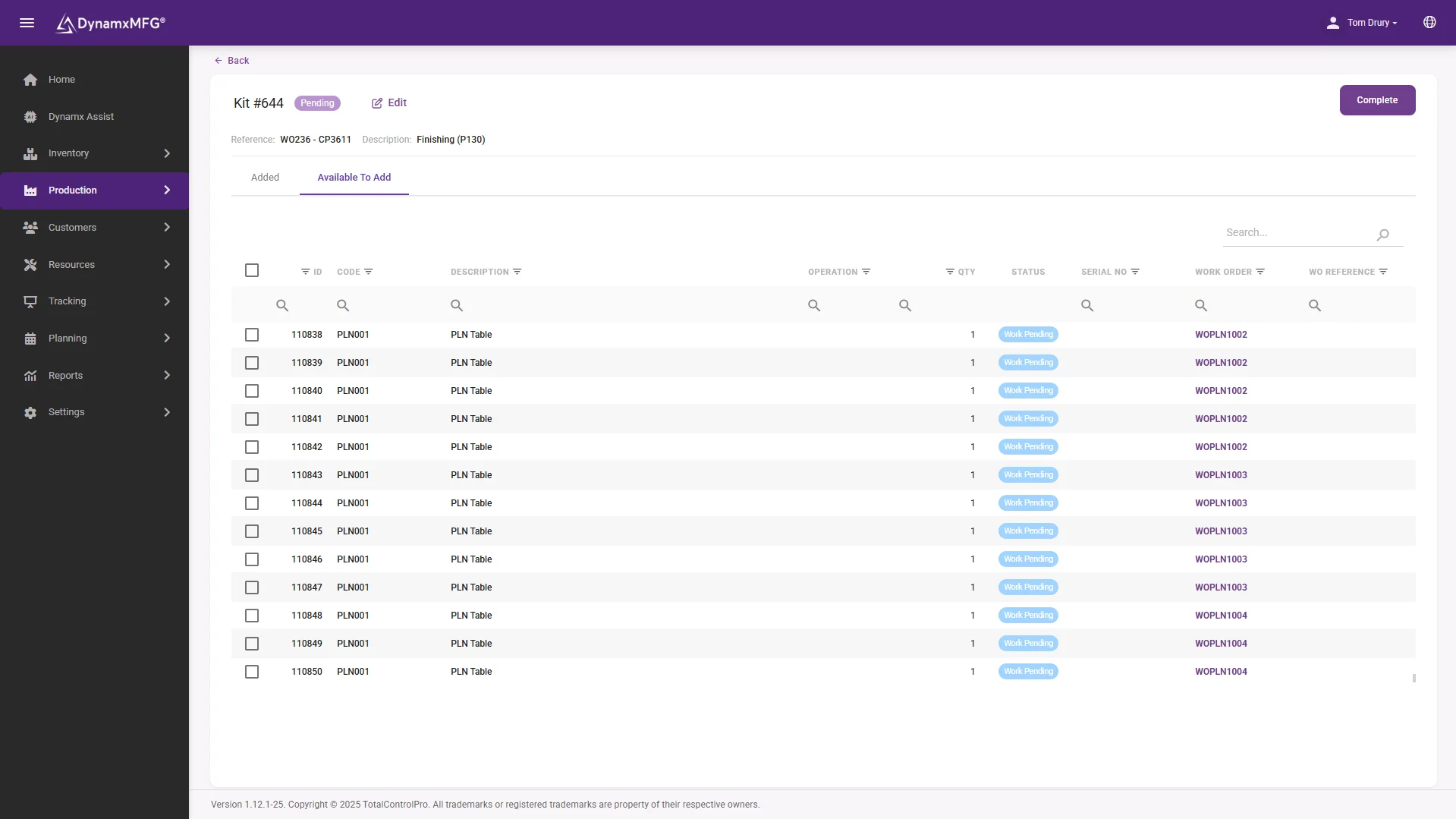
Kitting releases the pick list before the job reaches the line, so components are staged and confirmed before an operator starts. Where stock is short, purchase demand is raised immediately rather than discovered at the bench.
- BOM snapshots lock the spec at release
- Pick lists staged before the job starts
- Shortfalls raised as purchase demand automatically
The numbers
What manufacturers get from DynamxMFG
built-in reports, from live production data
from kick-off to running on the floor
more production capacity at GMC
on-time delivery at CPL
Rated 4.1/5 on Capterra, GetApp and Software Advice. Our ratings come from public review platforms, not testimonials we picked ourselves.
Getting started
Live in 90 days, not 18 months
We handle the implementation. Your team stays focused on production. Here is what your first 90 days look like.
Establish visibility and a trusted baseline
The first month replaces spreadsheet chaos and guesswork with a single source of live production data.
Regain control and remove obvious waste
With live data in place, your team shifts from reactive firefighting to data-driven action.
Prove the ROI and prepare to scale
The final phase turns your operational improvements into financial evidence.
Customers
What manufacturers say about DynamxMFG
“DynamxMFG is an excellent choice for manufacturers looking to digitise operations without being overwhelmed by complexity.”
“As GMC has grown, it had become harder for me to have such a keen view on components to see if those parts were profitable or not. DynamxMFG enabled us to monitor the machine time and see whether we are making a profit or a loss on each component.”
“The ability to dynamically modify BOMs after release, adding or removing items from work orders, scrapping and reworking parts, has been the single biggest improvement for our business.”
“We chose the system over competitors because of its ease of use, strong customer support and friendly delivery team. So far, everything has matched what was promised.”
“With DynamxMFG, all our production processes are tracked and the relevant data is captured. This increases our control over the business and helps us identify more opportunities to enhance efficiency and quality.”
“Our experience has been positive, and it was definitely worth switching. The support we have received has been extremely helpful. My favourite feature is the integration and automation capabilities.”
Built for electronics
Serial Traceability, Test Results and Controlled BOM Changes
Electronics and PCB assembly customers expect you to know exactly what went into each board and how it tested. DynamxMFG keeps that record as the work happens, so it is ready when a customer, an auditor or a returned unit asks for it.
Serial Number Traceability, Both Ways
Each finished unit can carry its own serial number, and component batch and serial numbers captured at goods-in are carried through allocation and consumption. Look up a unit and see the parts, the stages and the operators behind it. Look up a component batch and see every build that used it. That is what serial number tracking and batch tracking are for when a supplier issues a notice on a reel.
Kitting That Keeps the Line Moving
Pick lists are released to the kitting team before the job reaches the line, and every item is picked and confirmed. Shortages show up as purchase demand when the order is released, not when an operator opens an incomplete kit at the bench.
Test Results Against the Build
Pass or fail outcomes, rework and scrap are recorded against the individual build at the stage where they happen. A unit that failed test and was reworked carries that history with it, so recurring failures show up by product and by stage instead of sitting in a test log nobody reads.
Engineering Changes Without the Scramble
When an engineering change lands, update the design BOM and decide when it reaches the floor. Released works orders keep the snapshot of the spec they were released against, and you push the change to open orders when you are ready. The record then shows which revision every build was made to, which is the first question in any customer query.
Records That Support ISO 9001 and IPC Requirements
Software does not make a business compliant on its own. What DynamxMFG does is hold the records that quality systems and customer audits ask for: traceability, inspection and sign-off, non-conformance reports and a time-stamped history of each build. If your customers specify IPC workmanship standards, the process remains yours, and the system keeps the evidence of what was done.
Live Status and Real Cost Per Build
Operators track each stage from a tablet or scan station, so real-time production tracking shows where every build is without anyone chasing it. Labour and material cost build up against the works order as it runs, and job costing shows estimated against actual for each build.
Questions
What electronics manufacturers ask us
What happens when a BOM revision lands mid-build?
Jobs already released keep the snapshot of the spec they were released against, so they finish on the correct revision. New jobs pick up the updated BOM, and you can deploy a change to open work orders deliberately when you want them updated.
Can we trace which components went into which build?
Yes. Batch and serial numbers are captured at goods-in and carried through allocation and consumption, so every finished build has a component-level record behind it for recalls, audits and warranty claims.
How does kitting work?
The pick list is released to the kitting team before the job reaches the line. Pickers pick, transit and confirm each item through the Advanced Interface, so components are staged at the bench before an operator starts.
What if we are short of a component?
Shortfalls raise purchase demand automatically when the order is released, and the Pending Allocations view shows every outstanding shortage in one place, so you find out before the job starts rather than at the bench.
Does it handle high-mix, low-volume assembly?
Yes. Every job carries its own routing and BOM, and per-order snapshots let you vary a build for one customer without touching the master product record.
How long until we are live?
Ninety days. We set up your BOMs, routings and stock locations around how your line already runs, and migrate parts, suppliers and open orders as part of onboarding.
Can we look up a finished unit by serial number?
Yes. Each unit can carry a serial number, and the component batch and serial numbers captured at goods-in are linked to it through allocation and consumption, so one search shows what went into the build.
Can we record test results against each board?
Yes. Pass or fail outcomes, rework and scrap are recorded against the individual build at the stage where they happen, so each unit carries its own test and rework history.
How are engineering change orders handled?
Update the design BOM, then decide when the change reaches the floor. Released works orders keep the spec they were released against, and you push the change to open orders deliberately, so every build records the revision it was made to.
Will DynamxMFG help with ISO 9001 or IPC audits?
It holds the records audits ask for, including traceability, inspection and sign-off, non-conformance reports and a time-stamped build history. It does not certify you or replace your quality procedures.
Can we see what each build actually cost?
Yes. Labour is clocked against each operation and material is taken from what the BOM consumed, so estimated against actual cost builds up on the works order while the job is still running.
Related
Go deeper
Where to read next on serialisation, BOM control and batch tracking for electronics work.
See DynamxMFG running your production
Book a 15 minute walkthrough on your products, your order types and your factory layout.
Book a Demo

