
Capacity
Capacity planning software
Find out whether you have the machine hours, the people and the shifts to deliver what you have promised, before you promise it.
Definition
What is capacity planning software?
Capacity planning software compares the work you have committed to against the hours you genuinely have available, at each machine, cell and skill group, and shows you where you will fall short.
It answers a question most factories answer with a shrug: can we actually do this? Not in theory, and not if everything goes perfectly, but with your real shift patterns, your real absence rate and your real changeover times.
The number that matters is not what a machine could produce. It is what it produces on a normal week, including setups, breakdowns, breaks and the operator being pulled onto something urgent. Planning against theoretical capacity is how factories end up on permanent overtime.
See it live
Load against hours, resource by resource
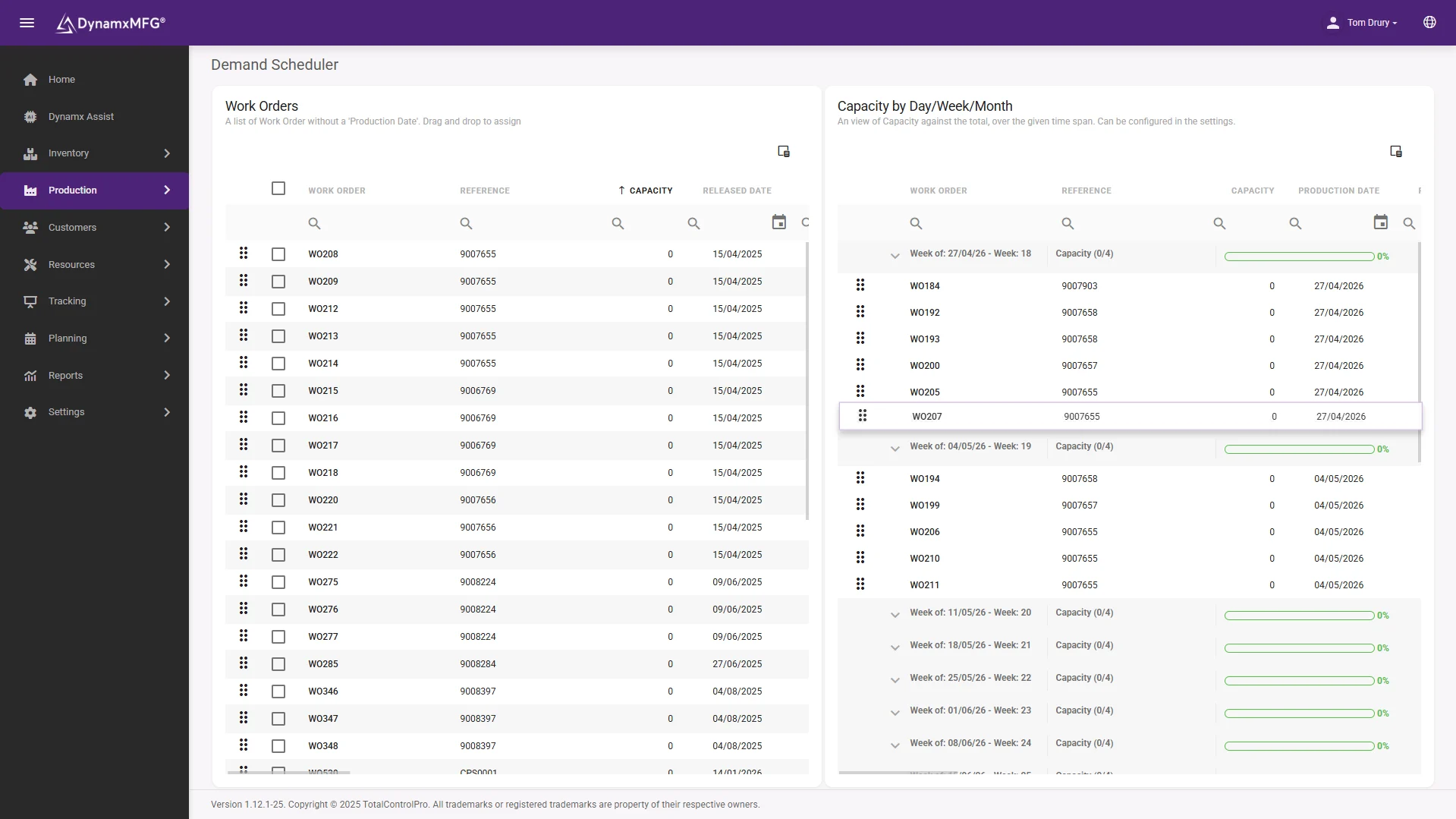
The scheduler shows committed work dropped onto real available hours at each machine and cell, so an overloaded week looks overloaded before it arrives.
Shift patterns, holidays and downtime are in the calculation, which is why the answer matches what the factory can actually do.
- Week-by-week load per resource
- Overloads visible before release
- What-if moves without committing
How it works
How capacity planning works
It is a comparison of two numbers, and both of them are usually wrong the first time you look.
Work out available hours
Shift patterns, holidays, planned maintenance and a realistic allowance for absence and breakdown. This is nearly always lower than people assume.
Work out required hours
Every open job, exploded into operations, each with its expected run and setup time at a specific work centre.
Load one against the other
Required hours are dropped onto the available hours week by week, resource by resource, showing where load exceeds what exists.
Decide what to do about it
Overtime, subcontract, re-sequence, move work to another cell, or tell a customer early. All four are better than finding out in week six.
Capabilities
What capacity planning gives you
Load versus available
A week-by-week picture of committed hours against real hours at each resource.
Bottleneck identification
The resource that caps your output, shown rather than argued about.
Overload warnings
Weeks that cannot be delivered, flagged while there is still time to act.
Skill and labour view
Capacity is people as well as machines, and often people are the tighter constraint.
Scenario testing
What happens to the load if you take this order, or lose that machine for a week.
Realistic lead time
A quotable lead time based on how loaded you already are.
The real numbers
Capacity from what actually happens
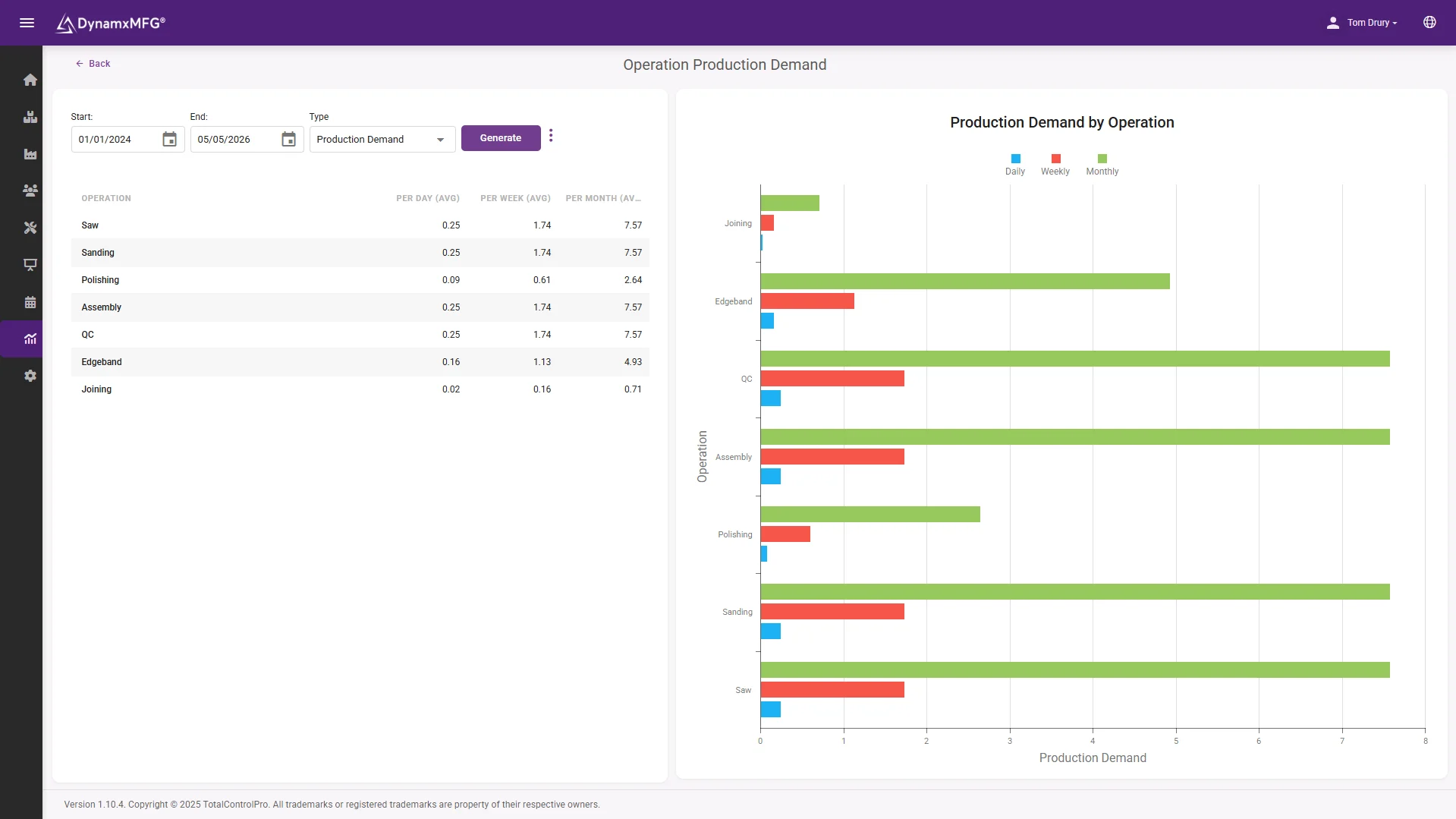
Booked times feed the capacity model, so when an operation consistently runs over its standard, your planning numbers correct themselves.
The demand report turns that into a forward view: what is coming, where it lands, and which weeks break first.
- Times from real bookings, not standards
- Demand landed by week and work centre
- Evidence for the overtime or invest decision
Benefits
What knowing your capacity changes
Most capacity problems are not capacity problems. They are visibility problems that became capacity problems.
You stop over-promising
The commonest cause of late delivery in a small factory is accepting more work than the month contains, because nobody was counting.
Overtime becomes a decision
Planned overtime costs less than emergency overtime, and far less than the customer credit note that follows missing the date.
Investment gets evidence
Knowing which resource has been at 98 per cent load for six months turns a capital request into an argument the board can check.
Subcontract gets cheaper
Deciding in week one to subcontract an overload is a negotiation. Deciding in week five is a rescue, and it is priced like one.
Levels of detail
Rough-cut or detailed capacity planning?
Two different exercises, used at different points, and confusing them wastes a lot of effort.
| Rough-cut | Detailed | |
|---|---|---|
| Question | Is this plan roughly feasible? | Exactly when does each operation run? |
| Resources modelled | Key constraints only | Every work centre and skill group |
| Time buckets | Weeks or months | Hours or shifts |
| Effort to maintain | Low | High, needs accurate routings |
| Used for | Accepting orders and quoting lead times | Releasing and sequencing work |
| Good enough for | Most UK SME manufacturers | Heavily constrained, capital-intensive plants |
Right for you?
When capacity planning earns its place
If more than one of these is true, you are almost certainly planning against a capacity figure that does not exist.
- Overtime has become routine rather than exceptional.
- You accept orders without any check on whether the weeks concerned are already full.
- One machine or cell is obviously the constraint but nobody has quantified by how much.
- Lead times quoted to customers are the same regardless of how loaded you are.
- You are considering buying a machine or hiring, and the case rests on a feeling.
- Holiday season regularly causes a delivery crisis that surprises everybody.
DynamxMFG
Capacity based on what your factory really does
Capacity planning is only as good as the times behind it. Most factories plan against standard times that were set years ago, often optimistically, and then wonder why the plan never holds.
DynamxMFG builds capacity from booked times on real jobs. When an operation consistently takes 40 minutes rather than the 25 in the routing, that shows up, and your capacity figures start reflecting the factory you actually have.
Real times, not standards
Capacity derived from what operators actually booked. See shop floor data capture.
Machine and labour load
Both constraints modelled, because people are often the tighter one. See resources and workforce.
Feeds the schedule
Capacity limits flow straight into production scheduling.
Integrations
Connects to what you already run
Capacity decisions ripple into purchasing and promising. DynamxMFG connects planning, stock and your accounts stack so one set of numbers drives all three.
See all 33 integrations →














Customers
What manufacturers say about DynamxMFG
“DynamxMFG is an excellent choice for manufacturers looking to digitise operations without being overwhelmed by complexity.”
“As GMC has grown, it had become harder for me to have such a keen view on components to see if those parts were profitable or not. DynamxMFG enabled us to monitor the machine time and see whether we are making a profit or a loss on each component.”
“The ability to dynamically modify BOMs after release, adding or removing items from work orders, scrapping and reworking parts, has been the single biggest improvement for our business.”
“We chose the system over competitors because of its ease of use, strong customer support and friendly delivery team. So far, everything has matched what was promised.”
“With DynamxMFG, all our production processes are tracked and the relevant data is captured. This increases our control over the business and helps us identify more opportunities to enhance efficiency and quality.”
“Our experience has been positive, and it was definitely worth switching. The support we have received has been extremely helpful. My favourite feature is the integration and automation capabilities.”
Questions
Capacity planning questions, answered
What is the difference between capacity planning and scheduling?
Capacity planning asks whether there are enough hours in total. Scheduling decides the order those hours get used in. You need the first before the second is worth doing.
How do I work out my real available hours?
Start from shift hours, then subtract planned maintenance, holidays, training and a realistic allowance for absence and breakdown. Most factories find the real figure is 15 to 25 per cent below the theoretical one.
Should I plan capacity for people or machines?
Both, and in a lot of UK SME factories skilled labour is the binding constraint rather than machine time. Modelling only machines hides the real problem.
What utilisation should I target?
Not 100 per cent. A resource loaded to full capacity has no ability to absorb variation, and queues in front of it grow rapidly. Most factories run their constraint in the 80s and everything else lower.
Do I need this if I subcontract overflow?
Especially then. Knowing early that you will overload gives you a negotiation with your subcontractor rather than an emergency.
How far ahead should I plan capacity?
At least as far as your longest material lead time, and ideally as far ahead as your order book gives you visibility.
Related reading
Read next
Background reading on capacity planning software from the DynamxMFG glossary and blog.
Find out what your real capacity is
Book a 30 minute call and we will load your current order book against your actual shift pattern and show you where the weeks break.


