
Small manufacturers
Manufacturing software for small businesses
Systems built for factories with 10 to 200 people, where nobody has a spare IT department, the budget is real money, and the software has to earn its keep in the first quarter.
Definition
What is manufacturing software for a small business?
It is the system that runs the making side of a small manufacturer: what has been ordered, what needs building, what material it needs, who is working on it, how far along it is and what it cost. Accounting software handles the money. This handles the work.
The difference from enterprise manufacturing software is not usually features, it is fit. A small manufacturer needs something that installs in weeks rather than years, is configured by the people who use it rather than by consultants, and does not need a full-time administrator to keep running.
The honest test of small business manufacturing software is whether it survives your busiest week. Anything that depends on somebody finding time to update it will quietly stop being true the first time the factory gets stretched.
See it live
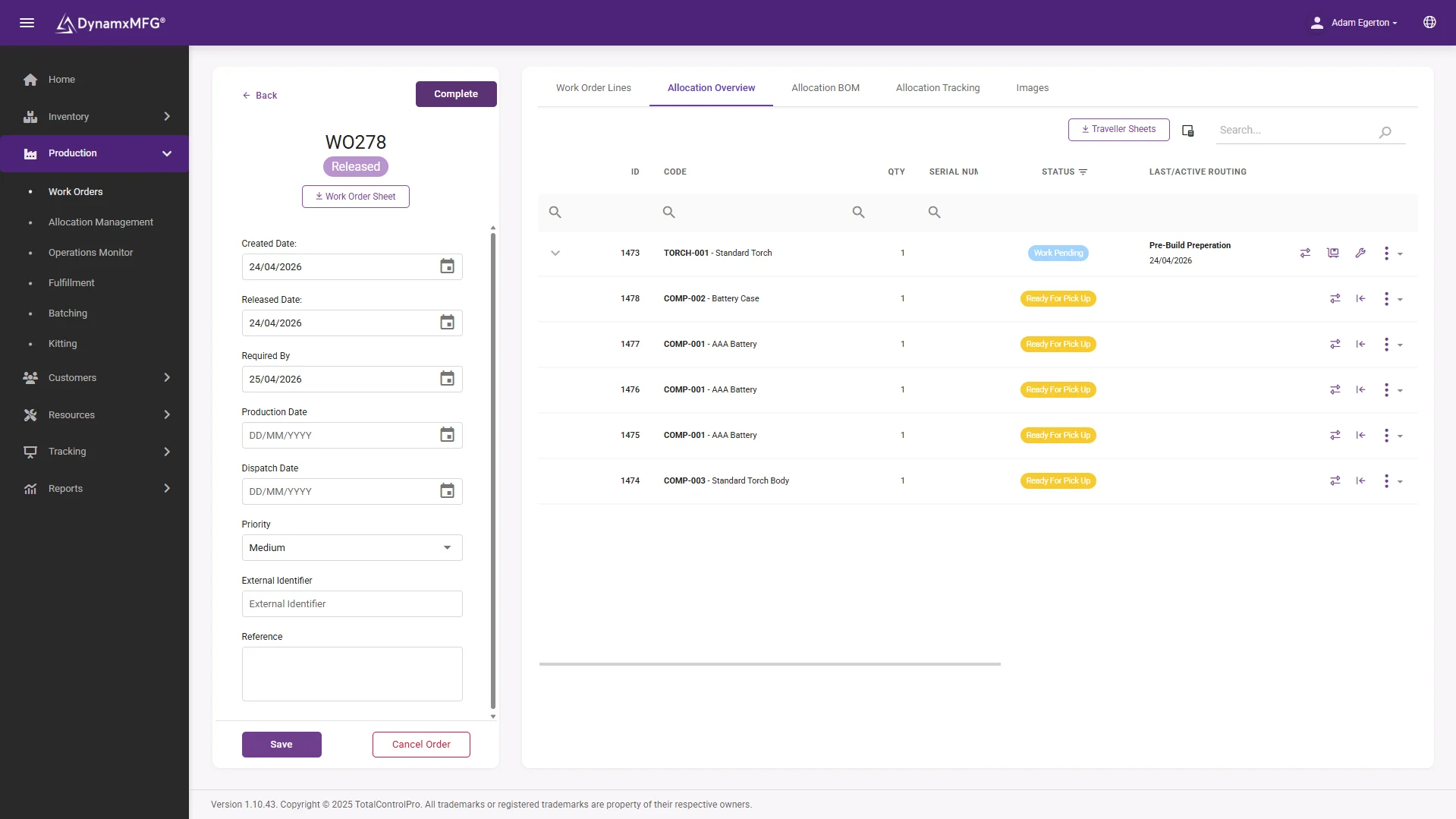
A works order your whole factory can see
Raise the job, and it appears at the work centre with its operations, material and drawings attached. No job bag, no chasing, no versions.
Operators book on and off at the terminal, so progress and cost build themselves while the work happens.
- Job, routing and materials in one record
- Booked on the floor in seconds
- Progress visible from the office instantly
How it works
How it works in a smaller factory
The shape is the same as a large plant. What changes is how much of it you need on day one.
Start with the order book
Customer orders become works orders with a routing and a bill of materials. This alone removes most of the spreadsheet sprawl in a typical small factory.
Capture on the floor
Operators book on and off jobs at a terminal. This is the step people skip to save money, and it is the step everything else depends on.
Let the numbers build themselves
Job cost, delivery performance and stock movements come out of the bookings rather than being compiled by somebody on a Friday afternoon.
Add the rest later
Scheduling, quality, traceability and reporting all sit on the same captured data. There is no need to switch everything on at once.
Capabilities
What a small manufacturer actually needs
Works order management
Turn an order into a job with materials, operations and a due date attached.
Shop floor booking
Live progress from the people doing the work, not from a clipboard.
Real job costing
What the job actually cost in labour, material and machine time versus what you quoted.
Stock control
Material issued against jobs so the figure on screen matches the shelf.
Delivery visibility
Which orders are on track and which are not, without walking the floor.
Accounts integration
Feeds Sage, Xero or QuickBooks rather than replacing them.
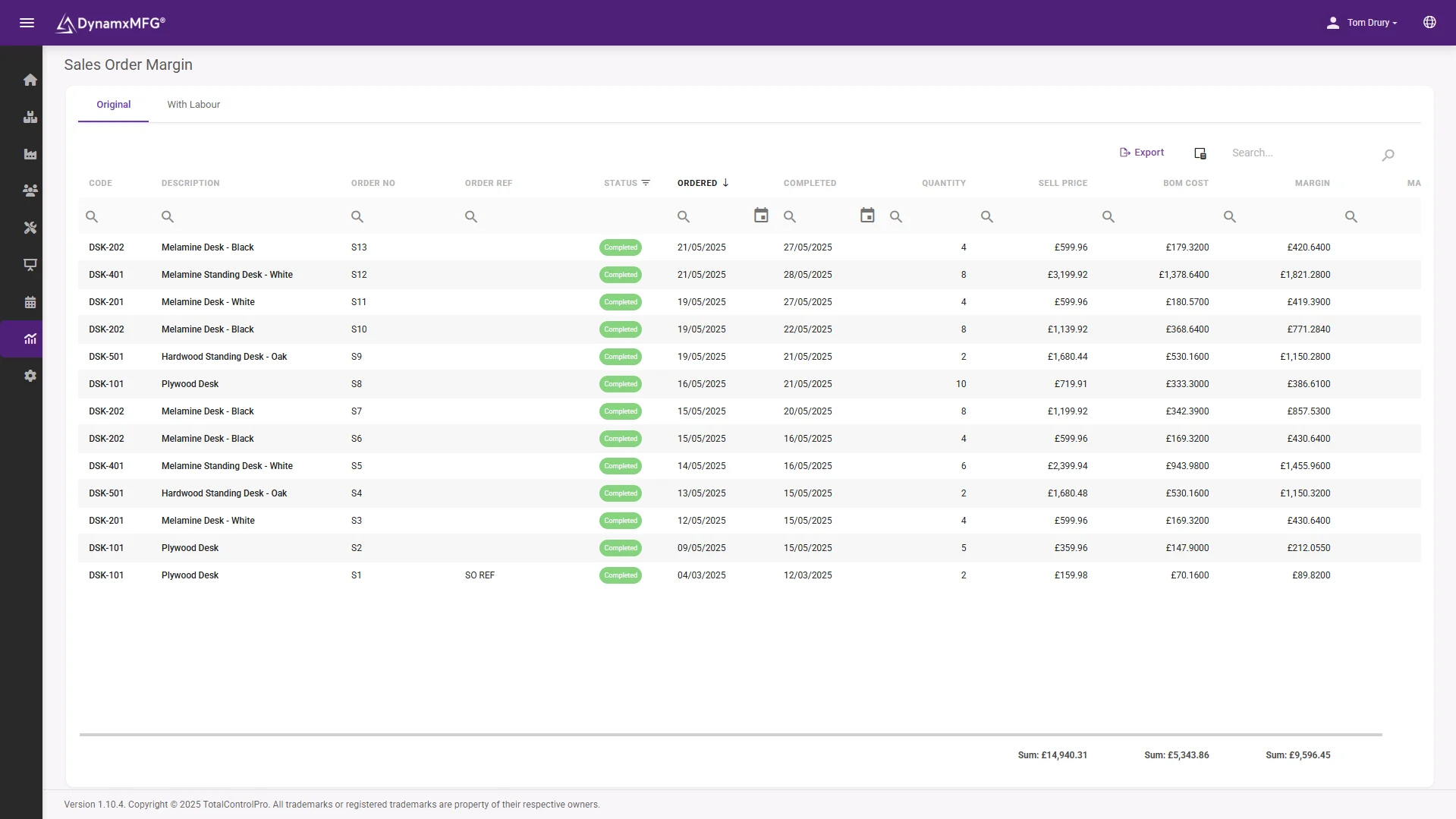
Know your margins
Find out which jobs actually pay
Margin by sales order, from real booked hours and issued material. This is the report that changes quoting decisions in the first month.
Most small manufacturers discover at least one product they have been quietly losing money on. Better to find it on a screen than at the year end.
- Actual against quoted, per job
- Margin by product and customer
- Built from bookings, not estimates
Benefits
Why smaller factories see it faster
A 40 person factory feels the effect of this within weeks, because there is nowhere for the waste to hide.
The owner gets their week back
In most small manufacturers one or two people are the system. Everything routes through them. Putting the state of the factory on a screen gives those people their capacity back.
Quoting stops being a guess
Once actual job costs exist, you find out which products and which customers have been quietly unprofitable. That single discovery often covers the cost of the system.
You can take on more work
Most small factories can absorb more volume than they think. What stops them is not capacity, it is not knowing where the capacity is.
Audits stop being a crisis
If you supply into aerospace, medical or automotive, the traceability evidence builds itself rather than costing you a fortnight of somebody's life.
Sizing it
What changes between a small factory and an enterprise
The functional list looks similar. The buying decision does not.
| Small manufacturer | Enterprise | |
|---|---|---|
| Deployment | Weeks. 90 days is realistic | 12 to 36 months |
| Configured by | The people who use it | External consultants |
| Cost model | Monthly subscription | Capital purchase plus services |
| Administration | Part of somebody's existing job | Dedicated internal team |
| Integration | Connects to the accounts package you already have | Replaces the finance system too |
| Biggest risk | Nobody uses it because it is slower than paper | The project never finishes |
Right for you?
Is this you?
The pattern is remarkably consistent across the UK manufacturers we work with.
- Between roughly 10 and 200 people, making to order rather than to stock.
- Production is currently run on spreadsheets, a whiteboard and a lot of experience.
- You have an accounting package that is fine at accounting and hopeless at production.
- One or two people hold the plan in their heads, and the business stops when they are away.
- You have been quoted for an ERP project that costs more than a machine and takes longer than a year.
- Customers are starting to ask for traceability evidence you cannot easily produce.
DynamxMFG
Built for this size of factory, not scaled down to it
Most manufacturing software aimed at small businesses is an enterprise product with modules removed, which is why it still takes a year to implement and still needs a consultant to change a report.
DynamxMFG was built for UK SME manufacturers from the start. It goes live in 90 days, it sits alongside your existing finance system rather than replacing it, and the people who run it are the people on your shop floor.
90 day deployment
Live on the floor in a quarter, not a financial year. See the savings calculator.
Keeps your accounts package
Connects to Sage, Xero and QuickBooks. See integrations.
Proven at this size
From 20 person job shops to Siemens. See the case studies.
Integrations
Connects to what you already run
Keep Sage, Xero or QuickBooks for the books. DynamxMFG runs the production side and passes the finished figures across, so nobody rekeys anything and your accountant keeps the system they know.
See all 33 integrations →











Customers
What manufacturers say about DynamxMFG
“DynamxMFG is an excellent choice for manufacturers looking to digitise operations without being overwhelmed by complexity.”
“As GMC has grown, it had become harder for me to have such a keen view on components to see if those parts were profitable or not. DynamxMFG enabled us to monitor the machine time and see whether we are making a profit or a loss on each component.”
“The ability to dynamically modify BOMs after release, adding or removing items from work orders, scrapping and reworking parts, has been the single biggest improvement for our business.”
“We chose the system over competitors because of its ease of use, strong customer support and friendly delivery team. So far, everything has matched what was promised.”
“With DynamxMFG, all our production processes are tracked and the relevant data is captured. This increases our control over the business and helps us identify more opportunities to enhance efficiency and quality.”
“Our experience has been positive, and it was definitely worth switching. The support we have received has been extremely helpful. My favourite feature is the integration and automation capabilities.”
Questions
Small business manufacturing software questions
How much does manufacturing software cost for a small factory?
Modern cloud systems are priced per user per month, which puts a small factory in the hundreds of pounds a month rather than the tens of thousands up front that on-premise ERP used to demand. The bigger cost is usually the time your team spends on setup.
Do I need MRP, MES or ERP?
Will this replace my accounting software?
No, and it should not. Keep Sage, Xero or QuickBooks for the books. Manufacturing software handles production and passes the finished figures across.
We are only 15 people. Is that too small?
No. Below about ten people most factories genuinely can hold it in their heads. Between ten and thirty is usually where that stops working and the spreadsheets start multiplying.
How long before we see anything back?
The first useful output is normally job costing, and it usually arrives within weeks of the floor booking properly. That is the number that changes quoting decisions.
What if we grow?
The point of capturing production data properly is that it scales with you. The factories that struggle at 100 people are usually the ones still running the systems they built at 20.
Related reading
Read next
Background reading on software for small manufacturers from the DynamxMFG glossary and blog.
See it running at your size of factory
Book a 30 minute call. We will show you a factory roughly your size and your mix, and you can judge whether it fits.


