
Planning
Production planning software
Work out what to make, how much and by when, against the material and capacity you genuinely have, so the plan you hand the floor is one they can actually run.
Definition
What is production planning software?
Production planning software decides what should be made over the coming weeks and months. It takes demand from confirmed orders and forecasts, checks it against stock, capacity and lead times, and produces a plan of what to make and what to buy.
It sits above scheduling. Planning decides that you need 400 assemblies by the end of March and that the castings need ordering this week. Scheduling then decides which machine runs which job on which day.
A plan that has not been checked against material and capacity is a forecast of what you would like to happen. The value of planning software is that it tells you which parts of the plan are impossible while you still have time to do something about it.
See it live
Demand, stock and the plan in one view
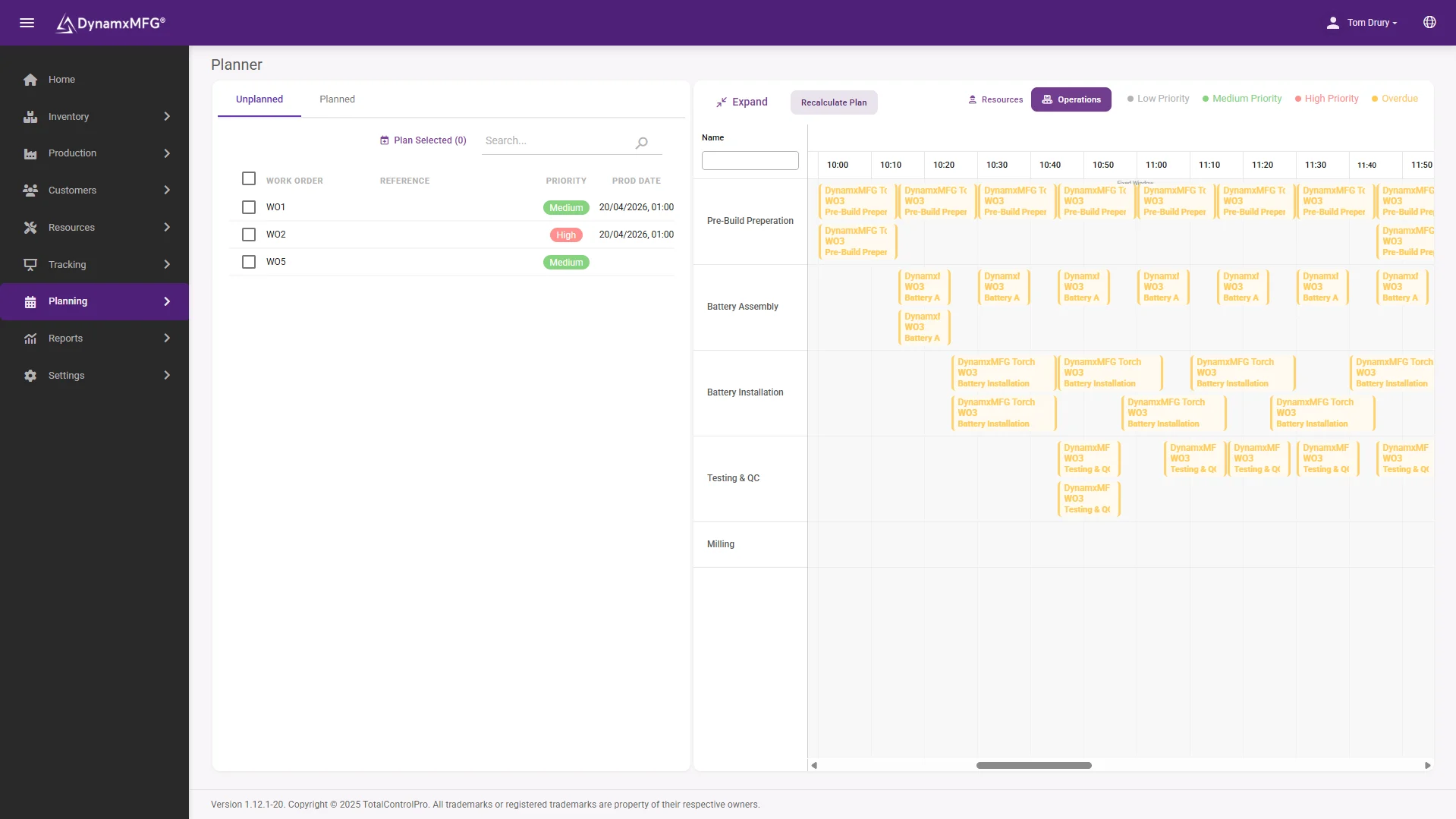
The planning screen nets your order book against free stock and open purchase orders, and turns the result into a dated list of what to make and buy.
Because stock updates as jobs consume material, the plan is built on the shelf as it is, not as it was at the last stock take.
- Multi-level BOM explosion
- Net requirements with dates
- Shortages flagged before release
How it works
How production planning works
The calculation is old and well understood. What varies is how honest the inputs are.
Collect the demand
Confirmed customer orders, forecast volumes and any stock replenishment requirements are pulled into a single demand picture.
Explode the requirement
Each product is broken down through its bill of materials into the components and raw material needed, level by level.
Net off what you hold
Free stock, work in progress and material already on order are subtracted, leaving the genuine net requirement.
Offset by lead time
Each requirement is pushed back by its purchase or manufacturing lead time, producing a dated list of what to order and start, and when.
Capabilities
What a planning system gives you
Demand consolidation
Orders and forecast in one place instead of four spreadsheets and an inbox.
Multi-level BOM explosion
Requirements calculated through sub-assemblies, not just top-level parts.
Net requirements
What you actually need to buy, after stock and open orders.
Lead time offsetting
Order dates worked backwards from when the material is needed.
Rough-cut capacity check
An early warning that the plan needs more hours than the month contains.
Shortage visibility
The parts that will stop a job, surfaced before the job is released.
Check the load
Demand against capacity, before you promise
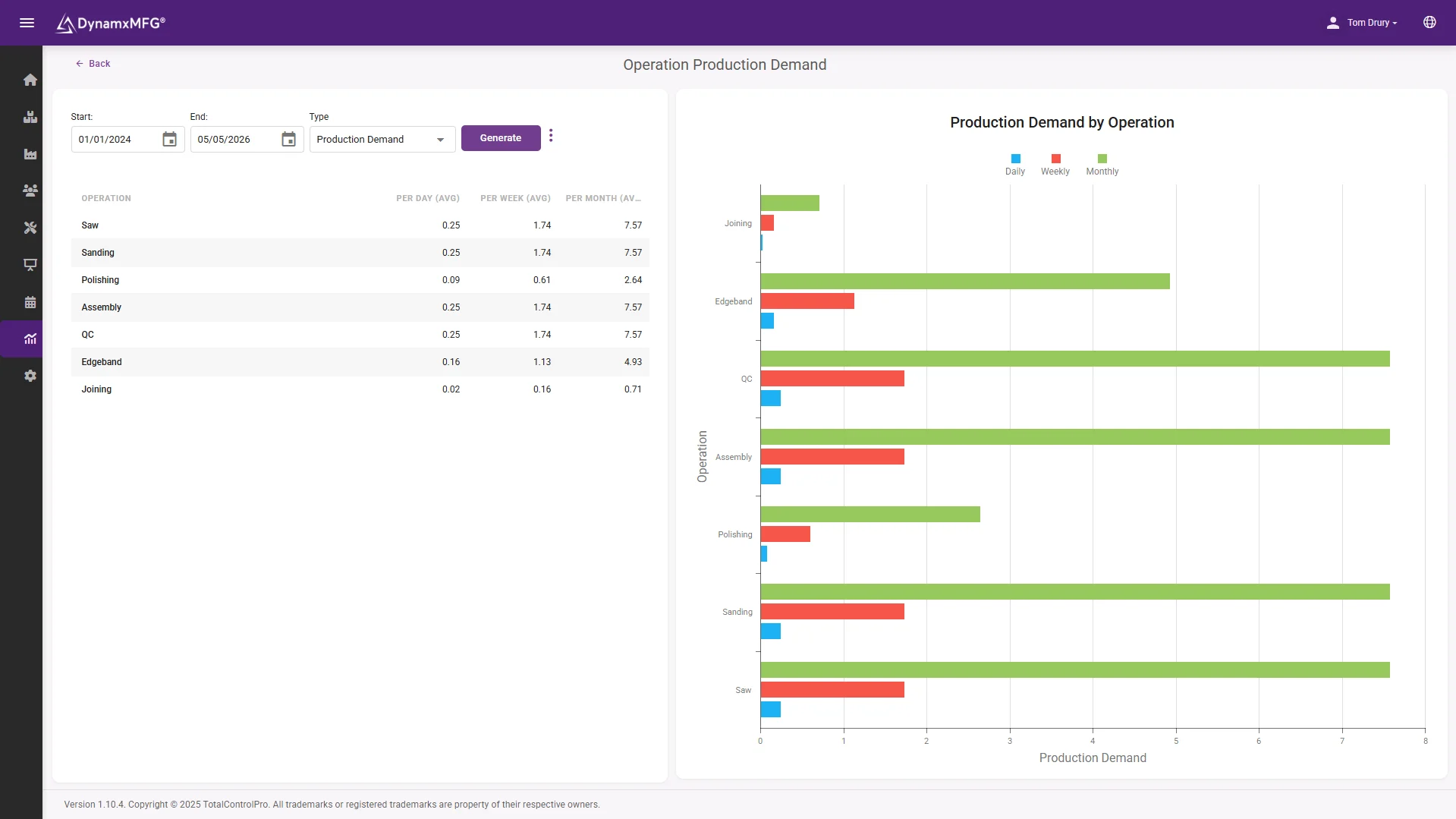
The demand report shows what the plan asks of each work centre week by week, so the impossible weeks surface while there is still time to act.
Overtime, subcontract or a conversation with the customer - all cheaper in week one than in week six.
- Load by work centre and week
- Rough-cut feasibility at a glance
- Built from real booked times
Benefits
What planning properly is worth
Planning does not speed up production. It stops you starting work you cannot finish.
Fewer stopped jobs
Most jobs that stall on a shop floor stall waiting for one part. Planning catches that shortage weeks earlier, when it is a phone call rather than a crisis.
Less cash on the shelf
Ordering to a calculated requirement rather than to a comfort level is usually where the working capital improvement comes from.
Deliverable promises
A plan checked against rough-cut capacity tells you when you are quoting a date the factory cannot hit.
Fewer heroics
When the plan is credible, the business stops relying on two experienced people to work out what to do next every morning.
Planning vs scheduling
Where planning ends and scheduling begins
These get used interchangeably and they are not the same thing. Buying the wrong one is a common and expensive mistake.
| Production planning | Production scheduling | |
|---|---|---|
| Decides | What to make and buy, and roughly when | The exact sequence on each resource |
| Horizon | Weeks to months | Hours to days |
| Granularity | Products and quantities | Operations, machines and shifts |
| Main inputs | Demand, BOMs, stock, lead times | Routings, capacity, live job progress |
| Typical output | A works order and purchase order list | A dated sequence per work centre |
| Fails when | Stock and BOM accuracy is poor | Capacity is treated as infinite |
Right for you?
When you need planning software
Planning becomes unavoidable at the point where lead times get longer than your memory.
- You buy material with lead times measured in weeks and regularly get caught short.
- Your bills of materials have sub-assemblies, so requirements are not obvious by eye.
- Purchasing is done by feel, and the stockroom reflects that.
- You are carrying safety stock because nobody trusts the requirement figures.
- Jobs get released to the floor and then stall waiting for one missing component.
- Demand is seasonal or lumpy enough that reacting to orders as they arrive is too late.
DynamxMFG
Planning built on numbers you can trust
Planning software fails on data quality, not on logic. If the stock figure is wrong or the bill of materials is out of date, the calculation will confidently produce a plan that cannot be executed, and people will stop believing it.
DynamxMFG keeps the inputs honest because they are a by-product of production. Material is issued against jobs as work happens, so the stock figure stays close to the shelf and the plan built on it stays credible.
Stock that matches reality
Consumption recorded at the operation, not reconciled at month end. See inventory management.
Plans into live jobs
Planned work becomes works orders on the floor. See planning and scheduling.
Feeds the sequence
What planning decides, scheduling sequences against real capacity.
Integrations
Connects to what you already run
Planning is only as good as its inputs. DynamxMFG keeps stock, BOMs and orders in one system and connected to your accounts package, so the plan runs on live numbers.
See all 33 integrations →












Customers
What manufacturers say about DynamxMFG
“DynamxMFG is an excellent choice for manufacturers looking to digitise operations without being overwhelmed by complexity.”
“As GMC has grown, it had become harder for me to have such a keen view on components to see if those parts were profitable or not. DynamxMFG enabled us to monitor the machine time and see whether we are making a profit or a loss on each component.”
“The ability to dynamically modify BOMs after release, adding or removing items from work orders, scrapping and reworking parts, has been the single biggest improvement for our business.”
“We chose the system over competitors because of its ease of use, strong customer support and friendly delivery team. So far, everything has matched what was promised.”
“With DynamxMFG, all our production processes are tracked and the relevant data is captured. This increases our control over the business and helps us identify more opportunities to enhance efficiency and quality.”
“Our experience has been positive, and it was definitely worth switching. The support we have received has been extremely helpful. My favourite feature is the integration and automation capabilities.”
Questions
Production planning questions, answered
Is production planning the same as MRP?
MRP is the calculation most planning systems use to work out material requirements. Production planning is the wider activity, including capacity and priorities. See MRP software.
How accurate does my stock need to be?
Below about 95 per cent accuracy the output stops being trustworthy and people revert to ordering by instinct. Fixing stock accuracy is usually the first job, not the second.
Can I plan without a forecast?
If all your material has short lead times, yes. As soon as anything takes longer to arrive than your customers give you to deliver, you are forecasting whether you call it that or not.
What is rough-cut capacity planning?
A quick feasibility check that compares the plan against available hours at your key resources before committing to it. It catches impossible plans early without the effort of full scheduling.
Do we need planning if we are make-to-order?
Usually yes, for the purchasing side. You may not be planning production far ahead, but you are still committing to material lead times.
How often should the plan be run?
Most SME manufacturers run it weekly, with the schedule flexing daily underneath. Running it more often than you can act on the output just creates noise.
Related reading
Read next
Background reading on production planning software from the DynamxMFG glossary and blog.
See a plan built from your real numbers
Book a 30 minute call and we will run planning against your bills of materials and your stock position, not a demo dataset.


