
Paperless factory
Paperless manufacturing software
Take the route cards, tally sheets, timesheets and job bags off the shop floor, and get back the hours your team currently spends filling them in and typing them up.
Definition
What is paperless manufacturing?
Paperless manufacturing means production runs without paper as the system of record. Works orders, drawings, instructions, quality checks and time bookings all live in a system and are accessed on terminals at the point of work.
It does not mean nobody ever prints anything. Some customers still want a paper certificate and some processes still need a printed label. It means paper stops being the thing the factory depends on to know what happened.
The cost of paper in a factory is almost never the paper. It is the transcription, the version confusion, the searching, the illegible entries, and the fact that nothing on a route card can tell you anything until somebody types it in.
See it live
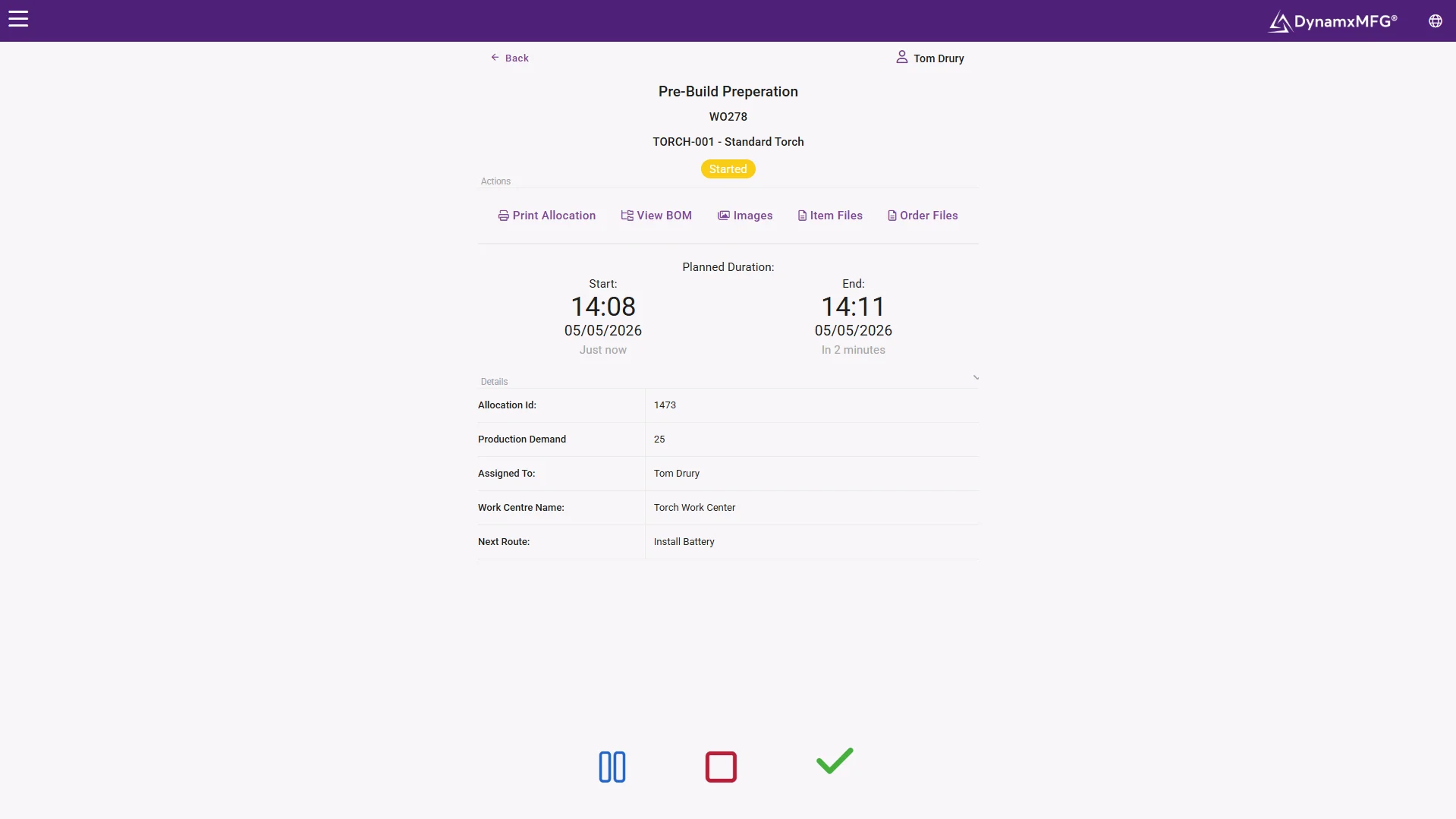
The screen that replaces the job bag
The works order, the drawing at its current revision, the quantity and the clock, all on the terminal at the work centre. Nothing printed, nothing lost, nothing superseded.
Booking on and off replaces the timesheet and the tally sheet in the same motion.
- Current-revision drawings at the operation
- No transcription, no typing up
- Faster than the route card it replaces
How it works
How a factory goes paperless
Nobody does this in one weekend. The factories that succeed do it in a deliberate order.
Start with the works order
Get the job onto a screen at the work centre with its operations and quantities. This alone removes the job bag and the printed route card.
Move time booking next
Replace timesheets and tally sheets with booking on and off at the terminal. This is where the admin saving actually lands.
Bring the documents across
Drawings, work instructions and specifications attached to the operation, so the operator sees the current revision rather than whatever is in the folder.
Then quality and traceability
Inspection results, batch numbers and non-conformances captured at the operation, which is the point where paper was costing you most in audits.
Capabilities
What replaces the paper
Digital works orders
The job, its operations and its materials on the terminal at each work centre.
Drawings at the operation
Current revision only, so nobody builds to a superseded drawing.
Electronic time booking
Book on and off instead of filling in a timesheet and a tally sheet.
Digital quality records
Checks recorded against the job as they are done, with the result stored.
Batch and serial capture
Scanned rather than written, which removes most transcription errors.
Instant retrieval
Find any job history in seconds instead of going to the archive.
The record
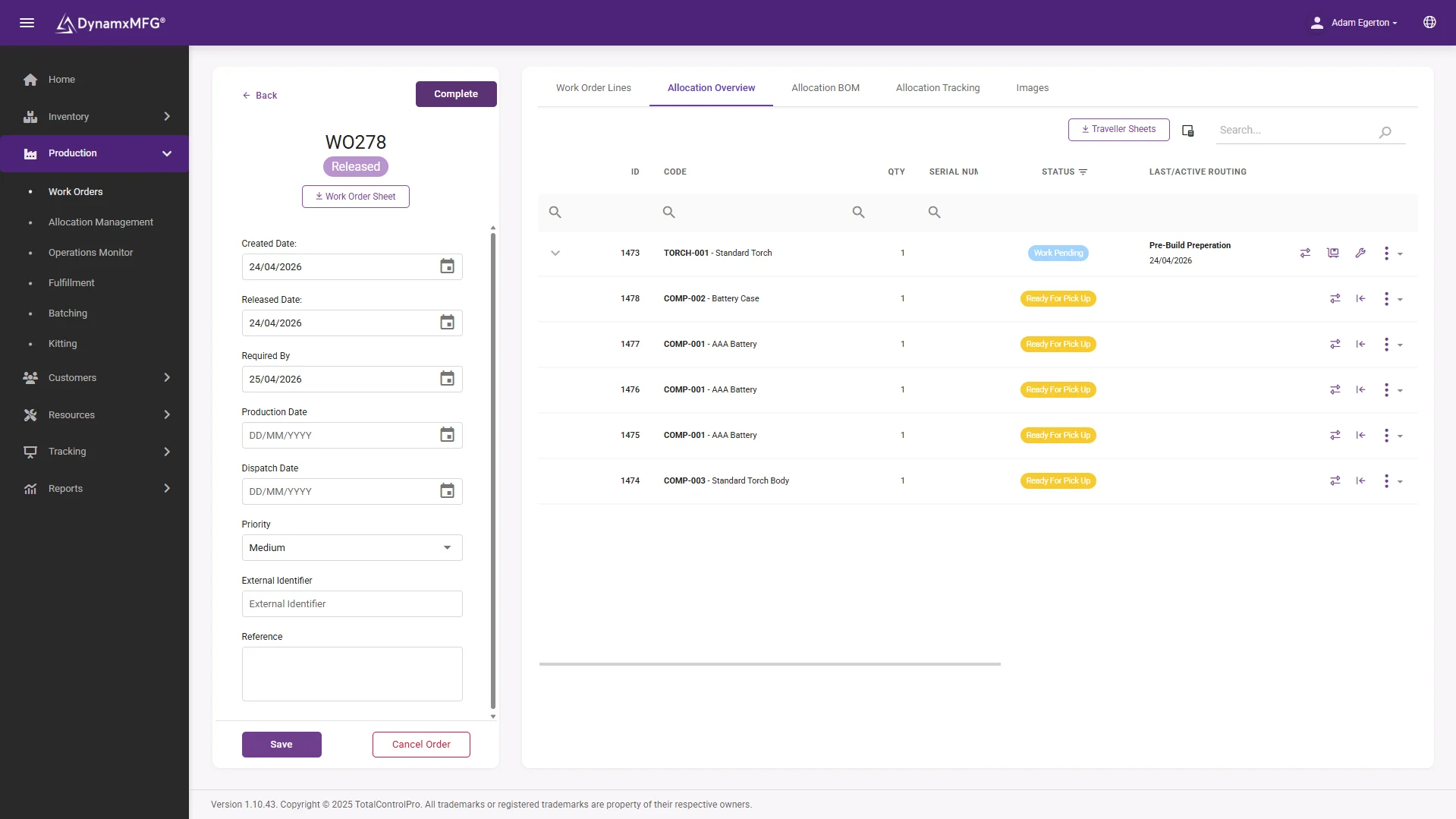
A works order that files itself
By the time a job closes it already carries its hours, material, batches, scrap and sign-offs. The archive room becomes a search box.
When a customer or auditor asks what happened on a job from last March, the answer takes seconds.
- Complete history per job, automatically
- Searchable in seconds, kept for years
- Audit evidence with no assembly required
Benefits
What removing the paper is worth
This is one of the few improvements where the savings show up in several places at once.
Admin hours come back
Somebody in every paper-based factory spends a meaningful part of every week typing up what already happened. That role usually stops existing in its current form.
Version errors disappear
Building to an out-of-date drawing is one of the most expensive mistakes a factory can make, and it is almost entirely a paper problem.
Audits stop being projects
Producing traceability evidence from a system takes minutes. From lever arch files it takes people off the job for days.
Data becomes usable
Anything on paper is invisible to analysis. The moment it is captured digitally you can cost it, chart it and improve it.
Paper vs paperless
What actually changes
A direct comparison of how the same activities work before and after.
| Paperless | Paper based | |
|---|---|---|
| Job instructions | Current revision on the terminal | Printed at release, may be superseded |
| Time recording | Booked at the operation | Written down, typed up later |
| Job status | Live, visible to everyone | Known when the paperwork comes back |
| Finding history | Search, seconds | Archive retrieval, hours |
| Data quality | Timestamped and validated | Handwriting, estimates and gaps |
| When something changes | Updated everywhere at once | Somebody walks onto the floor |
Right for you?
Signs your paper is costing you
Most factories know they should do this. These are the symptoms that usually force the decision.
- Someone spends hours each week typing route card data into a spreadsheet or accounts system.
- You have found work built to an out-of-date drawing more than once.
- Preparing for an ISO or customer audit means somebody disappears into the filing for a week.
- Job costs are only available long after the job shipped because the paperwork has to be processed.
- Route cards regularly go missing, get damaged, or come back half completed.
- Nobody can analyse scrap or downtime because the records are handwritten and inconsistent.
DynamxMFG
Paperless that survives a busy week
The reason paper persists in factories is that it is fast and it never crashes. Any replacement has to beat it on both counts at the machine, not in a demonstration.
DynamxMFG is built around that constraint. Terminals are designed for gloved hands and quick interactions, drawings sit with the operation, and booking a job takes seconds. If it were slower than the route card it replaced, it would not survive contact with a busy Thursday.
Fast at the machine
Badge, scan, book. See shop floor data capture.
Documents at the operation
Current drawings and instructions attached to the job. See works order software.
Audit evidence built in
Traceability accumulated as work happens. See traceability software.
Integrations
Connects to what you already run
Going paperless does not mean going it alone. DynamxMFG connects to the office tools you keep - Sage, Xero, Excel, Outlook - so the paper disappears without the familiar systems going with it.
See all 33 integrations →












Customers
What manufacturers say about DynamxMFG
“DynamxMFG is an excellent choice for manufacturers looking to digitise operations without being overwhelmed by complexity.”
“As GMC has grown, it had become harder for me to have such a keen view on components to see if those parts were profitable or not. DynamxMFG enabled us to monitor the machine time and see whether we are making a profit or a loss on each component.”
“The ability to dynamically modify BOMs after release, adding or removing items from work orders, scrapping and reworking parts, has been the single biggest improvement for our business.”
“We chose the system over competitors because of its ease of use, strong customer support and friendly delivery team. So far, everything has matched what was promised.”
“With DynamxMFG, all our production processes are tracked and the relevant data is captured. This increases our control over the business and helps us identify more opportunities to enhance efficiency and quality.”
“Our experience has been positive, and it was definitely worth switching. The support we have received has been extremely helpful. My favourite feature is the integration and automation capabilities.”
Questions
Paperless manufacturing questions, answered
Do we have to go paperless all at once?
No, and you should not. Most factories start with works orders and time booking, prove it works, then bring quality and documents across. Trying to do everything at once is how these projects stall.
What about operators who prefer paper?
Preference usually reflects speed. If the terminal is faster than the route card, resistance fades quickly. If it is slower, the preference is entirely rational and no policy will overcome it.
Can we still print when a customer demands it?
Yes. Certificates, labels and despatch documents still print. The difference is that they are produced from the system rather than being the system.
Is paperless a requirement for ISO 9001?
No. ISO requires control of documents and records, not digital ones. In practice digital makes compliance dramatically easier, which is why most certified manufacturers move that way.
What happens if the system is down?
Ask every vendor this. Cloud-based systems, DynamxMFG included, need a working connection to record bookings. Survey wifi coverage at every work centre before go-live and add a 4G/5G backup line if an outage would be costly.
How long does it take?
The technology is quick. The time goes into agreeing how you want operations, downtime reasons and quality checks structured. DynamxMFG deploys in 90 days including that work.
Related reading
Read next
Background reading on paperless manufacturing from the DynamxMFG glossary and blog.
Work out what your paper is costing
Book a 30 minute call and we will put numbers on the admin time, the transcription errors and the audit preparation you are currently absorbing.


