
Works orders
Works order software
Raise a works order, issue it to the floor with everything the operator needs, and get back a complete record of what it consumed and what it cost. No clipboards involved.
Definition
What is works order software?
A works order is the instruction that authorises production of a specific quantity of something. Works order software creates it, attaches the material and operations required, issues it to the shop floor and collects everything booked against it.
In UK factories it is also called a works order, a job, or a production order depending on the trade. Whatever it is called, it is the unit everything else attaches to: labour goes against it, material is issued to it, scrap is recorded on it, and its cost is the number that tells you whether the work was worth doing.
If the works order is the thing your factory organises itself around, it is worth asking what yours currently is. In a lot of businesses it is a printed sheet that exists in one copy and gets progressively less accurate as it travels.
See it live
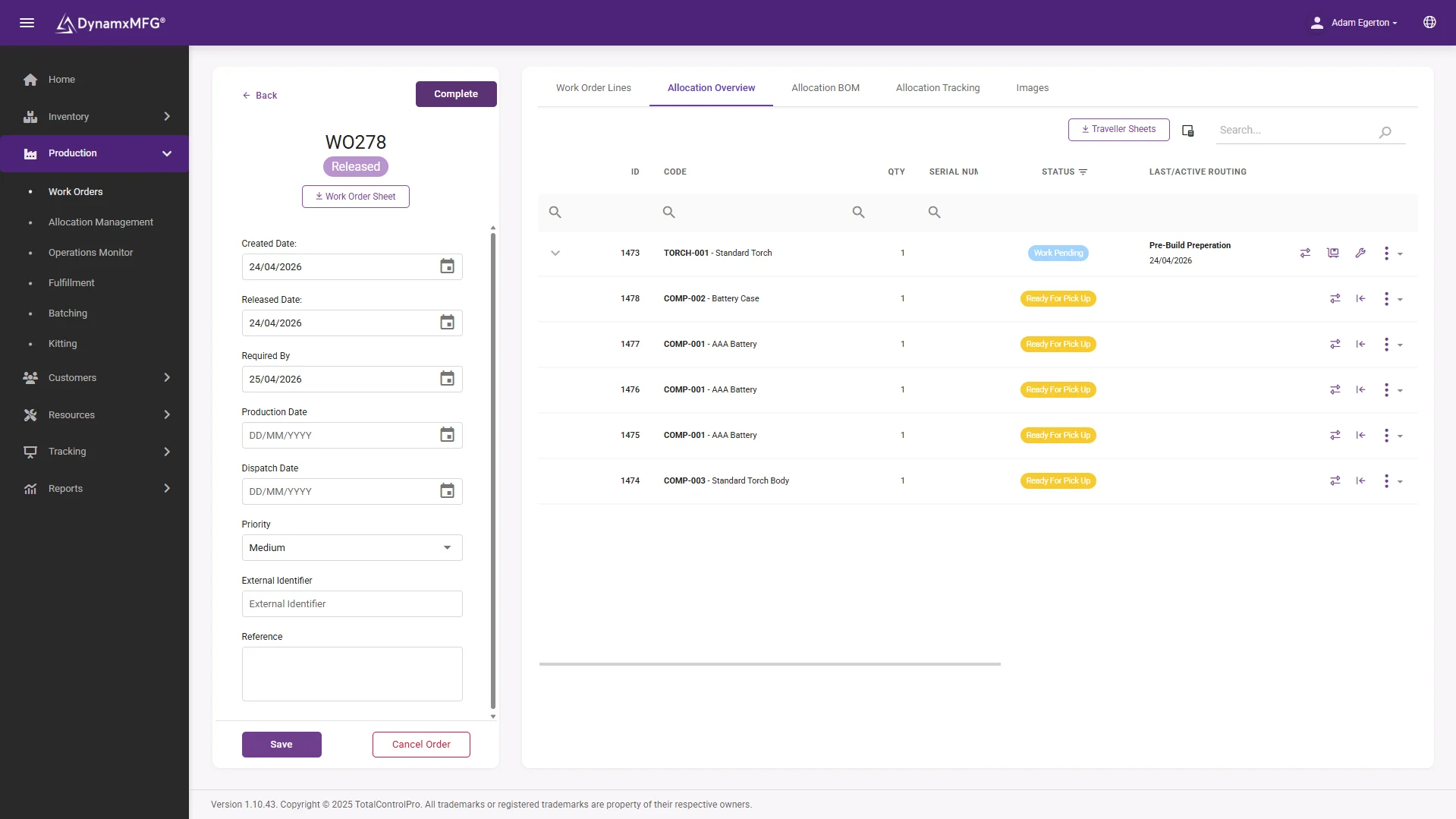
The works order as a living record
Raised from the sales order, carrying its bill of materials and routing, visible at every work centre it passes through. This is the spine the whole factory hangs off.
Amendments update the live order everywhere at once, so the floor is never building to a version that stopped being true on Tuesday.
- BOM and routing attached automatically
- Live at the terminal, not in a job bag
- Full history accumulated by the time it closes
How it works
How a works order flows
Four stages, and most of the pain in a paper system happens between the second and the third.
Raised from demand
A customer order, a stock replenishment or a planning run creates the works order, with the quantity and the required-by date.
Built from BOM and routing
The bill of materials says what it needs. The routing says which operations, in what order, at which work centre, and how long each should take.
Released to the floor
It appears in the queue at the first work centre with drawings, instructions and material allocations attached, rather than as a piece of paper somebody has to find.
Closed with a full record
When the last operation books off, the order carries its complete history: hours, material, scrap, operators, machines and dates.
Capabilities
What works order software handles
Order creation
From customer orders, forecasts or planning runs, singly or in batches.
BOM and routing attachment
Materials and operations pulled in automatically rather than typed each time.
Material allocation
Stock reserved and issued against the order, with batch and serial capture.
Operation tracking
Live progress through every step, not just open or closed.
Amendments
Quantity and specification changes handled mid-flight, with an audit trail.
Cost roll-up
Labour, material and machine time totalled against the order as it runs.
Behind the order
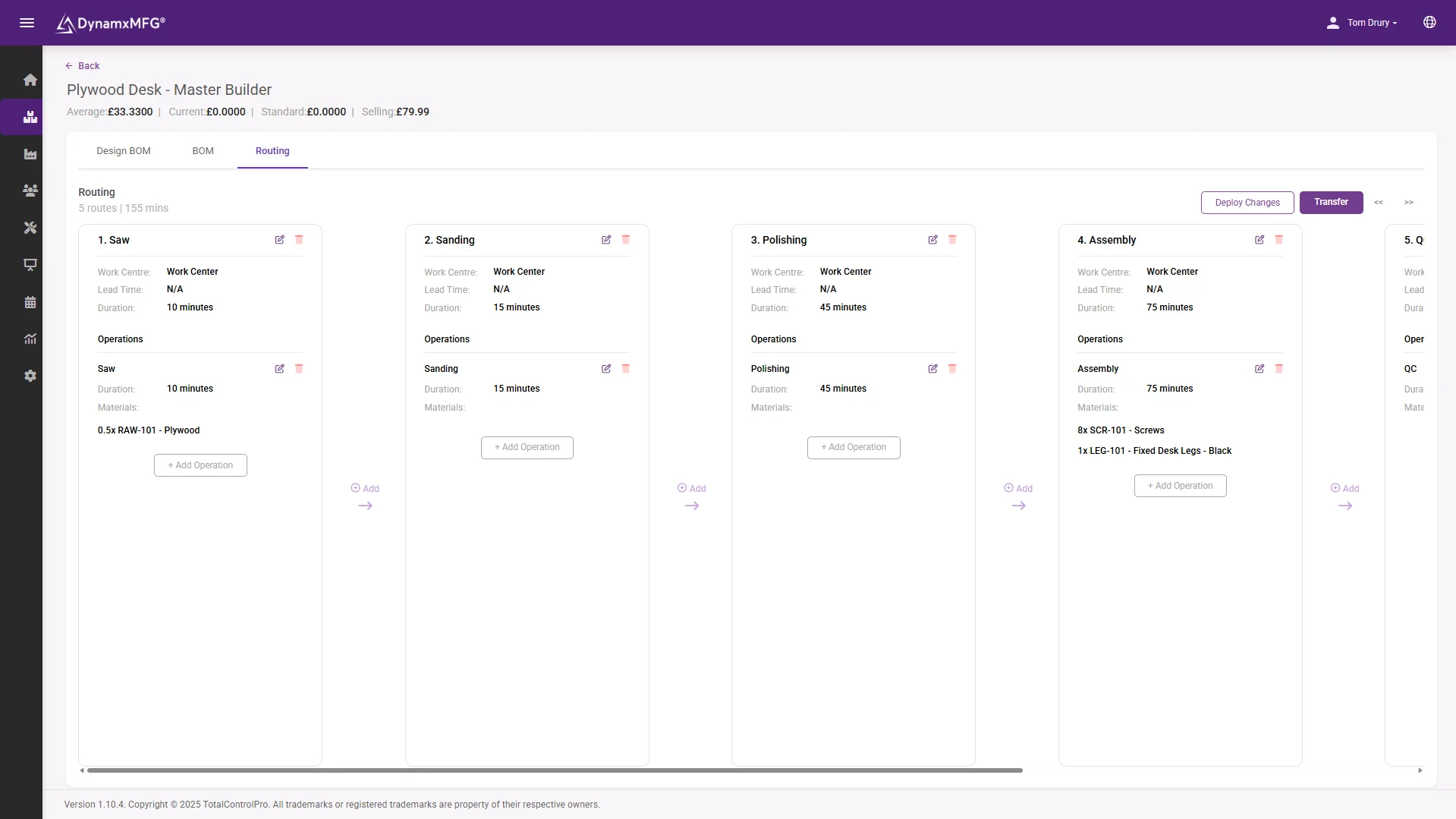
Routings that drive everything downstream
Operations, work centres and times sit on the routing, and the works order inherits them. Scheduling, capacity and labour costing all run off this one structure.
Keep the routing honest and everything downstream - the promise dates, the quotes, the capacity picture - stays honest with it.
- Operation sequence with times per work centre
- Feeds scheduling and capacity directly
- Planned times corrected by real bookings
Benefits
What changes when works orders go digital
The works order is where most of a factory's administrative waste is concentrated.
One version of the order
A paper works order exists in one place and is out of date as soon as anything changes. A digital one is the same for everybody, everywhere, always.
Changes stop causing scrap
When a customer changes a quantity or a specification, the update reaches the operation. Building the old version because the amendment did not travel is expensive and avoidable.
The record is complete
Every job ends with a full history rather than a route card with three boxes filled in and somebody's initials.
Costing happens automatically
Because everything books against the order, the cost exists the moment the job closes rather than being reconstructed later.
Order types
Works orders, sales orders and purchase orders
Three different documents that get muddled constantly, particularly when a business is moving off spreadsheets.
| Works order | Sales and purchase orders | |
|---|---|---|
| Authorises | Making something | Selling or buying something |
| Raised against | Internal production capacity | A customer or a supplier |
| Contains | Materials, operations, times, due date | Prices, quantities, terms, delivery |
| Consumes | Stock, labour and machine hours | Nothing directly |
| Closed when | The last operation is booked off | Goods are despatched or received |
| Owned by | Production | Sales and purchasing |
Right for you?
When you need works order software
Almost every make-to-order manufacturer needs this. The question is usually when the paper version stops coping.
- Works orders are printed, and the printed copy is the only record until somebody types it up.
- Amendments are communicated by walking onto the floor and telling somebody.
- You cannot tell which operation a job has reached without finding the paperwork.
- Material issued to jobs is recorded separately from the job itself, if at all.
- Job costs are estimated after the fact because the record is incomplete.
- You run more than a handful of live jobs at once and the whiteboard has stopped being enough.
DynamxMFG
The works order as a live record, not a printout
In DynamxMFG the works order is the spine of the system. It is created from the order or the plan, carries its bill of materials and routing, and appears in the queue at each work centre as the job progresses.
Because operators book against it at every operation, it accumulates its own history. By the time it closes it already contains the hours, the material, the batches, the scrap and the cost, with nobody having compiled anything.
Issued straight to the floor
Appears on the terminal at the work centre with drawings attached. See order management.
Collects its own record
Labour and material booked against it as work happens. See shop floor data capture.
Costs itself
Actual against quoted the moment it closes. See job costing.
Integrations
Connects to what you already run
The works order connects the commercial world to the factory. DynamxMFG links it to your CRM, accounts and spreadsheets so the same order is one record everywhere.
See all 33 integrations →













Customers
What manufacturers say about DynamxMFG
“DynamxMFG is an excellent choice for manufacturers looking to digitise operations without being overwhelmed by complexity.”
“As GMC has grown, it had become harder for me to have such a keen view on components to see if those parts were profitable or not. DynamxMFG enabled us to monitor the machine time and see whether we are making a profit or a loss on each component.”
“The ability to dynamically modify BOMs after release, adding or removing items from work orders, scrapping and reworking parts, has been the single biggest improvement for our business.”
“We chose the system over competitors because of its ease of use, strong customer support and friendly delivery team. So far, everything has matched what was promised.”
“With DynamxMFG, all our production processes are tracked and the relevant data is captured. This increases our control over the business and helps us identify more opportunities to enhance efficiency and quality.”
“Our experience has been positive, and it was definitely worth switching. The support we have received has been extremely helpful. My favourite feature is the integration and automation capabilities.”
Questions
Works order questions, answered
What is the difference between a works order and a job?
Nothing meaningful. Works order is the more formal UK term, job is what most shop floors actually say. Some systems use production order for the same thing.
Can a works order cover multiple products?
Normally one works order covers one product and quantity, so the cost and traceability stay clean. Related orders are usually linked to a parent sales order instead.
What happens when a customer changes the quantity mid-job?
A good system amends the live order, adjusts remaining material allocation and leaves an audit trail. On paper this is where scrap comes from, because the change does not always reach the operator.
Do I need routings to use works orders?
You can run works orders with just a bill of materials, but without routings you lose operation-level progress, capacity planning and meaningful labour costing. Most factories add them quickly.
How do sub-assemblies work?
A multi-level bill of materials generates linked works orders for the sub-assemblies, so you can see and cost the whole build rather than just the top level.
Can we still print them?
Yes, and many factories do during transition. The difference is that the printed copy stops being the system of record.
Related reading
Read next
Background reading on works order software from the DynamxMFG glossary and blog.
See a works order run end to end
Book a 30 minute call. We will take one of your products, raise the works order and follow it through to a closed job with a real cost on it.


