
Feature · Manufacturing Execution
Run every job, every day,
on a single MES platform.
DynamxMFG is the Manufacturing Execution System that connects your office to your shop floor. Work orders, routings, kitting and live tracking in one place. No more spreadsheets, paper travellers or chasing operators for status.
The problem
Your ERP plans the work. But who actually runs it?
An ERP knows what should happen. It does not know what is happening. Manufacturers fill that execution gap with paper travellers, whiteboards and a daily 8am huddle, and most jobs slip a day before anyone notices.
Travellers tell yesterday’s story
Paper travellers and ticked-off spreadsheets only show what has already happened. By the time the office sees a problem, the shift has finished and the next one has started.
Routings live in someone’s head
The right way to make this part is held by your most experienced operator. When they are off, every job takes longer and quality drifts. There is no system to fall back on.
No live data, no live decisions
Without live work order status you cannot reschedule, reprioritise or rebalance work centres until the damage is already done. Reactive becomes the default.
Routings
Every job has a route, and the system knows it
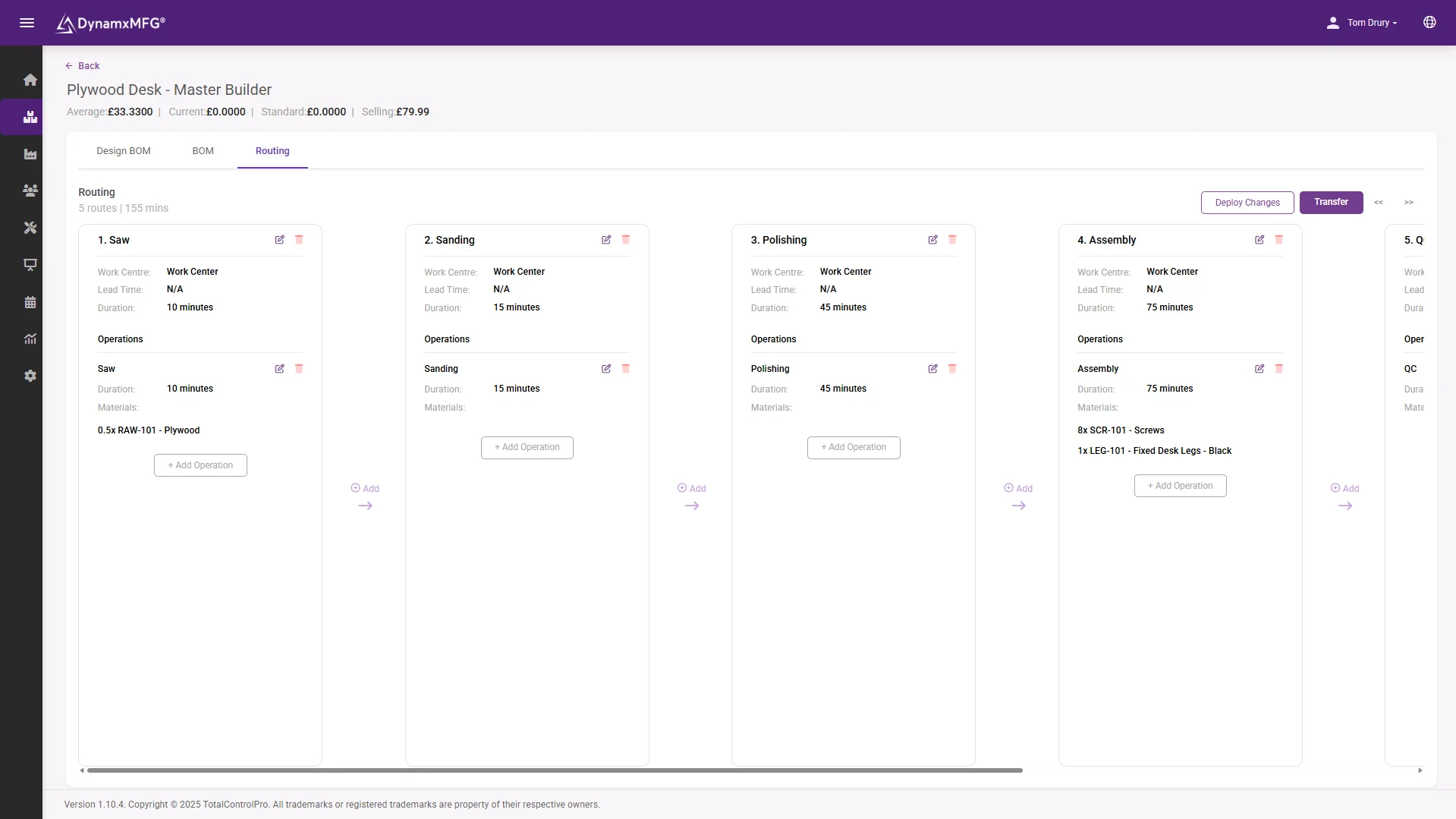
When a sales order is released, DynamxMFG creates the work order automatically and applies the routing held against the item’s Manufacturing BOM. The shop floor sees the operations in the right sequence, with the right materials allocated, every time.
Need to change a routing on the fly? Edit the BOM, click Deploy Changes, and the update propagates to every open work order using that build. The master record stays canonical and the floor stays current.
- Routing applied automatically on release
- Operations in sequence, materials already allocated
- Deploy a change to every open work order at once
Kitting and batching
Run jobs the way your shop floor actually runs them
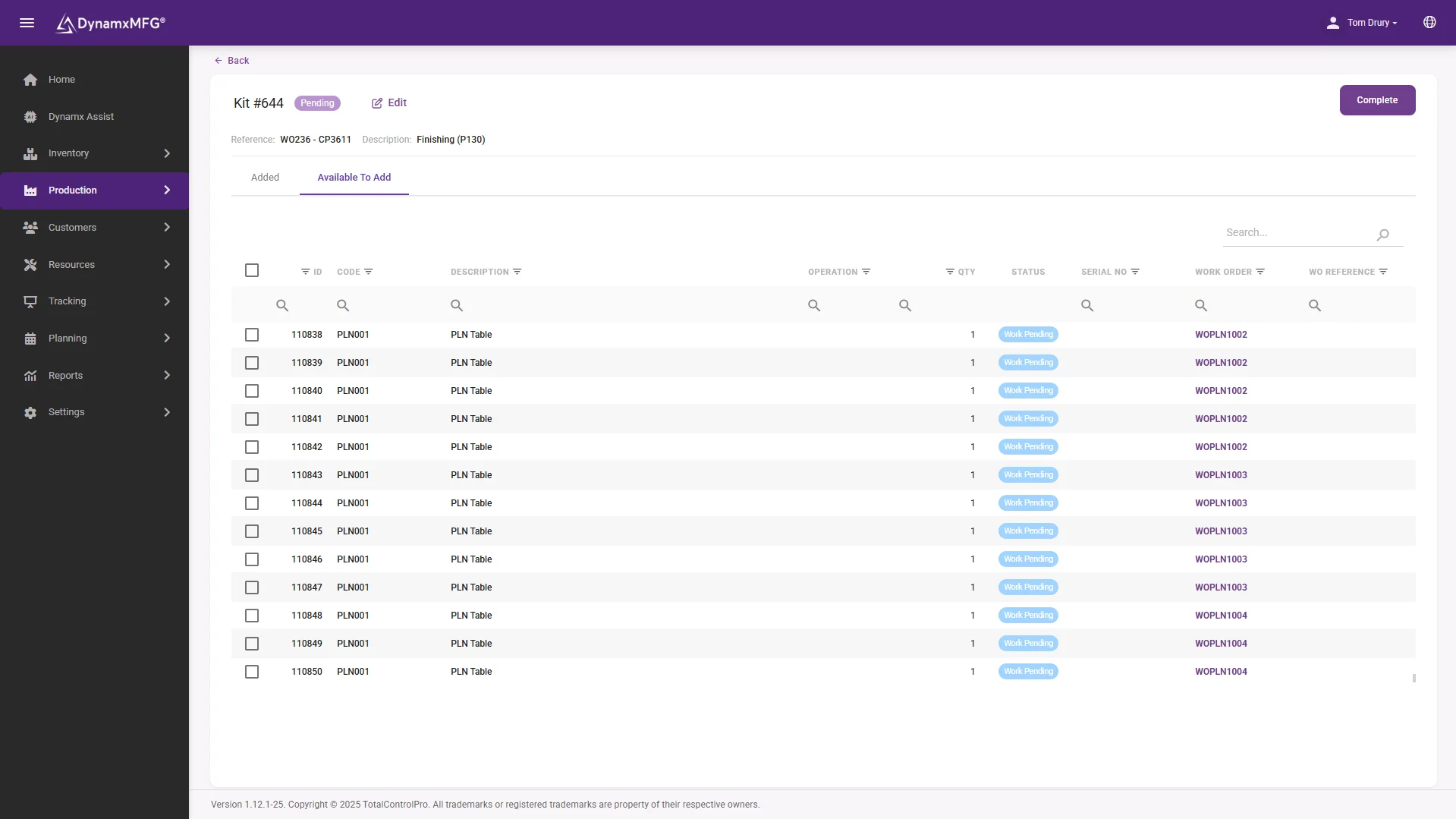
Real factories do not work one part at a time. Operators kit before they start. They batch identical parts at the heat treater. They bundle small items through finishing as one unit. DynamxMFG handles all three natively, so the system matches the floor rather than the other way around.
Choose sequential or simultaneous batching at any operation. Bundle small parts so they track as a single unit through the whole route. Kit materials at start of build with a guided pick list, so the floor sees one clear instruction at every step.
- Sequential or simultaneous batching at any operation
- Bundle small parts as one tracked unit
- Guided pick list at start of build
Live tracking
Live status from every operation, machine and operator
Operators clock in and pick up their next job from the Smart Worker Interface, a touchscreen-friendly shop floor interface. The moment they start an operation the office sees it. The moment a job stops, the manager knows why.
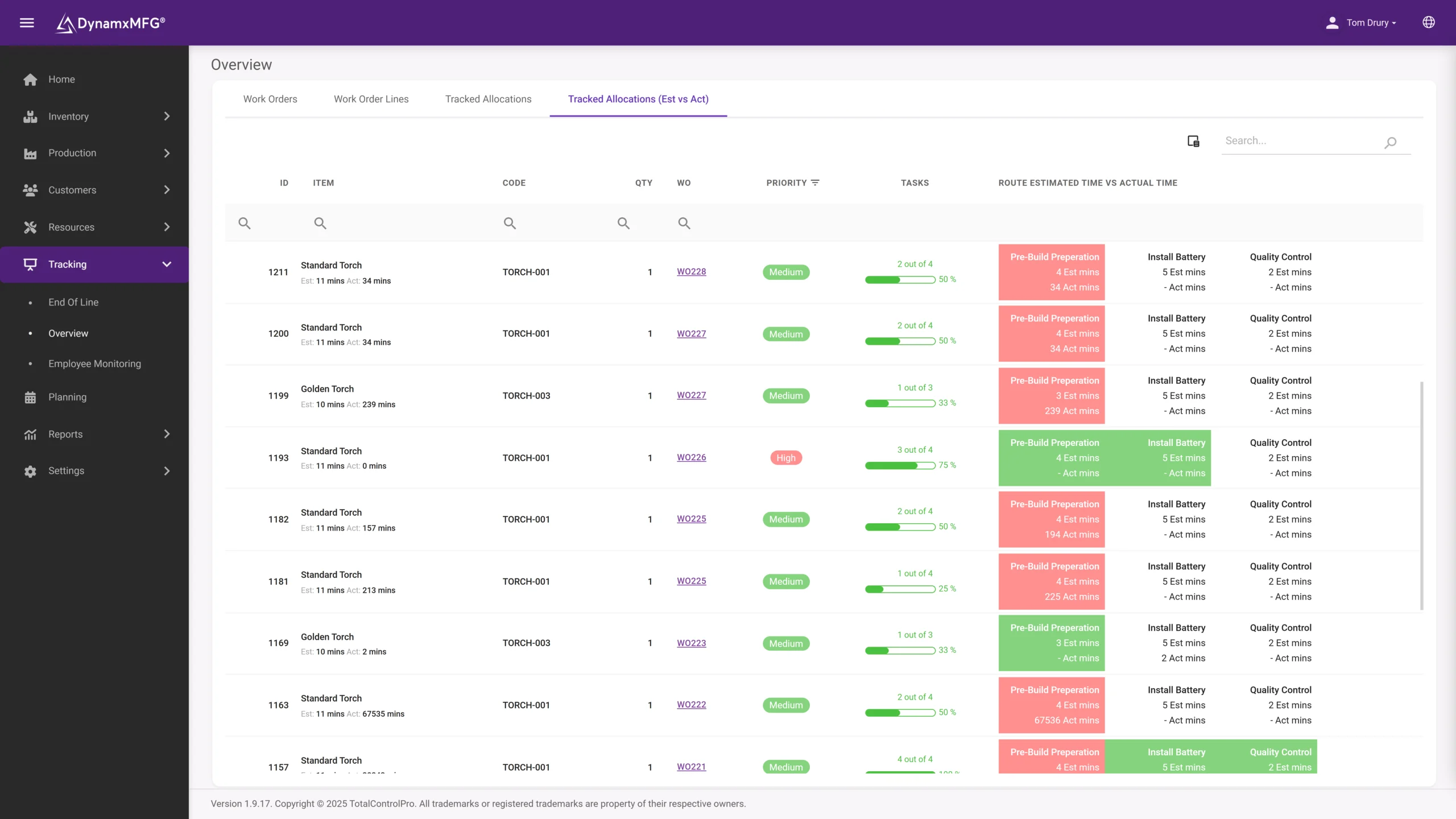
Estimated versus actual times update live. Stoppage reasons are captured at source rather than reconstructed afterwards. End-of-Line screens display live order status across the floor, so everyone sees the same picture from the office to the bench.
- Estimated vs actual, live on every operation
- Stoppage reasons captured at source
- End-of-Line screens across the whole floor
The detail
Everything else that comes with the MES
The execution details that turn a planning system into a system your shop floor actually uses every day.
Manufacturing & Design BOMs
A two-layer BOM model. The Design BOM lists every possible material. The Manufacturing BOM defines what is actually consumed at each routing operation.
Per-order snapshots
Lock a build version against an order. Customise materials or operations for that specific job without affecting the master record.
Stoppage reason analysis
Operators record a reason every time they pause. The Stoppage Reason Analysis report turns that into actionable improvement data.
Rework and remake
Configurable rework templates. Trigger a rework loop from any operation, with full traceability of what was reworked, when and by whom.
Clocking station and EOL
A QR-badge clocking station at the entrance, and wall-mounted End-of-Line screens showing live order status across the floor.
Auto-allocate, auto-consume
Materials are allocated to work orders the moment they are created. Auto-consume removes the need for manual picking at every step.
Connected
Your MES, your accounts system, your CRM: connected
DynamxMFG plugs into Sage and Xero so finished work orders flow into the books automatically. The Print Connector pushes traveller sheets and stock labels to printers without an extra middleware layer.
Need a custom hook? The Data Transfer Application and public REST APIs cover customers, sales orders, purchase orders and suppliers, so DynamxMFG sits cleanly in your existing stack.
See all integrations →








Questions
Manufacturing Execution System FAQs
What is the difference between an MES and an ERP?
An ERP plans and records the commercial side: orders, purchasing and accounts. An MES runs the work. DynamxMFG creates the work order, applies the routing, tells operators what to do next and captures what actually happened, live. Most manufacturers run both.
Do we have to replace our ERP or accounts system?
No. DynamxMFG works alongside Sage, Xero and QuickBooks, and connects to CRM systems too. Finished work orders flow into the books automatically, so your finance team keeps the tools they know.
How do operators interact with the system?
Through the Smart Worker Interface on any touchscreen device. They log in with an employee number, PIN or QR badge, then start and complete operations with a tap or a scan. There is no typing and nothing to navigate.
Can we change a routing without disrupting live jobs?
Yes. Edit the Manufacturing BOM and click Deploy Changes, and the update propagates to every open work order using that build. The master record stays canonical and nothing needs re-raising.
Does it handle batching and kitting properly?
Yes, natively. Batch identical parts sequentially or simultaneously at any operation, bundle small parts so they track as one unit through the route, and kit materials at start of build with a guided pick list.
How long before the MES is running on our floor?
Ninety days. We build your routings and BOMs around how your factory already works, migrate your parts and open orders, and train operators on the floor as part of onboarding.
Related
Explore further
The capability pages, definitions and reading that sit behind this part of DynamxMFG.
See your factory running through DynamxMFG
Book a 15 minute demo. We will show you how your jobs would flow through the MES, using a routing built from one of your real parts, not ours.
Book a Demo

