
Shop floor control
Shop Floor Control Software
Put the right job in front of the right operator, see every work order move through the factory as it happens, and know about a stoppage while you can still do something about it.
Definition
What Is Shop Floor Control?
Shop floor control is the day-to-day management of work once it reaches production. Planning decides what to make and when. Shop floor control is everything that happens after a works order is released: getting it to the right work centre, recording who worked on it and for how long, knowing how much is half-made and where it is, checking quality along the way, and reacting when a machine stops.
In a lot of UK factories that job is still done with printed job cards, a whiteboard and a supervisor walking the floor. It works, up to a point. The problem is that the information is always a few hours old and lives in one person's head, so by the time the office finds out a job has stalled, the delivery date has already gone.
Shop floor control software replaces the walk round with live data. Operators book work against the job on a screen at the work centre, and everyone from the planner to the managing director sees the same picture at the same time.
On the shop floor
The Smart Worker Interface: Control at the Work Centre
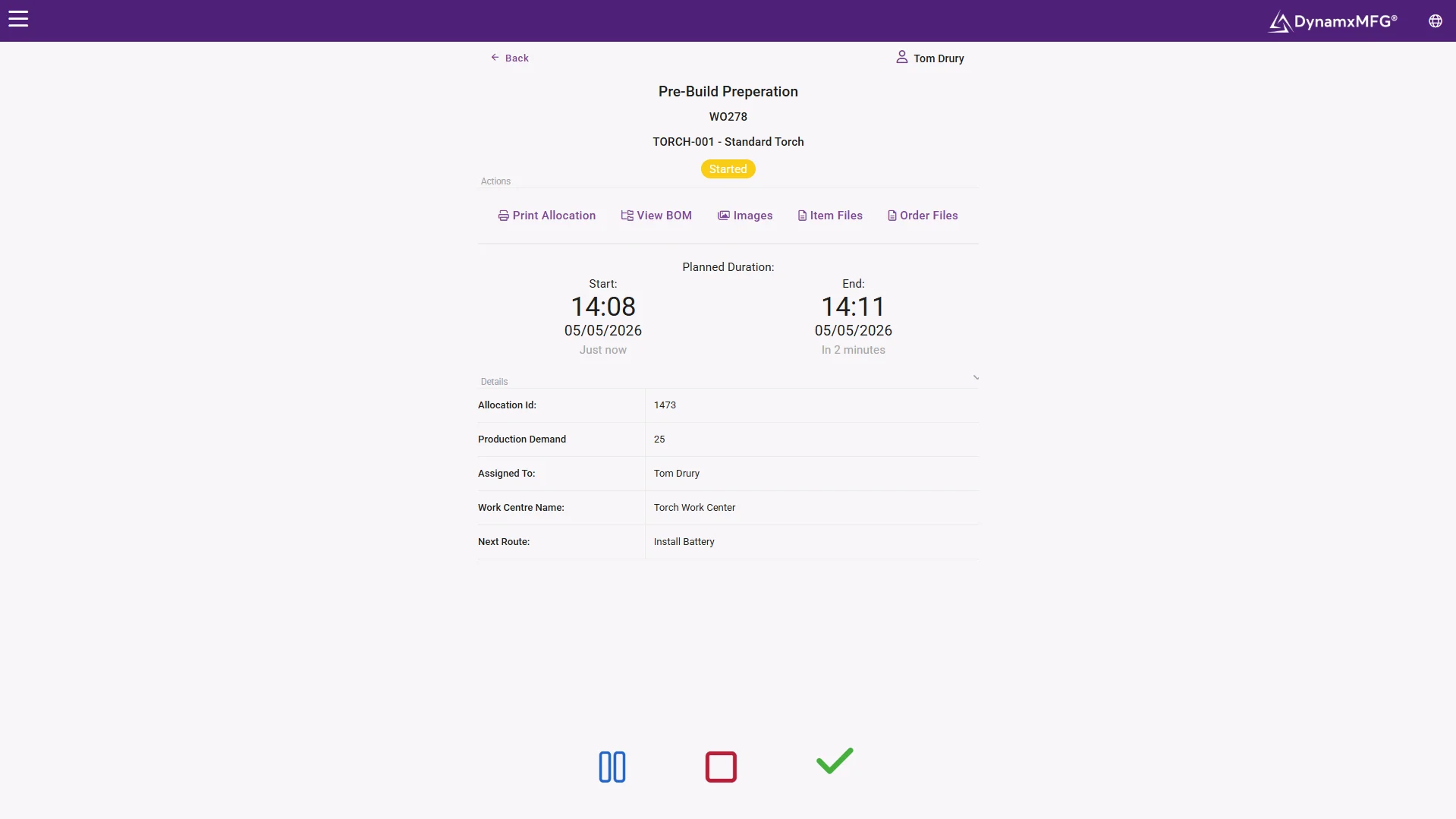
Shop floor control only works if operators actually use it. In DynamxMFG the Smart Worker Interface runs in a web browser on a tablet, touchscreen or PC at the work centre. Operators see the jobs queued for them, start and stop operations with a couple of taps or a barcode scan, and record quantities and stoppage reasons as they go.
The latest work order specification, drawings and instructions are on the same screen, so nobody is building from an out-of-date printout. Because it is browser based it needs a wifi connection on the shop floor, which is worth checking before you choose where terminals go.
- Jobs queued by work centre, in the planned sequence
- Start, pause and complete operations against the job
- Work instructions and specifications on screen
What it covers
The Six Jobs of Shop Floor Control
Whatever system you use, shop floor control comes down to the same six things.
Dispatching Work
Releasing works orders to production and telling each work centre what to run next, in what order, with the right materials and instructions.
Work Order Control
Keeping each job on its routing, pushing changes to the floor when an order is amended, and knowing which operation every job has reached.
Labour and Machine Booking
Recording which operator and which machine worked on each operation, and for how long, so actual time can be compared with the estimate.
Work in Progress
Knowing what is half-made, where it is sitting and how much value is tied up in it, without a stock count on a Friday afternoon.
Quality Checks
Attaching inspection steps and specifications to the job, and recording non-conformances against the operation where they happened.
Downtime
Capturing stoppages with a reason as they happen, so the conversation about lost hours starts from data rather than memory.
DynamxMFG
How DynamxMFG Handles Shop Floor Control
DynamxMFG is a cloud MES built for UK SME manufacturers. Shop floor control is not a bolt-on: the plan, the shop floor screens and the office reports all read and write the same live data.
Smart Worker Interface
Operators book time, quantities and stoppages against the job at the work centre. Clocking stations handle attendance with a QR badge scan.
Live Tracking
Every booking updates the job straight away. Supervisors see the stage of every order, who is on which job and which orders are behind. See real-time production tracking.
Planning
Works orders are raised from the plan and sequenced against capacity, then appear in the queue at each work centre. See production scheduling software.
Shop floor control is one part of a wider manufacturing execution system. If you are comparing full MES options, start with our manufacturing execution system page.
Plan to floor
From the Plan to the Work Centre Queue
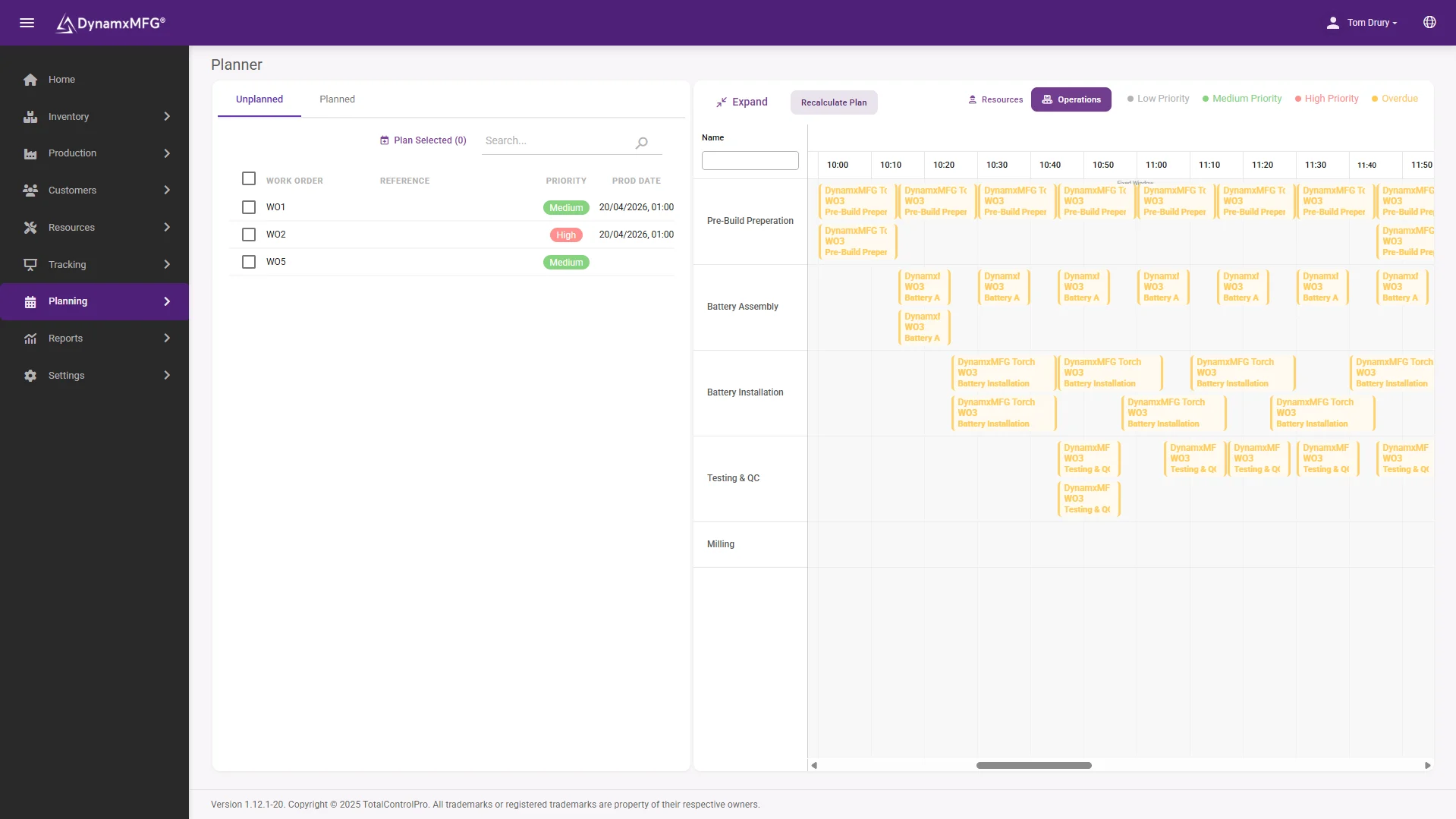
The weak point in most shop floor control is the gap between the office plan and what actually gets run. The schedule says one thing, the operator picks whichever job card is on top of the pile.
In DynamxMFG the planned sequence is what the operator sees. When the planner moves a job, the queue at the work centre changes. When the operator books an operation, the plan knows it is done.
- Works orders raised from the plan
- Sequence pushed to each work centre
- Progress fed straight back to the planner
Options compared
Paper, ERP or MES for Shop Floor Control?
There are three common ways UK SMEs run shop floor control. None is wrong for every business, but they give very different levels of visibility.
| Paper and spreadsheets | ERP production module | Shop floor control in a MES | |
|---|---|---|---|
| Where job status lives | Job cards, whiteboards and the supervisor | In the ERP, once someone types it in | Updated as operators book work |
| Labour and machine time | Written up at the end of the shift | Often entered later by the office | Booked against the operation as it happens |
| WIP visibility | A walk round or a stock count | Depends on how often bookings are made | Live, by job and work centre |
| Downtime | Remembered, if at all | Rarely captured at reason level | Stoppage reason recorded at the time |
| Changes to an order | Reprint and chase the old card | Office side updated, floor may not be | Pushed to the work centre screen |
| Best fit | Very small shops with simple, repeat work | Businesses where finance is the main driver | Job shops and make-to-order SMEs |
Buying guide
What to Look for in Shop Floor Control Software
Feature lists all look alike. These are the questions that separate a system operators will use from one that gets abandoned after a month.
- Booking takes seconds. If starting a job needs more than a scan or a couple of taps, operators will save it up for the end of the shift and your live data stops being live.
- The work centre screen shows the planned sequence, not just a list of open jobs. Otherwise the plan and the floor drift apart.
- Stoppages can be recorded with a reason at the time they happen. Downtime that is not captured cannot be reduced.
- Actual times are compared with estimates by job and operation. That is how routings get more accurate and quotes get more profitable.
- Order changes reach the floor. When engineering or sales amend a job, the operator should see the new version without anyone printing anything.
- It connects to your accounts and order book. Check the integrations list against what you already run, such as Sage, Xero or Business Central.
- Hardware and connectivity are realistic for your building. Ask what devices are needed and what network coverage the shop floor requires.
UK SMEs
Shop Floor Control for UK SME Manufacturers
Most shop floor control software was designed for large plants with an IT department and a long implementation budget. A 20 to 200 person UK job shop has different priorities.
Live in Weeks, Not Years
TotalControlPro maps your process, configures DynamxMFG to it and gets you running. Typical go-live is within 90 days, and a pilot on one cell can start sooner.
A UK-Based Team
Implementation and support come from TotalControlPro's own UK team, who know make-to-order manufacturing and speak the same language as your supervisors.
High Mix, Low Volume
Built for job shops where nearly every order has its own routing, drawings and changes, not for long runs of the same part.
Start Where It Hurts
You do not have to replace everything at once. Many customers start with shop floor tracking and job costing, then add planning and stock.
Case study
How GMC Took Control of Its Shop Floor
Gloucestershire Machining Centre is a precision CNC machining SME. As it grew, job status was scattered, projects could stall without anyone noticing, and the true cost of each part was close to impossible to work out. Scheduling was reactive and output seemed capped without more people or machines.
With DynamxMFG, GMC gained real-time job tracking, part-level costing and smarter scheduling, and was fully operational in under 90 days.
“As GMC has grown, it had become harder for me to have such a keen view on components to see if those parts were profitable or not. DynamxMFG enabled us to monitor the machine time and see whether we are making a profit or a loss on each component.”
Paul Bland, Managing Director, GMC
Integrations
Connects to what you already run
Shop floor control is more useful when it can see the rest of the business. DynamxMFG connects your order book, stock and accounts, so the time booked on the floor flows through to costing and invoicing without re-keying.
See all 33 integrations →












Questions
Shop Floor Control Questions, Answered
What is the difference between shop floor control and a MES?
Shop floor control is the set of activities that manage work once it reaches production: dispatching, booking labour and machine time, tracking WIP, quality checks and downtime. A MES is the software that does those things and usually adds planning, traceability, costing and reporting on top.
Is shop floor control the same as production planning?
No. Planning decides what to make and when. Shop floor control makes sure the plan is carried out, records what actually happened and flags when reality moves away from the plan. The two work best when they share the same live data.
Do operators need a device at every machine?
Not always. Many SMEs share a tablet or touchscreen between a few machines in a cell and add more only where operators need instructions on screen. DynamxMFG runs in a browser, so it needs a wifi connection wherever terminals are placed.
Can shop floor control software work alongside our existing ERP or accounts?
Yes. DynamxMFG connects to common systems such as Sage, Xero, QuickBooks and Business Central, so you can add live shop floor control without replacing the finance system you already rely on.
How long does it take to get shop floor control running?
With DynamxMFG, typical go-live is within 90 days. GMC was fully operational in under 90 days. A pilot on one cell or work centre can usually start earlier.
Related reading
Read next
More on shop floor control from the DynamxMFG glossary, blog and feature pages.
See Your Shop Floor Live
Book a 30 minute call and tell us how jobs move through your factory today. We will show you what shop floor control would look like in your layout.


