
Real-time tracking
Real-Time Production and Shop Floor Tracking Software
Shop floor tracking software that shows the state of the whole factory as it is right now, not as it was when somebody last updated the spreadsheet.
Definition
What is real-time production tracking?
Real-time production tracking shows what is happening across the factory as it happens: which jobs are running, at which machines, with which operators, how far through they are and what has stopped.
The distinction from reporting is timing, and it changes what the information is for. A report tells you what happened so you can explain it. Real-time tracking tells you what is happening so you can change it.
The practical difference is whether you find out about a problem while it is still a problem. A machine that has been down for forty minutes is an intervention. The same machine discovered on a report the next morning is just an explanation for a missed delivery.
See it live
Shop Floor Tracking Software That Shows Every Job Live
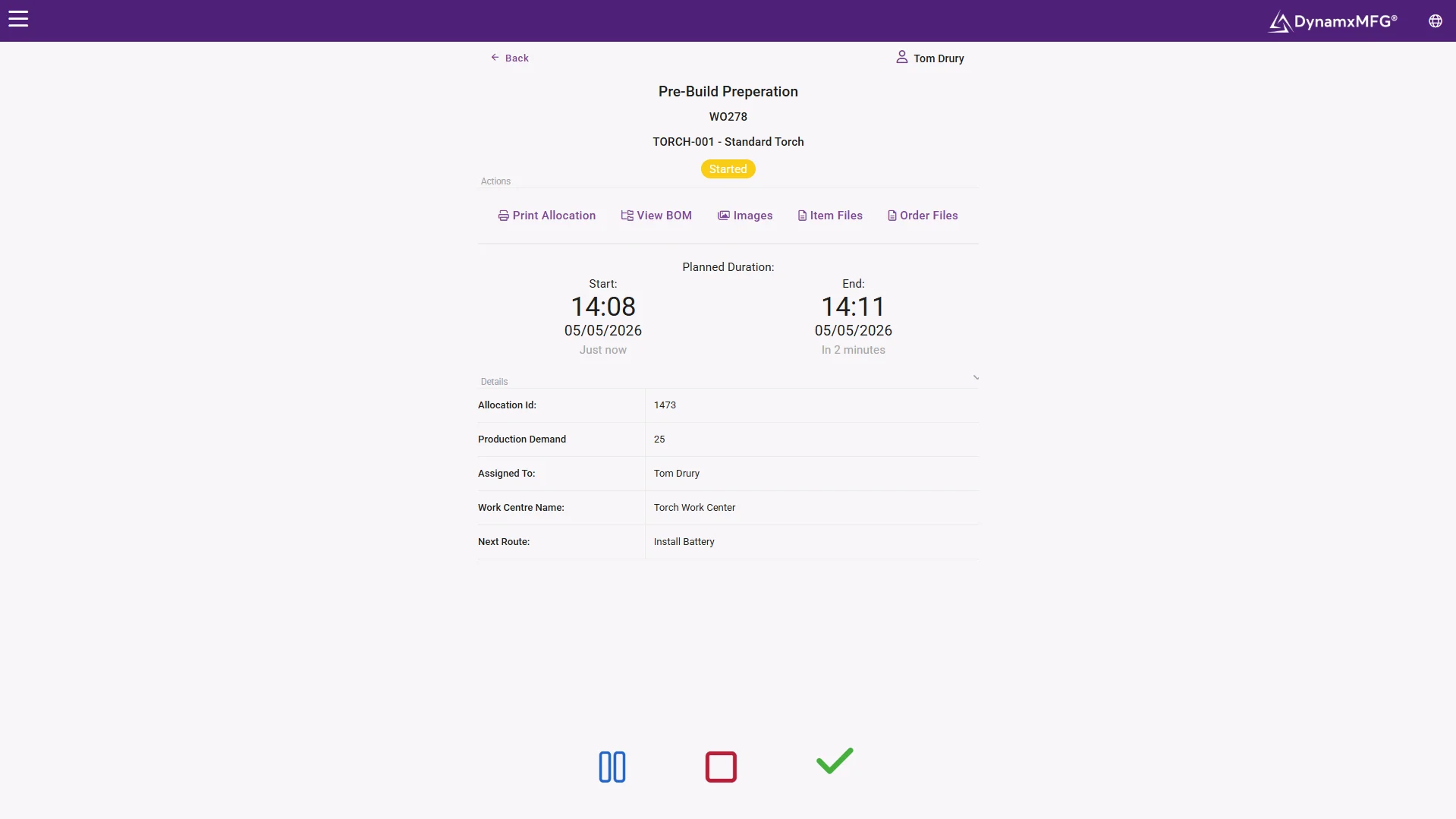
Every live job, its current operation, who is on it and how long it has been there, updating on every booking. This is the screen that ends the morning status meeting.
Put it on displays in the factory and the floor manages itself against the day's target.
- Updates on every single booking
- Same picture on floor and office screens
- Stalled work flagged within the hour
How it works
How real-time tracking works
It has one hard requirement: data has to arrive continuously, not in batches at the end of a shift.
Capture at the moment
Operators book on and off operations at terminals as they work. Every booking updates the picture immediately.
Machines report where they can
Equipment able to output run status feeds in directly, removing even the scan on those resources.
State is derived
Job position, machine status and queue lengths are calculated from the events rather than typed in by anybody.
Exceptions are pushed
Rather than expecting people to watch a screen, jobs running late or machines stopped beyond a threshold are raised actively.
Capabilities
What real-time tracking shows
Live job positions
Every open works order and the operation it has reached.
Machine status
Running, stopped, in setup or idle, with elapsed time in state.
Who is on what
Which operators are booked to which jobs right now.
Queues and dwell
What is waiting at each work centre and for how long.
Output against plan
Progress today measured against what today was supposed to deliver.
Shop floor displays
The same picture on screens in the factory, not just in the office.
WIP tracking
Shop Floor WIP Tracking: Know What Is Half-Made and Where
Work in progress is where cash and lead time hide. Every part that has been started but not finished has material and labour in it, and none of that comes back until it ships. On most shop floors WIP is counted by walking round, so the figure is only as good as the last walk.
Shop floor WIP tracking replaces the walk with bookings. Each time an operator books a job on or off an operation, the system knows the job has moved. That gives you a live answer to questions that are otherwise slow to answer.
Where is each job?
The operation every open works order has reached and the work centre it is sitting at, without anyone going to look.
How much is waiting?
The queue in front of each work centre, so a building bottleneck shows up before it starves the operations downstream.
How long has it been there?
Dwell time at each stage. Jobs that have not moved for a day are the ones most likely to miss their date.
What was started too early?
Work released before it is needed ties up material, labour and floor space. Seeing WIP job by job makes it obvious.
In DynamxMFG this comes from the same operator bookings that drive the live view, so there is no separate WIP count to keep up to date. For the detail on one job, see job tracking software.
To the door
Live through to despatch
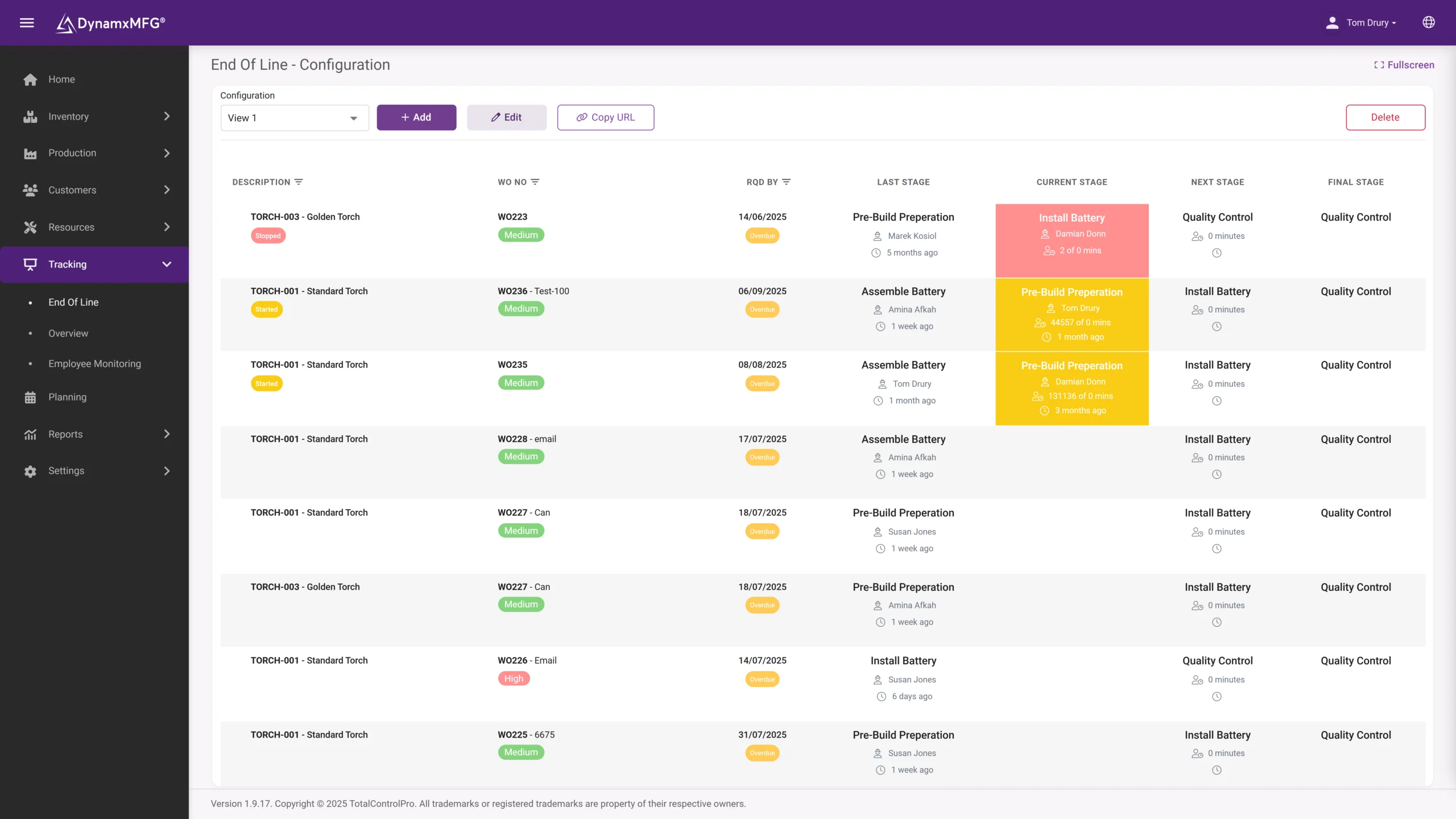
End-of-line tracking carries the picture through final checks and out of the building, so today's promises are being watched all the way to the van.
A job at risk at 10am is an intervention. The same job discovered tomorrow is an apology.
- Final operations and despatch live
- Output against today's plan
- Late risk raised while it is actionable
Benefits
What live visibility changes
The value of production data decays extremely quickly. Most of it is gone by the following morning.
Problems get intercepted
A stalled job flagged within the hour can often still make its date. The same job discovered tomorrow cannot.
Meetings get shorter
A large part of most production meetings is establishing what actually happened. When everyone is looking at the same live picture, that part disappears.
The floor self-corrects
Teams that can see their own output against target adjust without being managed. Screens on the floor are consistently more effective than reports in the office.
Escalation gets targeted
Instead of a general sense that the week is going badly, you get the three specific jobs that need attention.
Live vs reported
Real-time tracking or production reporting?
You want both, and they are built from the same captured data. What differs is when you look and what you can do about it.
| Real-time tracking | Production reporting | |
|---|---|---|
| Answers | What is happening now? | What happened over a period? |
| Used by | Supervisors, cell leaders, sales | Directors, finance, continuous improvement |
| Acted on | Within minutes or hours | Within weeks or months |
| Typical view | Live board or shop floor screen | Weekly or monthly pack |
| Value decays | Fast, within a shift | Slowly, trends stay useful |
| Requires | Continuous capture | Accurate capture, timing less critical |
Buying guide
What to Look for in Shop Floor Tracking Software
Most manufacturing tracking software looks similar in a demo. The differences show up on a busy afternoon with a full order book. These are the questions worth asking before you choose.
- Booking speed. If booking on and off a job takes more than a few seconds, operators will batch their bookings at the end of the shift and the live picture is gone.
- Update frequency. Ask whether the view updates on every booking or on a timed refresh. Anything measured in hours is reporting, not tracking.
- Network requirements. Most shop floor tracking runs in the cloud, so check what connection each terminal needs and survey wifi coverage at every work centre before you buy.
- Visibility beyond the office. The same picture should go on screens on the shop floor, and sales should be able to see job status without phoning production.
- One set of data. Tracking, job costing and scheduling should run from the same bookings. Separate systems mean separate versions of the truth.
- Time to go live. A tracking system that takes eighteen months to deploy is eighteen more months of the old spreadsheet. DynamxMFG typically goes live in around 90 days.
For UK manufacturers
Shop Floor Tracking Built for UK SME Manufacturers
DynamxMFG is built in Northampton for UK discrete manufacturers with roughly 10 to 200 people: precision engineering, CNC machining, electronics assembly, fabrication and specialist vehicle builds. Most are job shops or make-to-order businesses, where every works order is slightly different and the state of the floor changes by the hour.
That shapes how shop floor tracking has to work. Routings vary from job to job, operators move between machines, and the people running the business are often the same people fighting fires on the floor. Tracking has to be quick to book, quick to set up and priced for a small team, not scoped for a multinational.
It also has to be supported by people who understand the work. Implementation and support come from the TotalControlPro team in the UK, with hands-on onboarding rather than a manual and a login.
Right for you?
When you need live tracking
The pattern is a factory where everyone is well informed about yesterday.
- Your production picture is assembled each morning for a meeting and is out of date by lunchtime.
- Machine stoppages are noticed by whoever walks past rather than flagged.
- Sales cannot answer customer questions without asking production first.
- Nobody on the shop floor can see how the day is going against target.
- Late jobs are identified at the despatch bay rather than three operations earlier.
- You are running enough concurrent work that nobody can hold the state in their head.
DynamxMFG
Live because the data arrives as work happens
There is no way to make tracking real-time by reporting harder. If capture happens at the end of a shift, the best possible system shows you a picture that is several hours old.
DynamxMFG updates as operators book. Every scan changes the live view immediately, on office screens and on displays in the factory, which is what allows problems to be dealt with on the day they occur.
Updated on every booking
No refresh cycle and nothing to compile. See shop floor data capture.
Visible on the floor
Live boards where the work is, not only in the office. See manufacturing intelligence.
Job level detail
Drill from the factory view to one job. See job tracking.
Integrations
Connects to what you already run
Live status is most valuable in the hands of people outside the factory. DynamxMFG connects to your CRM and inbox so sales answer customers from the live picture, not from memory.
See all 33 integrations →









Customers
What manufacturers say about DynamxMFG
“DynamxMFG is an excellent choice for manufacturers looking to digitise operations without being overwhelmed by complexity.”
“As GMC has grown, it had become harder for me to have such a keen view on components to see if those parts were profitable or not. DynamxMFG enabled us to monitor the machine time and see whether we are making a profit or a loss on each component.”
“The ability to dynamically modify BOMs after release, adding or removing items from work orders, scrapping and reworking parts, has been the single biggest improvement for our business.”
“We chose the system over competitors because of its ease of use, strong customer support and friendly delivery team. So far, everything has matched what was promised.”
“With DynamxMFG, all our production processes are tracked and the relevant data is captured. This increases our control over the business and helps us identify more opportunities to enhance efficiency and quality.”
“Our experience has been positive, and it was definitely worth switching. The support we have received has been extremely helpful. My favourite feature is the integration and automation capabilities.”
Questions
Shop Floor Tracking Questions, Answered
What is shop floor tracking software?
Software that records work as it happens on the shop floor, usually by operators booking on and off jobs at terminals, and turns those bookings into a live view of every job, machine and operator. It replaces walking the floor and chasing paper travellers.
What is shop floor WIP tracking?
Tracking work in progress by stage: which operation each open job has reached, how much is queued at each work centre and how long it has been waiting. It shows bottlenecks and stalled jobs while there is still time to act.
How long does shop floor tracking take to set up?
A typical DynamxMFG deployment goes live in around 90 days, compared with 18 months or more for a traditional ERP project. Live job tracking only needs operator bookings, so it can start before any machine connectivity is in place.
How real-time is real-time?
It should update on every booking, so seconds. Be sceptical of anything describing itself as real-time that refreshes on a schedule measured in hours.
Do we need screens on the shop floor?
They are one of the cheapest and most effective parts of this. Teams that can see their own performance against target adjust without anybody managing them.
Does this need machine connectivity?
No. Operator bookings are enough for live job tracking. Machine connectivity adds precision on run and downtime, and is worth doing on the constraint first.
Will people feel monitored?
They can, and how it is introduced matters more than the technology. The framing that works is that the data protects the floor from being blamed for delays that were not theirs.
What if the network drops?
Cloud-based systems, DynamxMFG included, need a working connection to record bookings. Survey wifi coverage at every work centre before go-live and add a 4G/5G backup line if an outage would be costly.
Is this the same as a dashboard?
A dashboard is one way of displaying it. Real-time tracking is the underlying capability; the dashboard is the window onto it.
Related reading
Read next
Background reading on real-time production tracking from the DynamxMFG glossary and blog.
See your factory live
Book a 30 minute call and we will put a live production view on screen and drill into whatever you want to look at.


