
Shop floor data capture
Shop floor data capture software
Record what happened on the floor as it happens, from the people doing it, on a terminal that takes seconds. Everything else in a manufacturing system depends on getting this one thing right.
Definition
What is shop floor data capture?
Shop floor data capture, usually shortened to SFDC, is the recording of production events at the point they occur: an operator booking on to a job, an operation finishing, material being issued, a quantity scrapped, a machine going down.
It replaces the route card, the tally sheet and the end-of-shift transcription. Instead of writing something down and typing it up later, the record is created at the machine, at the moment, by the person who did the work.
Every clever thing a manufacturing system does, real-time production tracking, real costing, honest OEE, traceability, is downstream of capture. Get this wrong and everything above it is a well-presented guess.
See it live
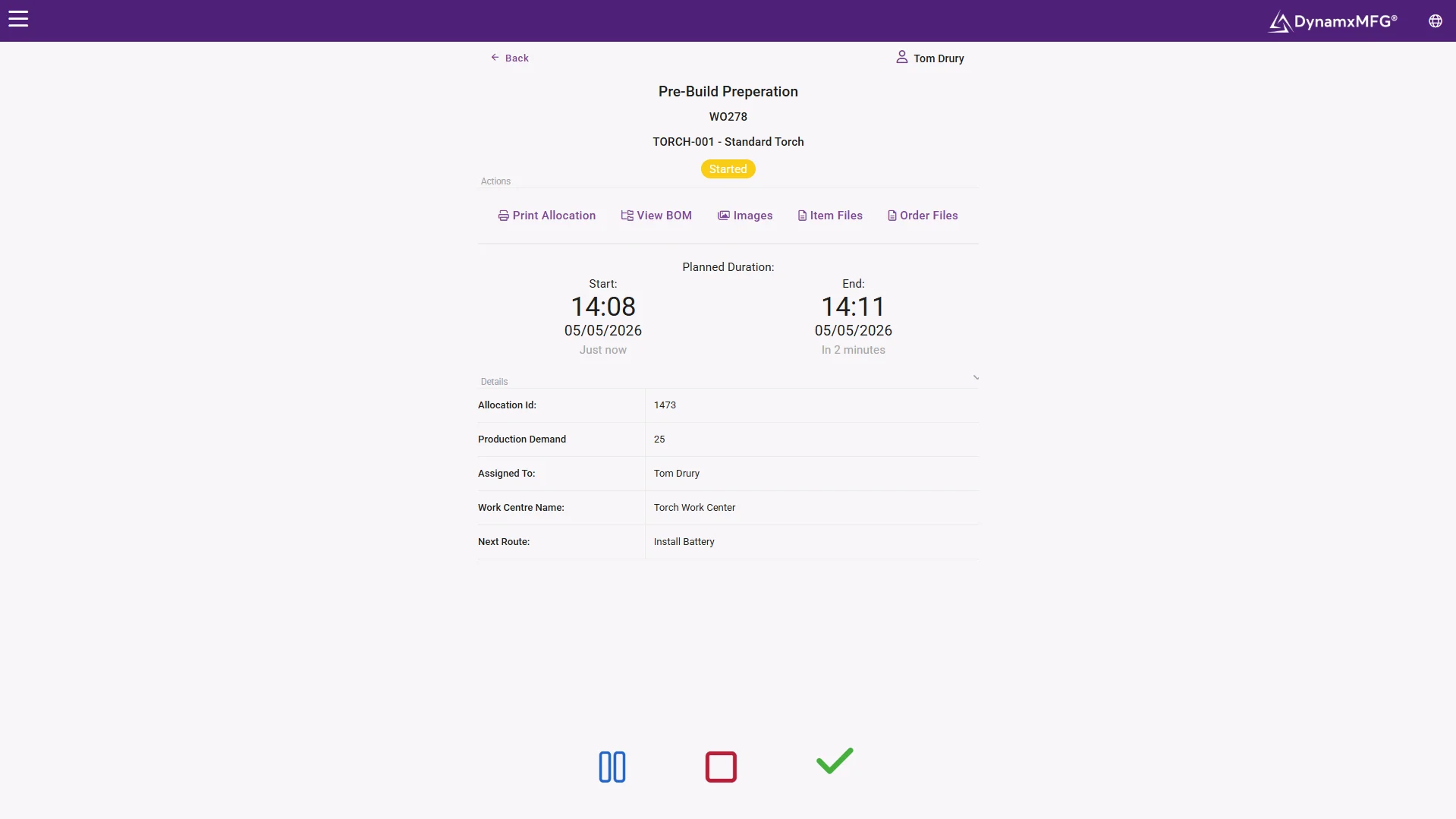
The terminal your operators actually use
Badge in, scan the job, book the operation. The shop floor screen is built for gloved hands and people in a hurry, because slow capture is capture that gets skipped.
Everything the operator needs is on the same screen: the queue at their work centre, the drawing, the quantity and the clock.
- Book on and off in seconds
- Drawings and instructions at the operation
- Runs over your shop floor wifi, with no local servers to maintain
How it works
How shop floor data capture works
The mechanics are simple. Making them fast enough that people actually do it is the hard part.
The operator identifies themselves
A badge scan or a PIN. This is what turns a booking into a labour record and lets you see who was working on what.
They scan the job
A barcode on the works order or route card brings up the operation, the drawing, the quantity and any instructions.
They book on and off
Start and finish times are recorded automatically. Nobody estimates how long something took, because the system watched.
Exceptions get captured too
Scrap quantities, downtime reasons, material batch numbers and quality checks are recorded against the same job at the same moment.
Capabilities
What SFDC captures
Labour time
Who worked on which operation, for how long, with no timesheet to reconcile.
Job progress
Which operation each job has reached, live, across the whole order book.
Material consumption
What was issued to the job, including batch and serial numbers where needed.
Scrap and rework
Quantity, reason and stage, so the cost of quality stops being invisible.
Machine downtime
How long a resource was stopped and why, which is where OEE comes from.
Quality results
Inspection outcomes recorded at the operation rather than on a separate sheet.
What it feeds
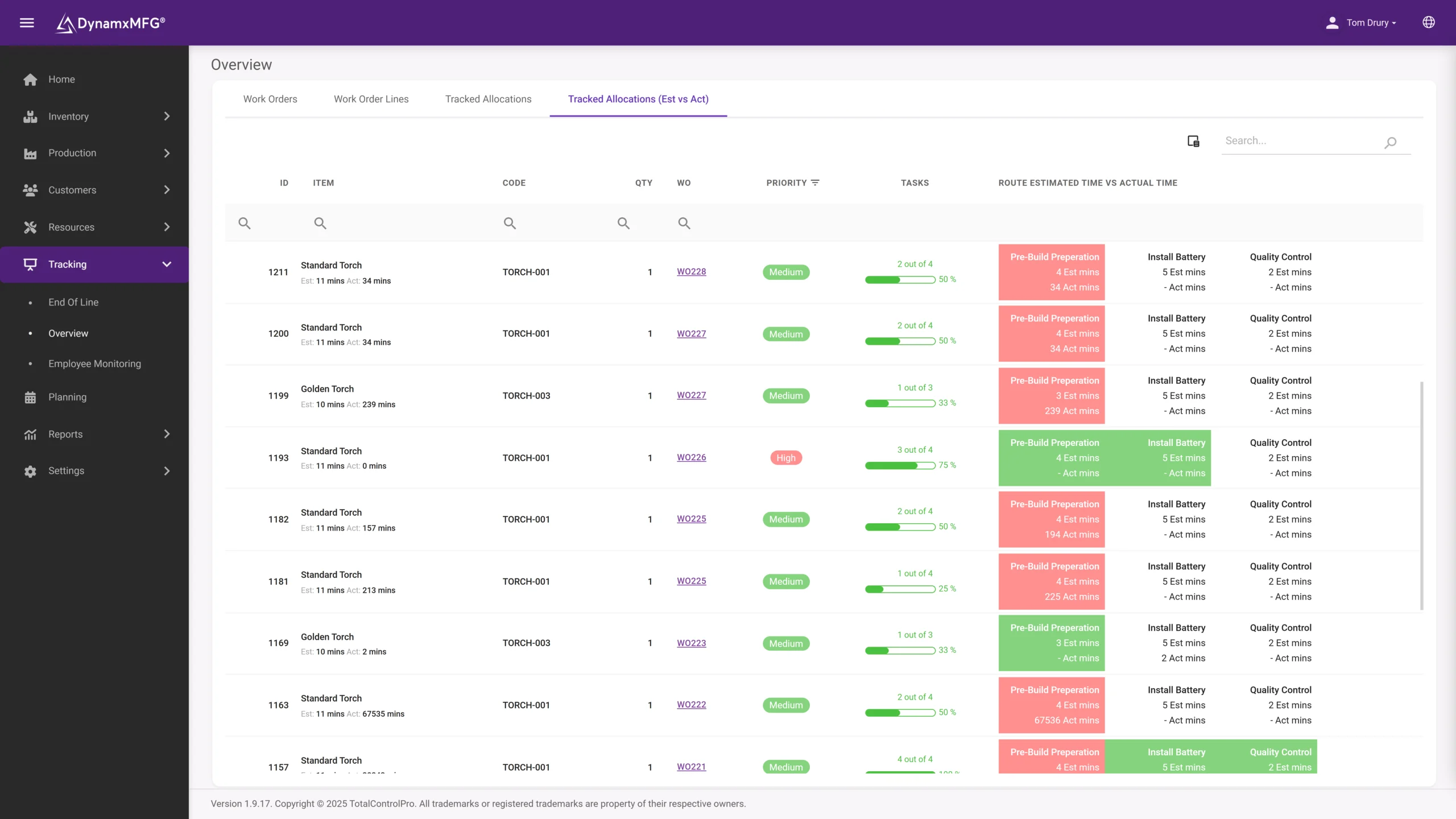
Estimated against actual, automatically
Every booking lands against the works order, so planned versus actual time per operation exists without anyone compiling it.
This is the data that fixes your routings, hardens your quotes and tells you which operations quietly run over every single time.
- Planned vs actual per operation
- Labour cost building live on the job
- Routings that correct themselves over time
Benefits
What capture actually changes
This is the least glamorous part of a manufacturing system and comfortably the highest returning.
Admin time disappears
A factory of 50 people transcribing route cards is losing hours every day to typing up work that has already been done once.
The data stops being wrong
Transcription is where errors enter. Capturing once, at source, removes an entire category of mistake from stock and costing.
Costing becomes real
You cannot cost a job accurately from estimated times. The moment booking is automatic, quoted versus actual becomes a live comparison.
Nobody has to chase
Because the record is created as work happens, the answer to where is that job is already on screen when somebody asks.
Paper vs capture
Route cards or shop floor data capture?
Most UK SME factories still run on paper, and it works right up until it does not.
| Shop floor data capture | Paper route cards | |
|---|---|---|
| When data appears | Immediately, as the work happens | After transcription, hours or days later |
| Accuracy | Timestamped by the system | Estimated and rounded by people |
| Admin cost | None beyond the scan | Somebody types up every card |
| Visibility | Whole order book, from any screen | Whatever is physically on the desk |
| Traceability | Material, operator and machine linked automatically | Reconstructed from files if you are lucky |
| Failure mode | Terminals must be quick and available | Cards get lost, wet, or filled in at the end |
Right for you?
When you need shop floor data capture
The tell is usually somebody in the office typing up something that already happened.
- Someone spends part of every day entering route card data into a spreadsheet or accounts package.
- Job costs are only known weeks after the job shipped, if at all.
- You cannot say which operation a job is at without asking the floor.
- Timesheets and job bookings are two separate exercises that never quite agree.
- Customers or auditors want traceability and producing it means digging through paper.
- You want OEE or scrap figures but nobody trusts the numbers you currently produce.
DynamxMFG
Capture that operators do not resent
Shop floor data capture projects fail for one reason above all others: the system is slower than the paper it replaced. If booking an operation takes six taps and a login that times out, people will batch it up to the end of the shift, and you are back to transcription with extra steps.
DynamxMFG is built around the terminal being fast. Badge, scan, book. It is designed to be used with gloves on, in poor light, by somebody who wants to get back to the machine, because that is the only version of this that survives a busy week.
Built for the environment
Large targets, few taps, usable with gloves on. See the Smart Worker Interface.
Feeds everything else
The same booking drives job costing, scheduling and traceability.
Barcode and serial ready
Material batches and serial numbers captured in the same scan.
Integrations
Connects to what you already run
Capture once, use everywhere. The same bookings feed job costing, scheduling and your accounts package through DynamxMFG's integrations, so data entered on the floor never gets typed again.
See all 33 integrations →











Customers
What manufacturers say about DynamxMFG
“DynamxMFG is an excellent choice for manufacturers looking to digitise operations without being overwhelmed by complexity.”
“As GMC has grown, it had become harder for me to have such a keen view on components to see if those parts were profitable or not. DynamxMFG enabled us to monitor the machine time and see whether we are making a profit or a loss on each component.”
“The ability to dynamically modify BOMs after release, adding or removing items from work orders, scrapping and reworking parts, has been the single biggest improvement for our business.”
“We chose the system over competitors because of its ease of use, strong customer support and friendly delivery team. So far, everything has matched what was promised.”
“With DynamxMFG, all our production processes are tracked and the relevant data is captured. This increases our control over the business and helps us identify more opportunities to enhance efficiency and quality.”
“Our experience has been positive, and it was definitely worth switching. The support we have received has been extremely helpful. My favourite feature is the integration and automation capabilities.”
Questions
Shop floor data capture questions, answered
What hardware do we need?
Usually a rugged tablet or touchscreen terminal at each work centre or cell, plus barcode scanners. You do not need one per machine to start, and most factories begin with a handful at the busiest points.
Will operators accept it?
They accept it when it is faster than the paperwork it removes and when they can see it stops them being blamed for delays that were not theirs. They reject it when it is slow or feels like surveillance.
What about operators who are not confident with technology?
Badge scan and one barcode is a lower literacy demand than filling in a route card. The systems that struggle are the ones that ask people to navigate menus.
Can we capture from machines automatically?
Where machines can output data, yes, and it removes even the scan. Most UK SME factories run a mix, with automated capture on newer equipment and operator booking elsewhere.
How long does it take to roll out?
Weeks, not months. The technical setup is quick; the time goes into agreeing how you want operations and downtime reasons structured before you start.
What if the network goes down?
Ask any vendor this. Terminals should keep working and sync when the connection returns, because a shop floor system that stops when the wifi hiccups will not be trusted again.
Related reading
Read next
Background reading on shop floor data capture from the DynamxMFG glossary and blog.
See a job booked in under ten seconds
Book a 30 minute call and we will run a job through capture end to end, using one of your own routings.


