
Sage 200 Manufacturing
The Sage 200 Manufacturing alternative
Sage 200 Manufacturing reached full end of life on 31 December 2025, and the 2025 R2 release removed it from the product entirely. Keep Sage 200 for your financials. Give production a system of its own.
What happened
The module is not going end of life. It is already gone.
Sage moved Sage 200 Manufacturing onto extended support back in November 2020, stripped the manufacturing functionality out of the product in the Sage 200 2025 R2 release, and ended extended support entirely on 31 December 2025. There is no version of waiting this out.
The officially sanctioned routes are certified bolt-ons, Cim200 and Sicon Manufacturing, which recreate the module inside the same architecture. That is a reasonable path if what you want is the old model with newer code. It is worth pausing on whether that is actually what you want.
Because the same fork applies here as everywhere else: your Sage 200 financials and commercials are fine and supported. What needs replacing is the manufacturing layer, and nothing says its replacement has to live inside Sage.
You are being offered a like-for-like swap at the exact moment you have a free choice. It is worth spending thirty minutes finding out what a shop-floor-first system looks like before signing up for another decade of the back-office model.
See it live
Production running beside Sage 200, not inside it
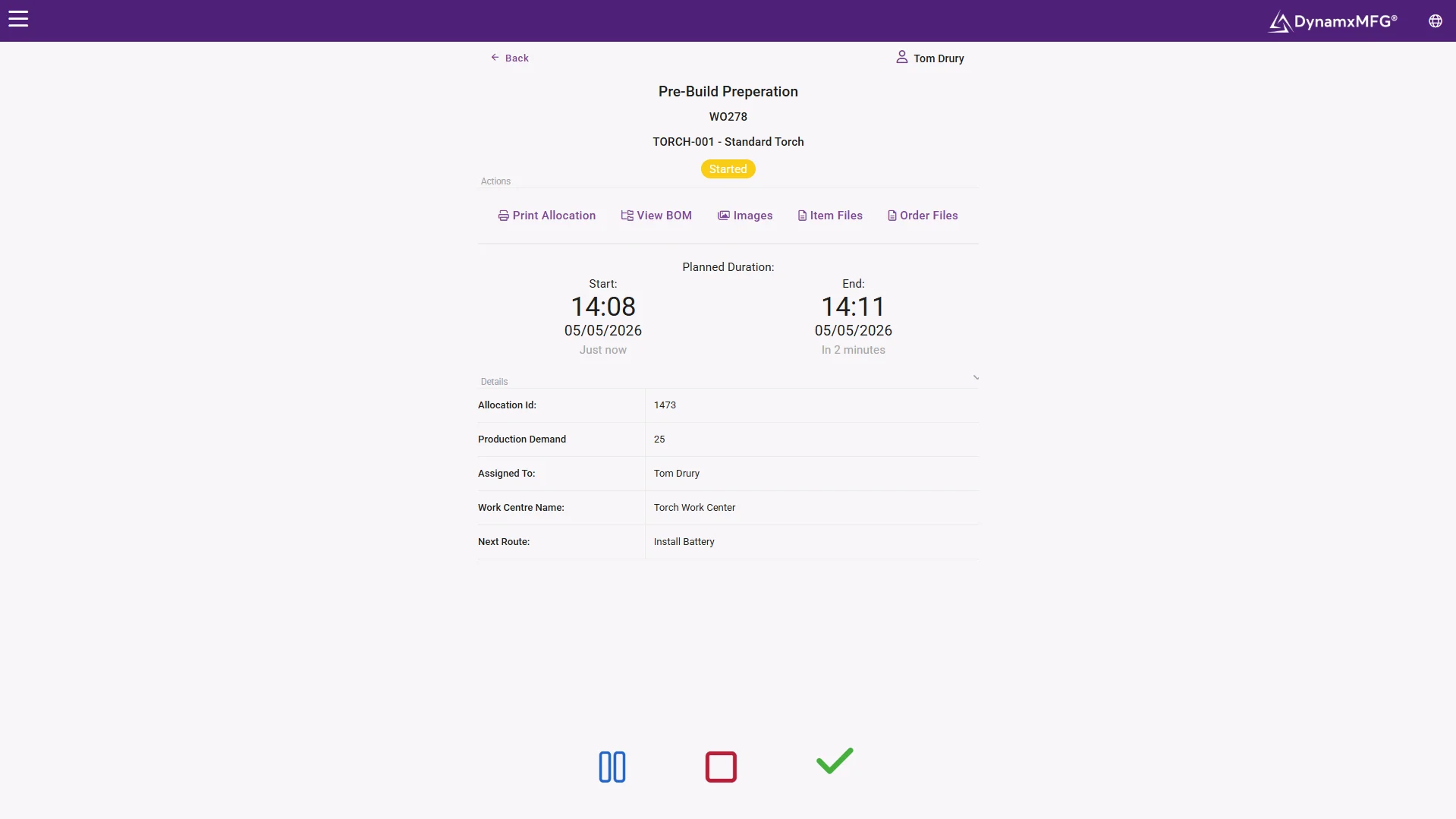
Works orders, routings and live job status on terminals at every work centre, with operators booking work as it happens. The factory gets a system designed around the factory.
Sage 200 keeps the financials, commercials and stock ledger it is good at, and receives clean production data through the integration.
- Live job status by operation
- Booking at the work centre, not the back office
- Clean handover of costs and stock to Sage 200
The alternative
Keep Sage 200. Replace the manufacturing.
DynamxMFG runs production as a cloud system in its own right and connects to Sage 200, rather than installing itself inside Sage's architecture. The distinction sounds technical and is actually commercial: it decides what you are locked into for the next ten years.
A certified bolt-on binds your manufacturing software to Sage 200's release cycle, its consultants and its future pricing. A system that stands beside it leaves every future decision open, including the ledger itself.
Financials untouched
Sage 200's accounting, commercials and reporting carry on exactly as they are. Finance keeps the system it chose.
A real MES on the floor
Live capture, finite scheduling, job costing and traceability, built shop-floor-first rather than module-shaped.
Connected from day one
The Sage 200 integration is already built, alongside 32 others. No development project required.
What you get
What production gets out of the move
Not a recreation of the retired module. The system the module should have grown into.
Works orders and BOMs
Multi-level structures with revision control. See BOM software.
Live shop floor capture
Labour, material and progress booked at the terminal. See shop floor capture.
Finite scheduling
Sequencing against real capacity. See scheduling software.
Job costing
Actual against estimate from real bookings. See job costing.
Batch and serial traceability
Genealogy searchable both directions. See traceability.
Reporting
Margin, delivery and utilisation from live data. See reporting.
The upgrade
Scheduling the module never attempted
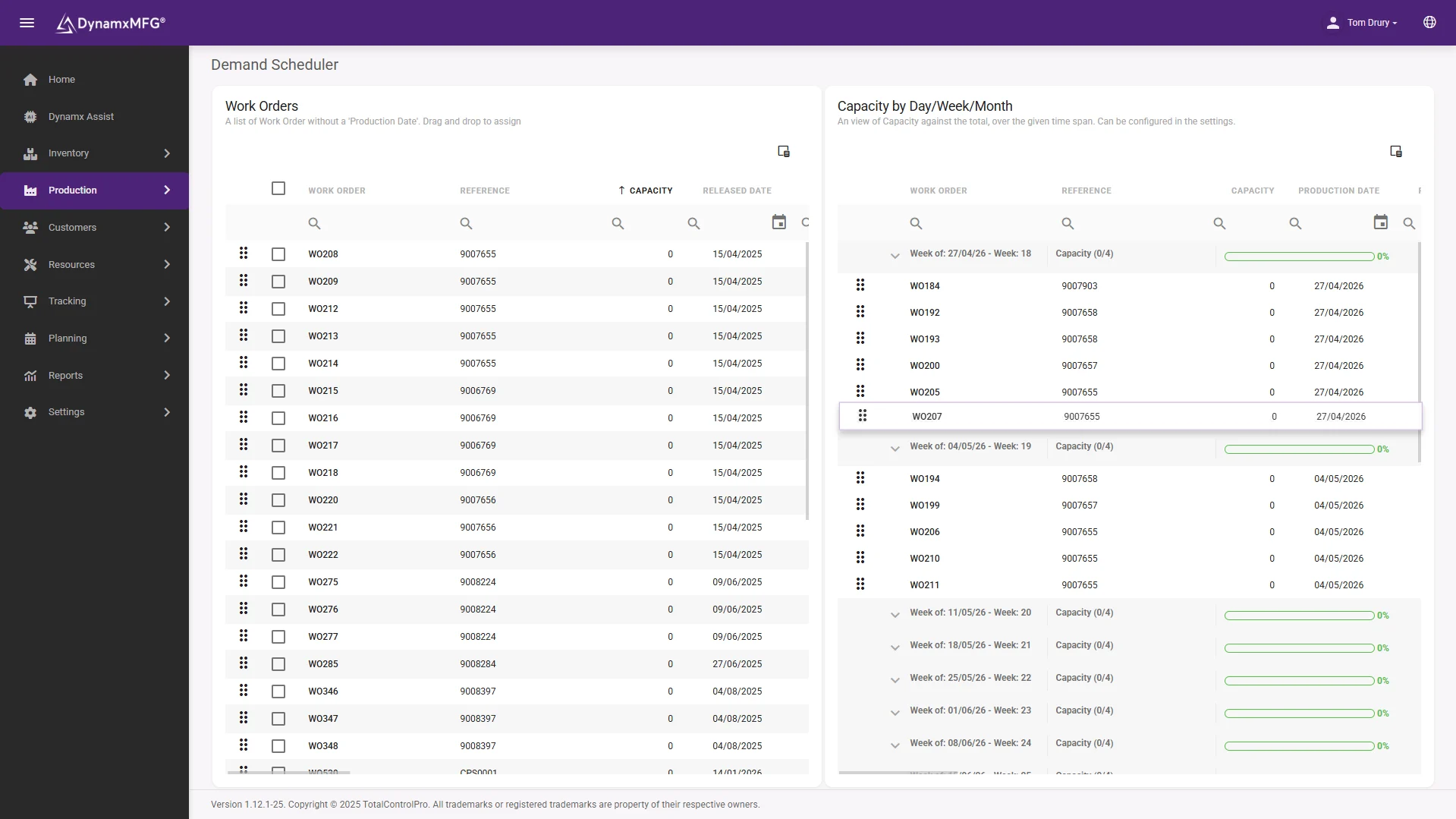
Finite capacity scheduling, on screen, against the hours each machine and cell genuinely has. Sage 200 Manufacturing planned against paper and optimism; this plans against reality.
When a machine goes down or a priority order lands, the re-plan is minutes, and the knock-on effects are visible before anyone makes a promise.
- Finite capacity by resource
- Drag-and-drop re-sequencing
- Fed live by shop floor bookings
Side by side
DynamxMFG or a certified bolt-on?
Cim200 and Sicon are competent recreations of the old model. The question is whether the old model is what your factory needs for the next decade.
| DynamxMFG + Sage 200 | A Sage 200 bolt-on | |
|---|---|---|
| Architecture | Cloud system connecting to Sage 200 | Modules installed within the Sage 200 estate |
| Built around | Shop floor terminals and live capture | Back-office processing screens |
| Tied to Sage releases | No. Independent, integrated via API | Yes. Compatibility tracks Sage 200 versions |
| Scheduling | Finite capacity, fed by live progress | Varies by module and configuration |
| If the ledger ever changes | Production system unaffected | Manufacturing selection starts again |
| Deployment | 90 days, run with your team | Consultant-led implementation |
Getting started
Off the retired module in 90 days
The deadline has already passed, but the migration has not become harder. It runs beside your live Sage 200 without touching it.
Weeks 1 and 2: lift the data
Items, bills of materials, routings and open works orders migrate from the manufacturing module. The mapping is well understood.
Weeks 3 to 6: connect and configure
The Sage 200 integration goes live, capacity and routings are sanity-checked, terminals are installed where the work happens.
Weeks 7 to 10: parallel running
Live jobs run in DynamxMFG while Sage 200 continues untouched. The comparison with the old module tends to be short.
Week 12: fully across
Production on current, developing software. Finance on the Sage 200 they already know. Nothing left on extended-support life support.
Is this you?
Who this page is for
Sage 200 sites hit this decision from a few different directions. All of them end at the same fork.
- You ran Sage 200 Manufacturing to the end and are now past the December 2025 support cliff.
- You are evaluating Cim200 or Sicon and want one genuinely different option on the shortlist.
- Production has drifted onto spreadsheets while the Sage decision sat unresolved.
- Finance is committed to Sage 200 and a full ERP replacement is not on the table.
- The factory needs scheduling and live capture the old module never provided anyway.
- You want the manufacturing decision uncoupled from the accounts decision, permanently.
Integrations
Built to sit beside Sage
DynamxMFG connects to Sage 200 today, along with Sage 50, Xero, QuickBooks and the rest of your stack. Production costs, stock movements and order data flow to the ledger cleanly, which is the part of the old arrangement actually worth keeping.
See the Sage 200 integration →












Customers
What manufacturers say about DynamxMFG
“DynamxMFG is an excellent choice for manufacturers looking to digitise operations without being overwhelmed by complexity.”
“As GMC has grown, it had become harder for me to have such a keen view on components to see if those parts were profitable or not. DynamxMFG enabled us to monitor the machine time and see whether we are making a profit or a loss on each component.”
“The ability to dynamically modify BOMs after release, adding or removing items from work orders, scrapping and reworking parts, has been the single biggest improvement for our business.”
“We chose the system over competitors because of its ease of use, strong customer support and friendly delivery team. So far, everything has matched what was promised.”
“With DynamxMFG, all our production processes are tracked and the relevant data is captured. This increases our control over the business and helps us identify more opportunities to enhance efficiency and quality.”
“Our experience has been positive, and it was definitely worth switching. The support we have received has been extremely helpful. My favourite feature is the integration and automation capabilities.”
Questions
Sage 200 Manufacturing questions, answered
When did Sage 200 Manufacturing end?
It moved to extended support in November 2020, the functionality was removed from the product in the Sage 200 2025 R2 release, and extended support ended on 31 December 2025. It is no longer supported in any form.
Does replacing it mean leaving Sage 200?
No. Sage 200's financials and commercials are unaffected and fully supported. DynamxMFG replaces the manufacturing layer and connects to the Sage 200 you keep.
How is DynamxMFG different from Cim200 or Sicon?
Both are certified bolt-ons that recreate the module inside the Sage 200 estate, tied to its releases and implementation model. DynamxMFG is an independent cloud MES built around live shop floor capture, connected to Sage 200 through an existing integration rather than installed within it.
What data comes across from the old module?
Item masters, bills of materials, routings and open works orders migrate at the start of deployment. Historic module data remains readable for as long as you keep it available.
We are mid-evaluation of the bolt-ons. Is it worth pausing?
A 30 minute demonstration will not delay a bolt-on decision meaningfully, and it is the only way to see the shop-floor-first model against the back-office model before committing to one of them for a decade.
How long does the switch take?
DynamxMFG deploys in 90 days including migration, the Sage 200 connection and shop floor terminals, with your accounts running uninterrupted throughout.
The module is gone. Choose its replacement properly.
Book a 30 minute call. We will run one of your works orders through DynamxMFG beside your Sage 200, and you can judge the two models side by side.


