
Bills of materials
Bill of materials software
Hold every product structure in one place, at the right revision, so purchasing, costing and the shop floor are all working from the same list.
Definition
What is bill of materials software?
A bill of materials is the structured list of every component, sub-assembly and raw material needed to build one unit of a product, with the quantity of each. Bill of materials software holds those structures, manages their revisions and feeds them to everything that depends on them.
That is a longer list than most people expect. Purchasing uses the BOM to work out what to order. Planning uses it to calculate requirements. Costing uses it to work out material cost. The shop floor uses it to know what to draw from stores. If the BOM is wrong, all four are wrong together.
A bill of materials maintained in a spreadsheet is not a bill of materials, it is a copy of one. The moment there are two copies, one of them is out of date, and nobody can tell you which.
See it live
One structure, every level, one version
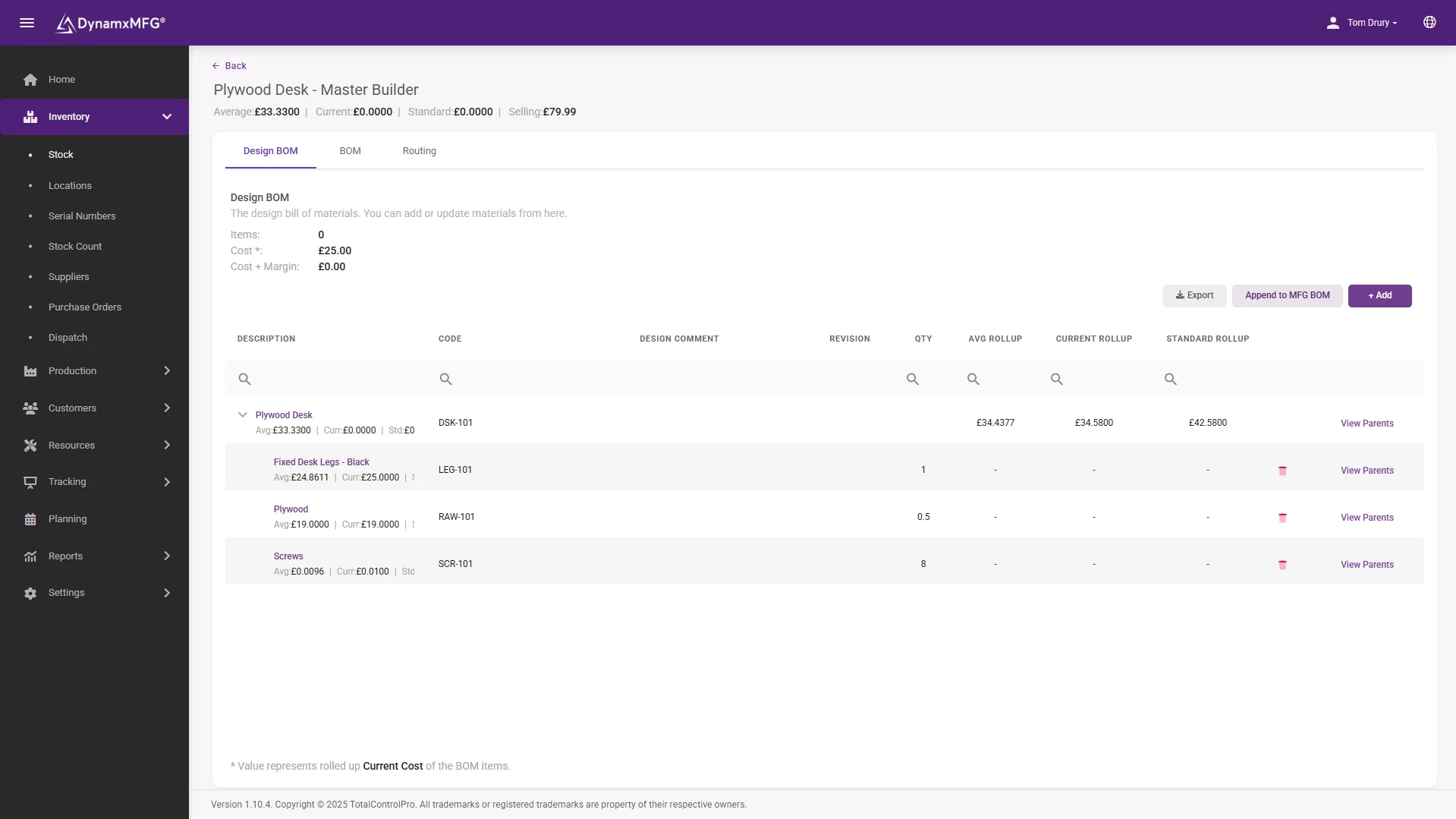
Multi-level BOMs with sub-assemblies nested properly, each line pointing at a real stock item with a real cost. Change it once and everything downstream changes with it.
Revision control means last March's job can still tell you exactly what it was built from.
- Multi-level with nested sub-assemblies
- Versioned changes with an audit trail
- Costed roll-up through every level
How it works
How bills of materials work
A good BOM does three things: describes the structure, controls the version, and connects to everything downstream.
Structure the product
Components and quantities per unit, arranged in levels so sub-assemblies are visible as things you make rather than things you buy.
Control the revision
Every change is versioned with a date and a reason, so you can tell what a job built last March was actually made from.
Link to stock and suppliers
Each line points at a real stock item with a real supplier, lead time and cost, rather than a description somebody typed.
Feed the works order
When a job is raised the BOM generates the material requirement and the picking list automatically.
Capabilities
What BOM software handles
Multi-level structures
Sub-assemblies nested properly rather than flattened into one long list.
Revision control
Versioned changes with an audit trail of who changed what and when.
Where-used enquiry
Every product affected by a component, which matters when a part is obsoleted.
Costed BOMs
Rolled-up material cost through every level, updated as purchase prices move.
Alternates and substitutes
Approved replacements, so a shortage does not automatically stop a job.
Phantom assemblies
Structures that exist for costing but are never physically stocked.
Paired with
The routing that finishes the definition
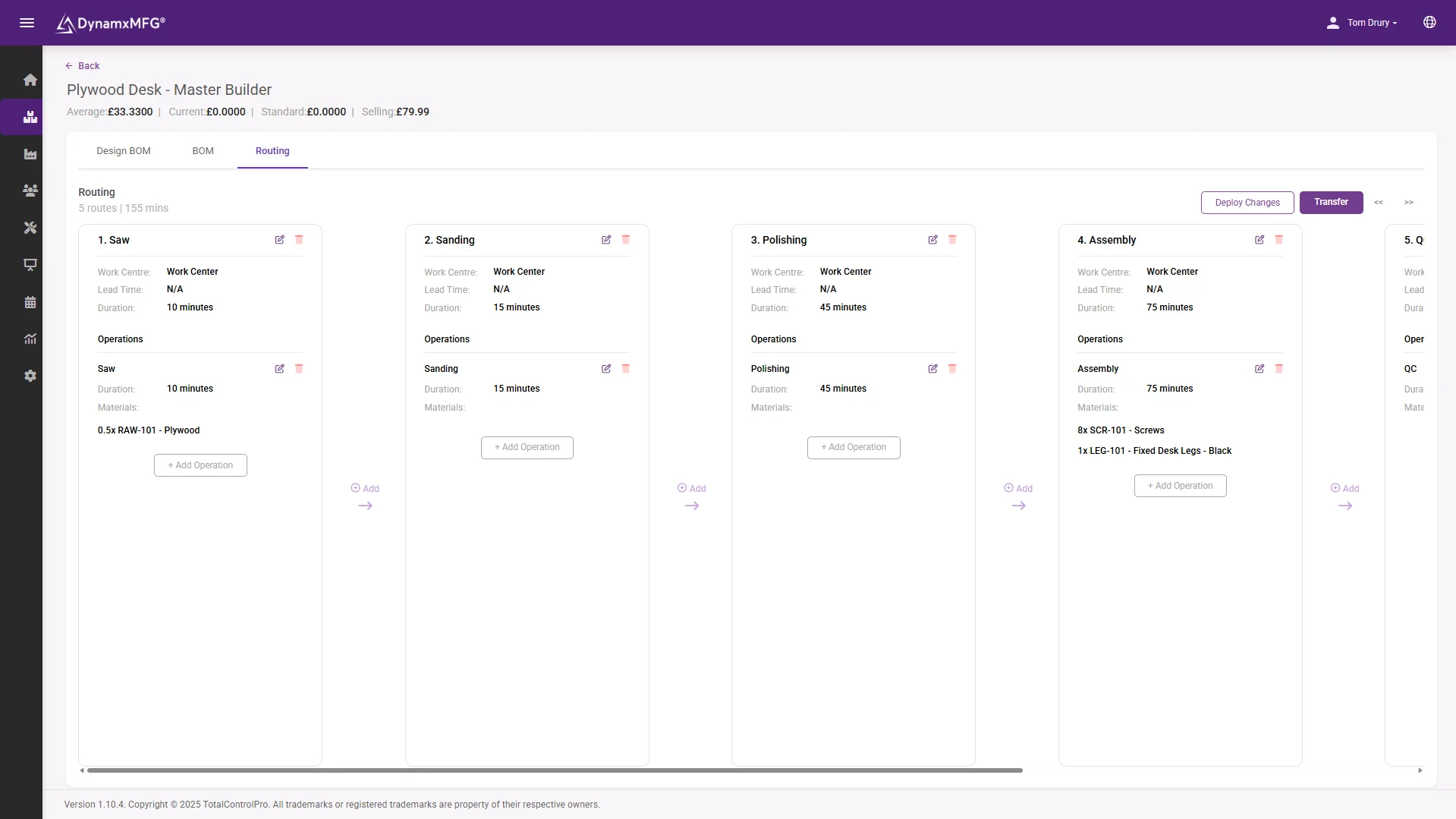
The BOM says what goes in, the routing says how it gets made. Together they raise complete works orders with material, operations and times attached in one click.
Keep both honest and purchasing, scheduling and costing all inherit the accuracy.
- BOM and routing raised into jobs together
- Material allocation generated automatically
- Planned times ready for capacity and quoting
Benefits
Why BOM accuracy pays
Bills of materials are unglamorous and they quietly determine whether half your other systems produce sense.
Purchasing stops guessing
Requirements calculated from an accurate structure remove both the shortages and the over-ordering that come from buying by feel.
Costs stop drifting
Material cost is usually the largest part of a job. A BOM that is 10 per cent wrong makes every quote 10 per cent wrong in the same direction.
Shortages surface earlier
A structured BOM lets planning see a missing level-three component weeks before the level-one job is due to start.
Engineering changes land safely
Versioned BOMs mean a design change reaches production once, cleanly, rather than through a series of conversations.
BOM vs routing
Bill of materials or routing?
The two halves of a product definition. You need both, and they answer completely different questions.
| Bill of materials | Routing | |
|---|---|---|
| Describes | What the product is made of | How the product gets made |
| Contains | Components and quantities | Operations, work centres and times |
| Drives | Purchasing, material cost, picking | Scheduling, capacity, labour cost |
| Owned by | Engineering and purchasing | Production engineering |
| Changes when | The design changes | The process changes |
| If it is wrong | You buy the wrong things | You promise the wrong dates |
Right for you?
When you need proper BOM software
The spreadsheet works until the products multiply or the revisions start.
- Your bills of materials live in spreadsheets and more than one person edits them.
- You have found jobs built from a superseded structure.
- Products have sub-assemblies, so requirements are not obvious by inspection.
- A component change means manually working out which products it affects.
- Material cost in your quotes comes from a list that nobody has reprised recently.
- You need to prove what a specific historic job was built from.
DynamxMFG
One structure, used by everything
The value of a BOM is entirely in it being the single version. As soon as engineering has one copy, purchasing has another and the shop floor is working from a printout, you have three products and only one of them is right.
In DynamxMFG the bill of materials sits with the product and is used directly: works orders take their material from it, stock is issued against it, and the material cost of a job is rolled up from it. There is nothing to keep in sync because there is only one copy.
Drives the works order
Material requirement and picking generated from the structure. See works order software.
Feeds planning
Multi-level explosion into net requirements. See production planning.
Rolls into job cost
Real issued material against the structure. See job costing.
Integrations
Connects to what you already run
BOMs feed more than the factory. DynamxMFG connects structures to your accounts for costing and to Solidworks and Excel for engineering, so one version serves everyone.
See all 33 integrations →











Customers
What manufacturers say about DynamxMFG
“DynamxMFG is an excellent choice for manufacturers looking to digitise operations without being overwhelmed by complexity.”
“As GMC has grown, it had become harder for me to have such a keen view on components to see if those parts were profitable or not. DynamxMFG enabled us to monitor the machine time and see whether we are making a profit or a loss on each component.”
“The ability to dynamically modify BOMs after release, adding or removing items from work orders, scrapping and reworking parts, has been the single biggest improvement for our business.”
“We chose the system over competitors because of its ease of use, strong customer support and friendly delivery team. So far, everything has matched what was promised.”
“With DynamxMFG, all our production processes are tracked and the relevant data is captured. This increases our control over the business and helps us identify more opportunities to enhance efficiency and quality.”
“Our experience has been positive, and it was definitely worth switching. The support we have received has been extremely helpful. My favourite feature is the integration and automation capabilities.”
Questions
Bill of materials questions, answered
What is a multi-level bill of materials?
One that shows sub-assemblies as their own structures rather than flattening everything into a single list of parts. It matters because sub-assemblies are things you make, with their own operations and lead times.
How do I handle engineering changes?
With revision control and an effective date, so jobs already in production finish to the old structure and new jobs pick up the new one. Doing this by overwriting the BOM causes scrap.
What is a phantom assembly?
A structure that exists for costing and clarity but is never physically stocked, because it is built and consumed within the same operation. Useful for keeping BOMs readable.
Can BOMs come from our CAD system?
Often yes, and it removes a large source of transcription error. DynamxMFG connects to Solidworks among others.
How accurate do BOMs need to be?
More accurate than anything else in the system, because so much depends on them. BOM errors do not stay contained, they propagate into purchasing, costing and planning simultaneously.
What about bespoke products where every one is different?
You use a base structure with configurable options rather than a fresh BOM each time. Bespoke does not mean unstructured, it means parameterised.
Related reading
Read next
Background reading on bill of materials software from the DynamxMFG glossary and blog.
Bring your product structures into one place
Book a 30 minute call and we will take one of your more awkward multi-level products and show it running as a live structure.


