
Advanced Planning and Scheduling
Advanced Planning and Scheduling (APS) Software
APS plans material, machines, people and due dates together, against the capacity you really have. Here is what that means, how it differs from MRP and basic scheduling, and when a UK SME actually needs it.
Definition
What Is APS Software?
Advanced planning and scheduling (APS) software builds a production plan that respects every constraint at the same time. Material, machine hours, people and customer due dates are weighed together, rather than one after another.
Most planning tools work in sequence. MRP works out what material you need. Somebody then works out whether the machines can cope. Somebody else decides the order of the work. Each step is done on its own, and each one assumes the others will be fine.
APS joins those steps up. The question it answers is not "what do we need?" or "what runs next?" but "what can we actually make, with what we have, by when?"
If a plan does not know the mill is already full on Thursday, or that the castings land on Friday, it is not advanced planning. It is a list of hopes with dates on.
In practice
APS Thinking, Built Into Your MES
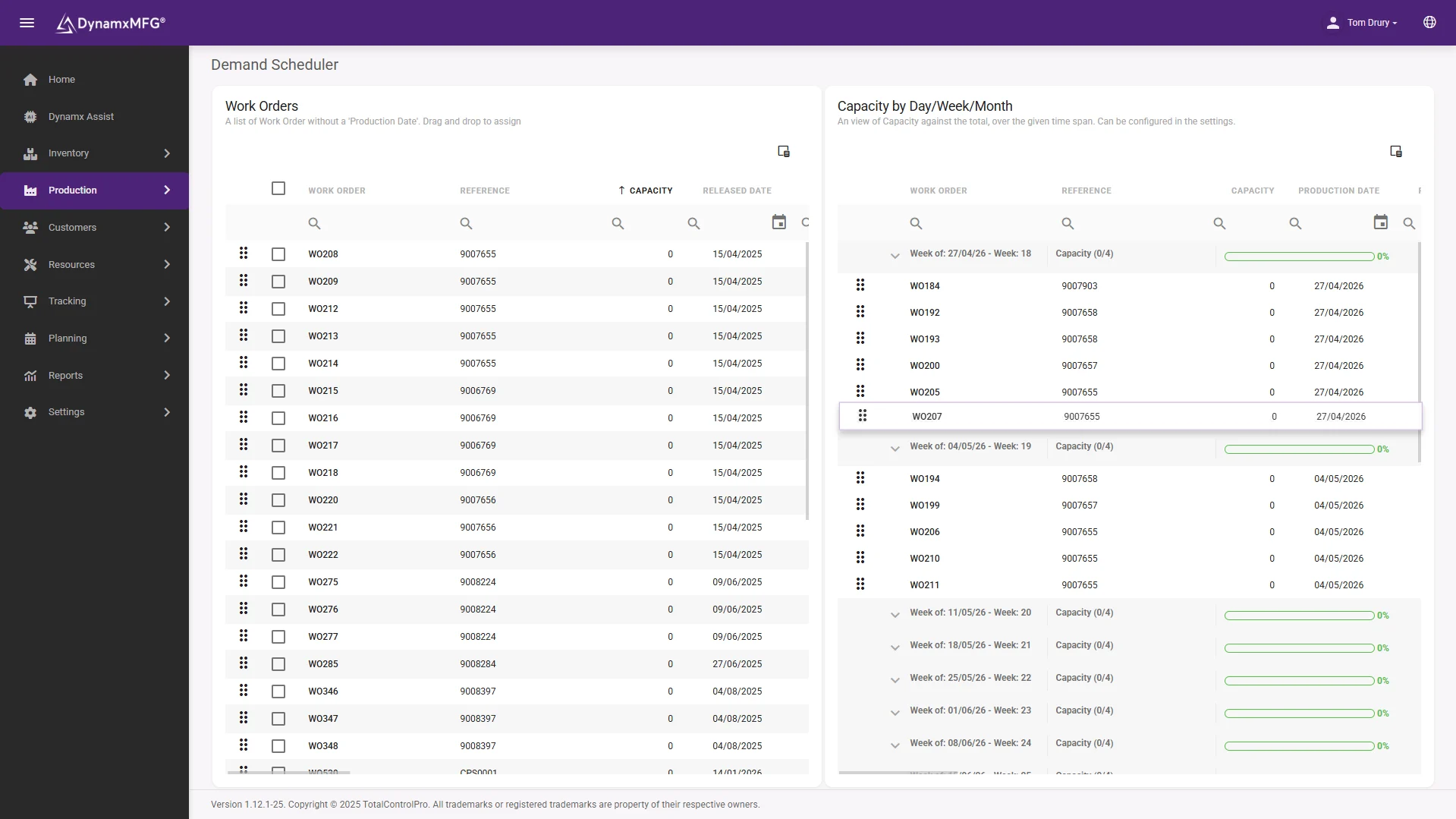
DynamxMFG Smart Planning brings the core APS idea, plan against real constraints, into the same system your operators already use on the shop floor.
Every open work order sits on one timeline. Load builds up against each work centre as you plan, and the bar turns red before you overcommit.
- Jobs planned against real routings and work centres
- Overloaded work centres flagged before release
- Progress from the shop floor updates the plan
Compare
APS vs Basic Scheduling vs MRP
The three terms get used interchangeably. They are not the same thing, and knowing the difference saves you buying the wrong tool.
| MRP | Basic scheduling | APS | |
|---|---|---|---|
| Main question | What material do we need, and when? | What order do the jobs run in? | What can we make, with what we have, by when? |
| Capacity | Usually assumed to be infinite | Sometimes finite, often by hand | Finite, by work centre |
| Material | The whole point | Often ignored | Checked alongside capacity |
| Time horizon | Weeks to months | Days | Days to months, joined up |
| When things change | Re-run overnight or by hand | Re-shuffle the board | Re-plan from live progress |
| Typical home | MRP and ERP systems | Spreadsheets, whiteboards, planning boards | Dedicated APS tools, or planning built into a MES |
Put simply, MRP tells you what to buy, scheduling tells you what to run next, and APS checks that both are possible before you promise a date. For the sequencing side on its own, see production scheduling software.
Finite capacity
Why Finite Capacity Is the Heart of APS
Finite capacity means planning against the hours each resource genuinely has. Infinite capacity planning ignores that, so it will happily load 200 hours onto a machine with 40 available and report that everything is on time.
APS treats every one of these as a limit that can stop a job:
Machines and work centres
Each work centre has a set number of hours. Once they are full, the next job moves, whatever its priority.
People
A job that needs a skilled setter cannot start when the setter is on another machine or on holiday.
Material
A job scheduled before its material arrives is not a plan. It is a delay waiting to be discovered at the bench.
Due dates
The customer date is a constraint too. APS shows which jobs will miss before you have promised them.
Finite capacity only works if the routings and work centre hours behind it are roughly right. Start with your best estimates and let booked times correct them.
DynamxMFG
What DynamxMFG Smart Planning Does
Smart Planning is the planning and scheduling capability inside DynamxMFG. It works from the same data your operators create on the shop floor, so the plan and the factory stop drifting apart.
Demand Scheduler
Maps every open work order against your production calendar. Drag jobs into day, week or month buckets, and a live capacity bar shows how loaded each period is.
The Planner
Every open work order on one timeline. Overloaded work centres turn red, so you can rebalance before the shop floor feels it.
Real routings and work centres
Jobs are scheduled against their actual routings, so the load on each work centre reflects the operations each job really needs.
Live shop floor progress
Operators book on and off at the work centre. Progress updates the plan as it happens, not at the end of the week.
Material in the same system
Materials are allocated to work orders when a sales order is released, and shortages raise purchase demand, so you can see whether a job can start.
Actual times into job costing
Booked times feed job costing, so you learn which jobs make money as well as which ones run late.
Where it fits
APS, Scheduling and Capacity Planning: Which Page Do You Need?
APS is the umbrella. It joins up three jobs that are often done separately, and we cover each one in more depth:
Capacity planning
Do we have enough machine time and labour over the coming weeks? Read about capacity planning software.
Production scheduling
What runs on which machine, in what order, today and this week? Read about production scheduling software.
Production planning
What will we make, how many and by when? Read about production planning software.
APS
All three, checked against material and due dates at the same time. That is this page.
Be realistic
Do You Need a Dedicated APS System?
Usually not at SME scale. Standalone APS tools earn their keep when the constraint modelling gets genuinely complex: many plants, long multi-level supply chains, or a planning team whose whole job is running optimisation scenarios.
Most UK SME discrete manufacturers have a different problem. The plan is in a spreadsheet, the shop floor is invisible, and nobody knows whether a new order fits until it is late. For them, finite capacity planning inside their MES, fed by live job data, solves the real problem without a second system to maintain.
A separate APS tool is only as good as the data it is fed. If it sits outside the system that knows what has actually been made, someone has to keep the two in step, and that is usually where it breaks.
Right for you?
Who Needs APS-Style Planning?
The case is strongest where the mix is wide and the constraints are real.
- You run high-mix, low-volume work, with a different routing for most jobs.
- One machine or cell is clearly the bottleneck on everything you ship.
- Jobs regularly reach the bench before their material does.
- Delivery dates get promised before anyone checks capacity.
- Your plan lives in a spreadsheet that one person maintains.
- A rush order wrecks the week and nobody can see the knock-on effects until customers ring.
If material is your only real constraint and capacity is rarely tight, MRP on its own may be enough.
DynamxMFG
Planning That Knows What the Shop Floor Is Doing
DynamxMFG is a manufacturing execution system built for UK SME discrete manufacturers. Planning, shop floor tracking, stock, purchasing and job costing sit in one system, so there is no nightly export between the plan, the stock list and the costing spreadsheet.
Results depend on the business. Gloucestershire Machining Centre, a precision CNC subcontractor, reported a 40% capacity increase and 94% on-time delivery after gaining job-level visibility with DynamxMFG. CPL, which handles complex vehicle builds, runs at 99.9% on-time delivery.
A typical go-live is within 90 days, not the 18 months associated with traditional ERP projects.
Integrations
Connects to what you already run
Advanced planning is only as good as the data behind it. DynamxMFG connects your order book, stock and accounts, so the plan works from the same numbers as the rest of the business.
See all 33 integrations →











Customers
What manufacturers say about DynamxMFG
“DynamxMFG is an excellent choice for manufacturers looking to digitise operations without being overwhelmed by complexity.”
“As GMC has grown, it had become harder for me to have such a keen view on components to see if those parts were profitable or not. DynamxMFG enabled us to monitor the machine time and see whether we are making a profit or a loss on each component.”
“The ability to dynamically modify BOMs after release, adding or removing items from work orders, scrapping and reworking parts, has been the single biggest improvement for our business.”
“We chose the system over competitors because of its ease of use, strong customer support and friendly delivery team. So far, everything has matched what was promised.”
“With DynamxMFG, all our production processes are tracked and the relevant data is captured. This increases our control over the business and helps us identify more opportunities to enhance efficiency and quality.”
“Our experience has been positive, and it was definitely worth switching. The support we have received has been extremely helpful. My favourite feature is the integration and automation capabilities.”
Questions
APS Questions, Answered
What does APS stand for?
APS stands for advanced planning and scheduling. It is software that plans production against material, machine capacity, labour and due dates at the same time, rather than one at a time.
What is the difference between APS and MRP?
MRP works out what material you need and when, and usually assumes capacity is unlimited. APS adds finite capacity, so it checks whether the machines and people can do the work before a date is promised.
What is the difference between APS and production scheduling?
Production scheduling decides the order jobs run in on each work centre over the next few days. APS covers that and joins it up with capacity planning and material, over a longer horizon.
Does a small manufacturer need APS software?
Often not as a separate system. Most UK SMEs get what they need from finite capacity planning inside their MES, fed by live shop floor data. A dedicated APS tool makes sense when constraint modelling is genuinely complex.
Does DynamxMFG include APS?
DynamxMFG Smart Planning plans work orders against work centre capacity, flags overloads before release, and updates from live shop floor progress. It covers the APS needs of most SME discrete manufacturers in the same system as tracking, stock and job costing.
Related reading
Read next
More on planning, scheduling and capacity from DynamxMFG.
See Your Order Book Planned Against Real Capacity
Book a 30 minute call and bring a week that went wrong. We will walk through Smart Planning using a job mix like yours.


