
Industry · Composites
Every roll, every layup,
every cure run accounted for.
DynamxMFG tracks prepreg from freezer to finished part. Out-life is counted against the roll, layup is signed off stage by stage, and every part is linked to the cure run it went through.
Sound familiar?
The clock is always running
In composites the material starts ageing the moment it leaves the freezer. The most expensive scrap happens after the cure. Both come down to records nobody has time to keep by hand.
Out-life tracked on a clipboard
Rolls come out of the freezer, go back in, then come out again. Working out the out-life left from a handwritten log is guesswork.
Scrap you only find after cure
A layup fault stays hidden until the part comes out of the autoclave. By then the material and the hours are already spent.
Autoclave time nobody can see
The autoclave sets the pace of the whole shop. Without a live view of loads, parts queue while cure slots run half empty.
Side by side
Spreadsheets and generic tools vs DynamxMFG
Generic tools cannot count out-life against a roll or tie a part to its cure run. Composites records have to build as the work happens.
| DynamxMFG | Spreadsheets and generic tools | |
|---|---|---|
| Prepreg out-life | Balance held against each roll, updated at issue and return | Handwritten freezer log, worked out by hand |
| Cure run records | Parts booked onto a load, cure record attached to each | Autoclave sheets filed away from the job |
| Layup traceability | Ply and debulk data captured at every operation | Paper layup sheets signed after the event |
| Scrap value | Cost of a failed part visible against the job | Found at month end, cause already forgotten |
| Autoclave capacity | Ovens run as work centres with live load queues | Whiteboard bookings and a queue nobody can see |
What you get
Everything a composites shop needs. Nothing it does not.
DynamxMFG is built around the way composites work runs, from freezer issue through layup and debulk to cure, inspection and despatch.
Works Orders and Layup Routing
Every part runs on a works order with its own bill of materials and routing. Operators clock on and off each layup, debulk and trim stage from the floor, so the record of who did what, and when, builds as the job moves.
Replaces: Paper route cards, layup sheets, verbal handovers
Material Control and Out-Life
Rolls and batches are issued to the job at the point of use, so stock and traceability are one record. Each roll carries its own out-life balance, counted down every time it leaves the freezer, and operators see the time remaining before layup starts.
Replaces: Freezer log books, out-life spreadsheets, stock reconciliations
Quality Capture at Each Stage
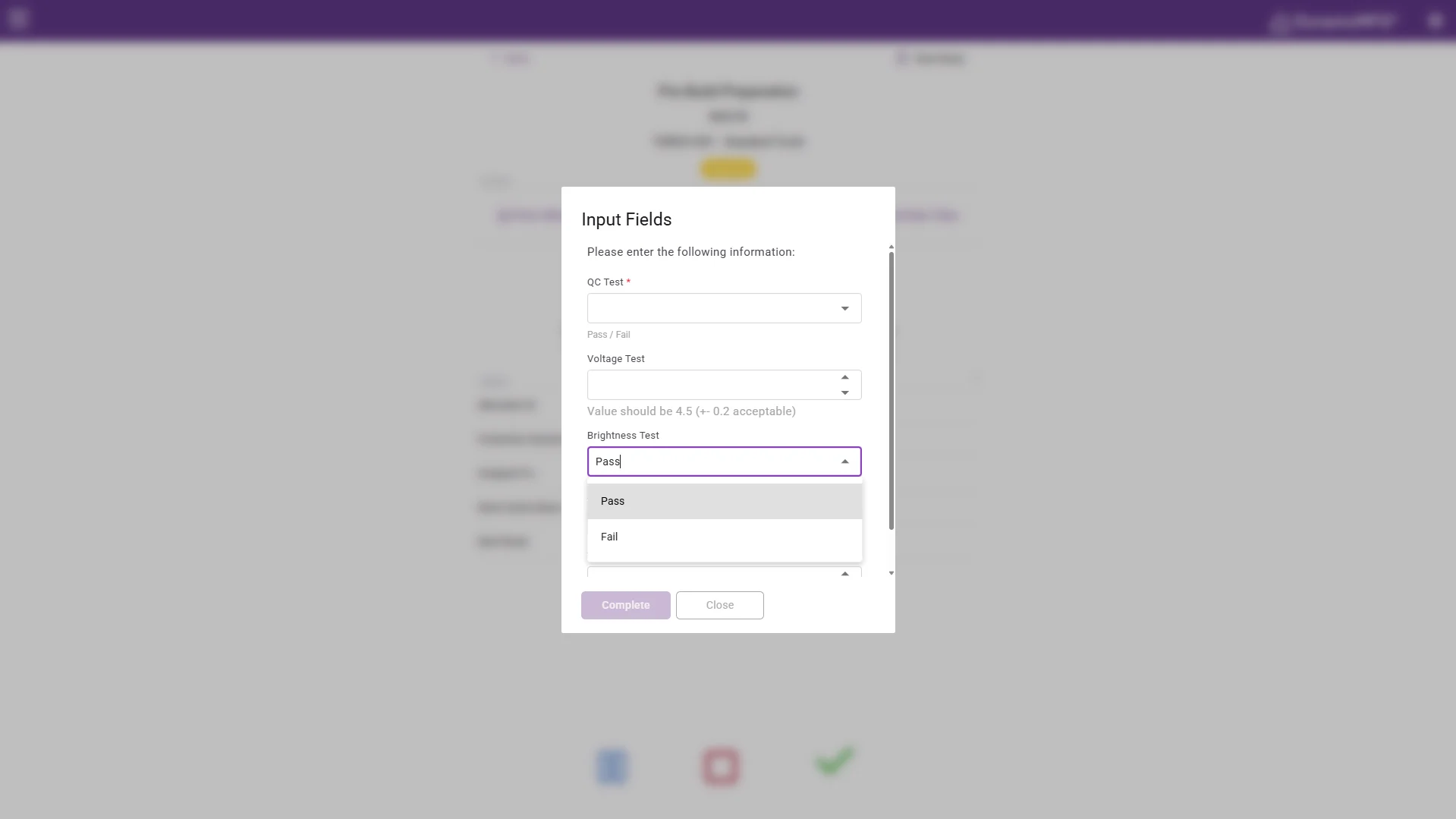
Set the data you need at each operation, from ply counts and orientation checks to debulk times, measurements and NCR references. Fields can be made mandatory, so the operation will not close until the entry is made. Quality records and production records become the same record.
Replaces: Inspection clipboards, quality folders, retyped check sheets
Cure Scheduling and Traceability
Autoclaves and ovens are set up as work centres with their own capacity and shift patterns, so jobs are scheduled against them like any other constraint. Book parts onto a load and the cure record attaches to every part in it, ready to pull from either end.
Replaces: Whiteboard load plans, cure log sheets, filed cycle printouts
Material control
From roll number to finished part
Every part carries the rolls and batches that went into it, the people who worked on it and the cure run it went through. When a customer questions a material batch, you can see which parts it touched and where they went.
Material is booked out against the job at the point of use. That means the stock figure and the traceability record are the same record. Freezer stock, out-life and consumption stay in step, with no separate spreadsheet to reconcile.
- Roll and batch numbers on every part
- Out-life balance held against each roll
- Cure run records attached to the job
The numbers
What manufacturers get from DynamxMFG
built-in reports, from live production data
from kick-off to running on the floor
more production capacity at GMC
on-time delivery at CPL
Rated 4.1/5 on Capterra, GetApp and Software Advice. Our ratings come from public review platforms, not testimonials we picked ourselves.
Getting started
Live in 90 days, not 18 months
We handle the implementation. Your team stays focused on production. Here is what your first 90 days look like.
Establish visibility and a trusted baseline
The first month replaces spreadsheet chaos and guesswork with a single source of live production data.
Regain control and remove obvious waste
With live data in place, your team shifts from reactive firefighting to data-driven action.
Prove the ROI and prepare to scale
The final phase turns your operational improvements into financial evidence.
Customers
What manufacturers say about DynamxMFG
“DynamxMFG is an excellent choice for manufacturers looking to digitise operations without being overwhelmed by complexity.”
“As GMC has grown, it had become harder for me to have such a keen view on components to see if those parts were profitable or not. DynamxMFG enabled us to monitor the machine time and see whether we are making a profit or a loss on each component.”
“The ability to dynamically modify BOMs after release, adding or removing items from work orders, scrapping and reworking parts, has been the single biggest improvement for our business.”
“We chose the system over competitors because of its ease of use, strong customer support and friendly delivery team. So far, everything has matched what was promised.”
“With DynamxMFG, all our production processes are tracked and the relevant data is captured. This increases our control over the business and helps us identify more opportunities to enhance efficiency and quality.”
“Our experience has been positive, and it was definitely worth switching. The support we have received has been extremely helpful. My favourite feature is the integration and automation capabilities.”
Questions
What composites manufacturers ask us
Can it track prepreg out-life?
Yes. Each roll holds its own out-life balance, and the clock runs whenever the material is out of the freezer. Issues and returns are booked at the point of use, so the balance stays current. Operators see the remaining out-life before they start, and you can report on rolls approaching their limit.
How do we link parts to a cure run?
Parts are booked onto an oven or autoclave load as a batch. The load carries its own record, including the cycle used and any data you choose to capture against it. Every part in that load inherits the link, so the cure record can be pulled from the part or from the run.
Can we capture layup data at each stage?
Yes. Dynamic data capture fields are configured per operation for ply counts, orientation checks, debulk times, measurements and NCR references. Any field can be made mandatory, so the operation cannot close until the entry is made. The layup record and the production record end up being the same record.
Can we plan around autoclave capacity?
Yes. Autoclaves and ovens are set up as work centres with their own capacity and shift patterns. Jobs are scheduled against them like any other constraint. You can see which loads are booked, where the queue is building and which parts are waiting on a cure slot.
How long until we are live?
Ninety days. We configure routings, material rules and quality fields around the way you already work, including your freezer control and your cure records. Most composites shops start with one cell and one part family, then extend across the floor once operators are comfortable with the tracking.
Related
Go deeper
Where to read next on traceability, batch control and job costing for composites work.
See DynamxMFG running on your own parts
Book a 15 minute walkthrough on your materials, your layup process and your cure schedule.
Book a Demo

