
Industry · Specialist Vehicle Conversions
One vehicle at a time,
every hour and part accounted for.
DynamxMFG tracks each conversion on its own build. Options and fit-out stages sit on the works order, subcontract trades stay visible, and the approval evidence is captured as the work is done.
Sound familiar?
Every vehicle is a one-off
A base vehicle arrives and weeks of fitting out begin. No two orders carry the same option list, and the build record still has to satisfy an inspector at the end of it.
Specification drifts mid-build
The customer adds a rack, changes the seating or moves a socket after the vehicle is in the bay. The paperwork stays as it was written, and the extra hours never reach the invoice.
Fit-out trades outside the plan
Electrical, trim, paint and signwriting move between bays with no record. When one trade runs late, the next arrives to a vehicle that is not ready for them.
Approval evidence chased at handover
Weights, test results, photographs and component certificates get gathered once the vehicle is finished. The last week of the build goes on paperwork instead of vehicles.
Side by side
Spreadsheets and generic tools vs DynamxMFG
Generic tools were built for repeat batches, not for a build where every vehicle carries its own option list, its own trades and its own evidence file.
| DynamxMFG | Spreadsheets and generic tools | |
|---|---|---|
| Per vehicle specification | Each build holds its own BOM, routing and options | Marked up copy of the last similar job |
| Mid-build changes | Works order amended after release, cost follows the change | Retyped documents and hours nobody records |
| Fit-out trade progress | Each trade booked on and off the vehicle | Workshop whiteboard and a walk round the bays |
| Subcontract work | Supplier, purchase order and return date held on the job | Chased by phone once the vehicle is late |
| Approval evidence | Weights, tests and photos captured at the operation | Collected from files after the vehicle is built |
What you get
Everything a conversion workshop needs. Nothing it does not.
DynamxMFG is built around low volume, highly configured vehicle work, from base vehicle receipt through fit-out and trades to inspection and handover.
Works Orders per Vehicle
Every vehicle runs on its own works order, with its own bill of materials, routing and option list. The chassis or VIN sits at the top of the job, so parts, hours and sign-offs stay attached to that vehicle rather than to a batch of them.
Replaces: Paper build sheets, marked up spreadsheets, verbal handovers
Change Control Mid-Build
Specifications move once the vehicle is in the bay. Add or remove items on a released works order, change a stage on the routing, and the cost follows. Extra parts and hours show against the job, so a variation can be invoiced rather than absorbed.
Replaces: Retyped build sheets, verbal change requests, unbilled extras
Fit-out and Trade Scheduling
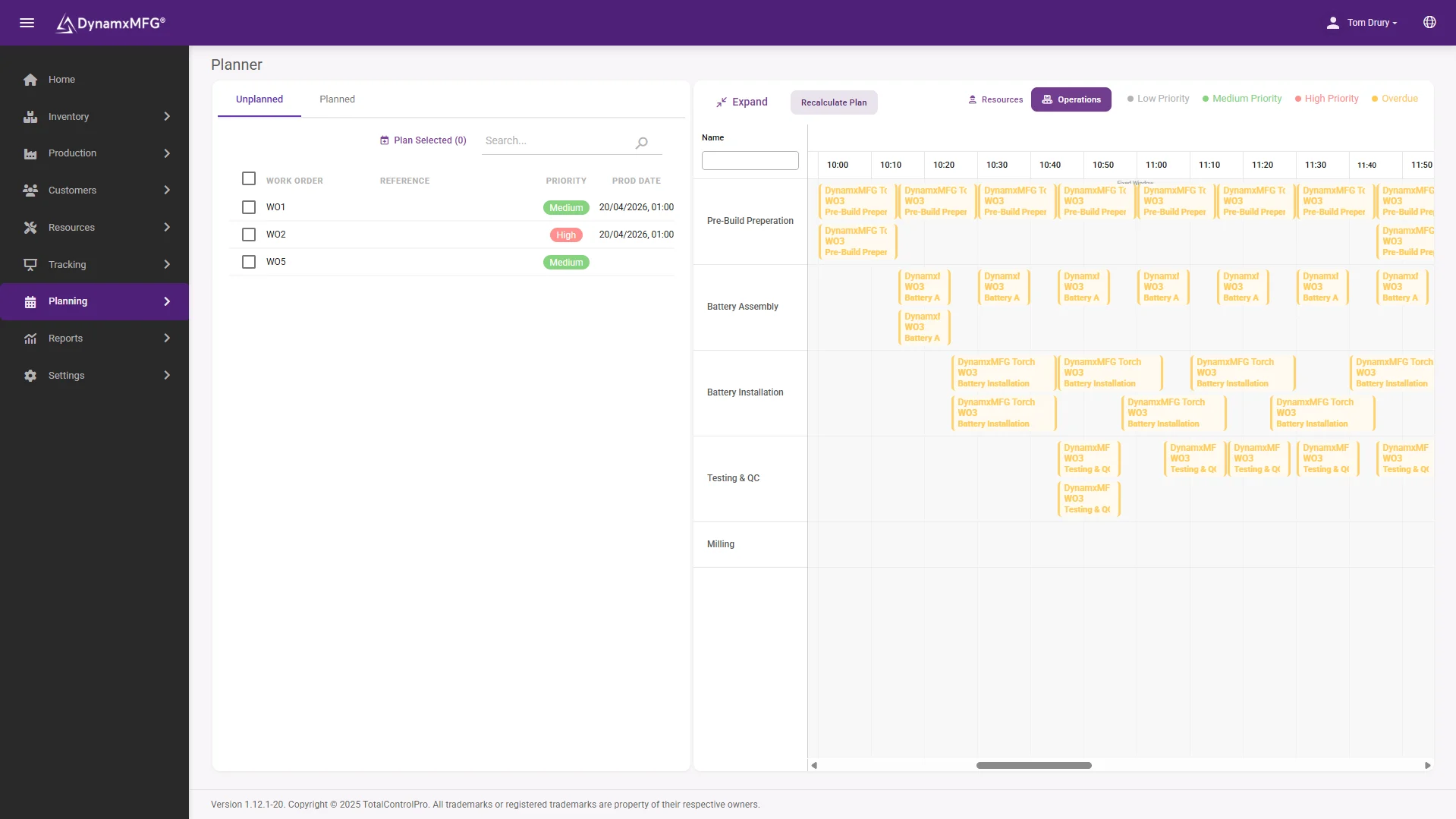
Bays, ramps and trades are set up as work centres with their own capacity and shift patterns. Each conversion stage is booked on and off from the floor, so you can see which vehicle a trade is on, what is waiting for a bay and where the queue is building.
Replaces: Workshop whiteboards, bay planners, daily progress meetings
Approval and Handover Records
Set the data you need at each operation, from weights and torque checks to electrical tests, component certificates and photographs. Fields can be made mandatory, so a stage will not close until the entry is made, and the evidence file builds while the vehicle is being built.
Replaces: Inspection clipboards, photo folders, end of build document hunts
Build records
One record per vehicle, from base to handover
The base vehicle arrives with a VIN and leaves as a finished conversion. Everything in between sits on one job: the parts issued, the trades who worked on it, the checks recorded and the changes agreed with the customer along the way.
Because the evidence is captured at the operation, the build record and the approval file end up being the same record. When VCA or an IVA inspector asks what was fitted and how it was checked, the answer is a search rather than a week of hunting.
- Every part and hour tied to the VIN
- Test results and photographs captured at source
- Full change history held against the job
The numbers
What manufacturers get from DynamxMFG
built-in reports, from live production data
from kick-off to running on the floor
more production capacity at GMC
on-time delivery at CPL
Rated 4.1/5 on Capterra, GetApp and Software Advice. Our ratings come from public review platforms, not testimonials we picked ourselves.
Getting started
Live in 90 days, not 18 months
We handle the implementation. Your team stays focused on production. Here is what your first 90 days look like.
Establish visibility and a trusted baseline
The first month replaces spreadsheet chaos and guesswork with a single source of live production data.
Regain control and remove obvious waste
With live data in place, your team shifts from reactive firefighting to data-driven action.
Prove the ROI and prepare to scale
The final phase turns your operational improvements into financial evidence.
Customers
What manufacturers say about DynamxMFG
“DynamxMFG is an excellent choice for manufacturers looking to digitise operations without being overwhelmed by complexity.”
“As GMC has grown, it had become harder for me to have such a keen view on components to see if those parts were profitable or not. DynamxMFG enabled us to monitor the machine time and see whether we are making a profit or a loss on each component.”
“The ability to dynamically modify BOMs after release, adding or removing items from work orders, scrapping and reworking parts, has been the single biggest improvement for our business.”
“We chose the system over competitors because of its ease of use, strong customer support and friendly delivery team. So far, everything has matched what was promised.”
“With DynamxMFG, all our production processes are tracked and the relevant data is captured. This increases our control over the business and helps us identify more opportunities to enhance efficiency and quality.”
“Our experience has been positive, and it was definitely worth switching. The support we have received has been extremely helpful. My favourite feature is the integration and automation capabilities.”
Questions
What vehicle conversion manufacturers ask us
Can it handle a different specification on every vehicle?
Yes. Every vehicle runs on its own works order with its own bill of materials, routing and option list. Shared parts stay as single stock items, so a long option range does not mean duplicating inventory records. The build on the floor reflects what that customer ordered rather than a standard template.
What happens when the customer changes the spec mid-build?
You amend the works order after it has been released. Items can be added or removed, stages can be changed, and the cost follows. The parts and hours spent on the change show against the job, so a variation is visible before the invoice is raised rather than lost in the margin.
Does it help with type approval evidence?
It supports the process rather than replacing it. Weights, electrical tests, torque checks, component certificates and photographs are captured at the operation they belong to, and any field can be made mandatory. The evidence file for a VCA or IVA submission builds while the vehicle is being converted.
Can we track work sent out to subcontractors?
Yes. Signwriting, upholstery, paint and specialist fit-out sit on the routing as operations, with the supplier, the purchase order and the expected return date against them. The vehicle stays on the job while it is off site, so it shows in your WIP and in your schedule instead of going quiet.
How long until we are live?
Ninety days. We configure bays, trades, routings and the data you capture at each stage around the way your workshop already runs. Most converters start with one vehicle type and one build line, then extend across the rest of the workshop once the team is settled on the tracking.
Related
Go deeper
Where to read next on works orders, BOM control and scheduling for vehicle conversion work.
See DynamxMFG running your conversions
Book a 15 minute walkthrough on your vehicle types, your option lists and your workshop layout.
Book a Demo

