
Compare solutions
DynamxMFG vs Unleashed
Unleashed is inventory management software, now part of The Access Group, strong on stock control and B2B sales. DynamxMFG is a manufacturing execution system. The overlap is smaller than it looks: one manages what you hold, the other manages what you make.
The short answer
One manages stock. One manages production.
Choose DynamxMFG® if…
Production is the heart of your business. You run works orders through multiple operations and machines, need operator time capture and live WIP, and quote against actual shop floor cost rather than stock cost.
Choose Unleashed if…
You distribute more than you manufacture, batch and landed costs on purchased stock are the priority, and light kitting or assembly is as complex as production gets. Unleashed handles that well.
The fundamental difference: Unleashed records stock movements. DynamxMFG records the work that turns material into product, live from the floor.
Side by side
DynamxMFG vs Unleashed at a glance
| DynamxMFG | Unleashed | |
|---|---|---|
| Best for | UK SME discrete manufacturers tracking live production | Product businesses where stock leads |
| Shop floor tracking | Live, updated by operators at the machine | Limited, assembly-focused |
| Job costing | Actual labour, material and overhead per job, live | Landed cost and margins on stock |
| MRP and planning | Included, with purchasing and scheduling | Stock-driven replenishment |
| Accounts integration | Xero, Sage 50/200, QuickBooks and more | Xero, QuickBooks |
| UK-based support | Yes, UK team on UK hours | Partial, NZ heritage |
| Implementation | Structured 90-day go-live | Self-serve to light-touch |
| Pricing | Priced for SMEs | Published, per user |
Capability matrix
Every capability, side by side
| DynamxMFG | Unleashed | |
|---|---|---|
| Live shop floor tracking | ✓ | ✕ |
| Operator clocking at the machine | ✓ | ✕ |
| Live job costing from actuals | ✓ | ✕ |
| Quoting and estimating | ✓ | ◐ |
| MRP and purchasing | ✓ | ◐ |
| Production scheduling | ✓ | ✕ |
| Inventory and batch tracking | ✓ | ✓ |
| Quality and NCR tracking | ✓ | ✕ |
| Serial and batch traceability | ✓ | ✓ |
| Live dashboards and reporting | ✓ | ◐ |
| Xero, Sage and QuickBooks integration | ✓ | ◐ |
| API and webhooks | ✓ | ✓ |
| UK-based support | ✓ | ◐ |
| 90-day implementation | ✓ | ◐ |
✓ Included ◐ Partial or via workaround ✕ Not included Based on published product information, September 2026. Tell us if something has changed.
See it live
A deeper look at what you get with DynamxMFG
Shop floor
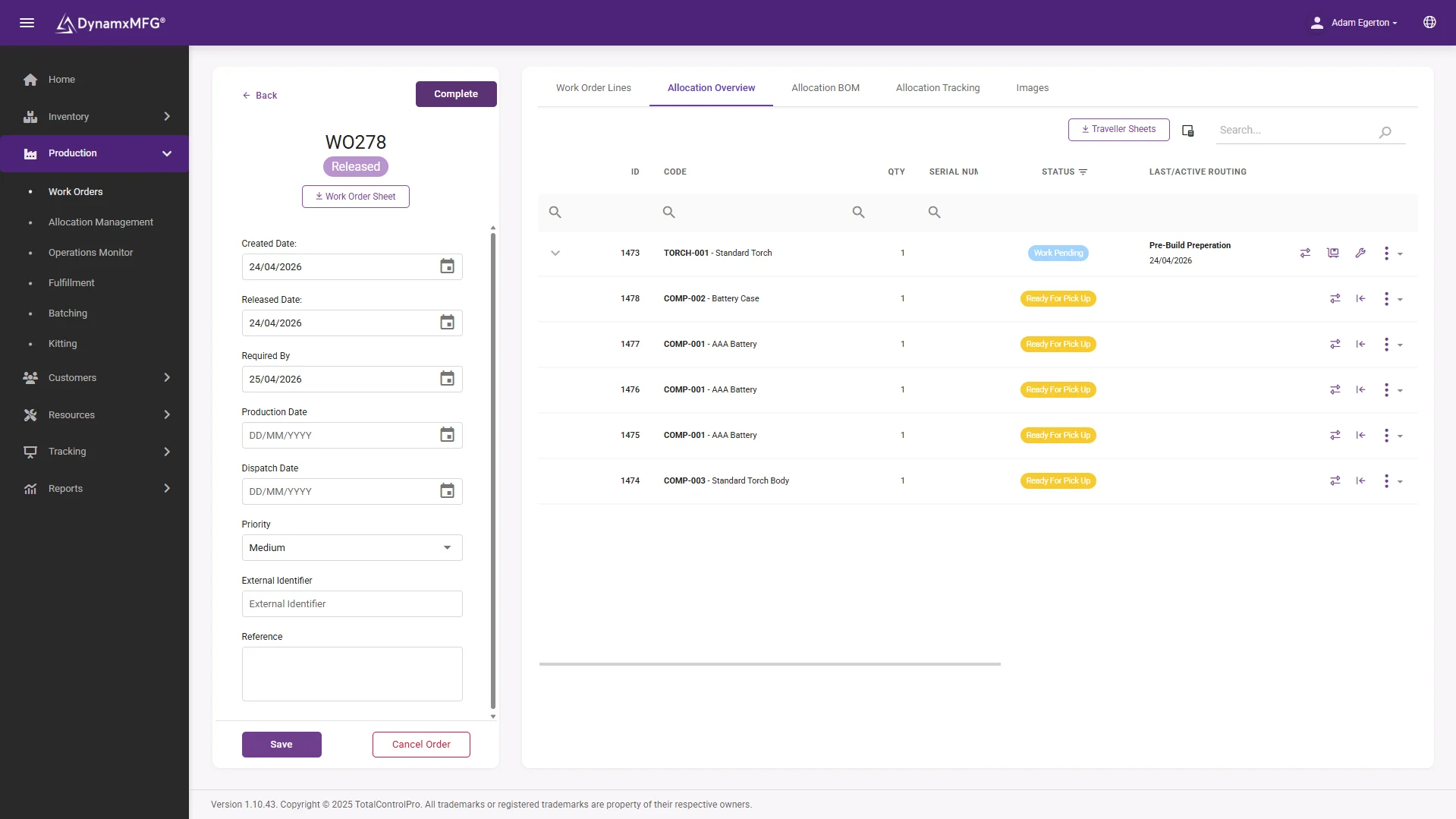
Works orders, live from the floor
Works orders are raised with their bill of materials and routing attached, then issued straight to screens at each work centre. Operators book on and off operations at the terminal, so progress, labour and material land against the job as it happens.
No re-keying, no walking the floor to find out where a job is, and no waiting until Friday for the tracker to be updated.
- Works orders with BOMs and routings
- Live booking at the work centre
- Progress visible without leaving the office
Job costing
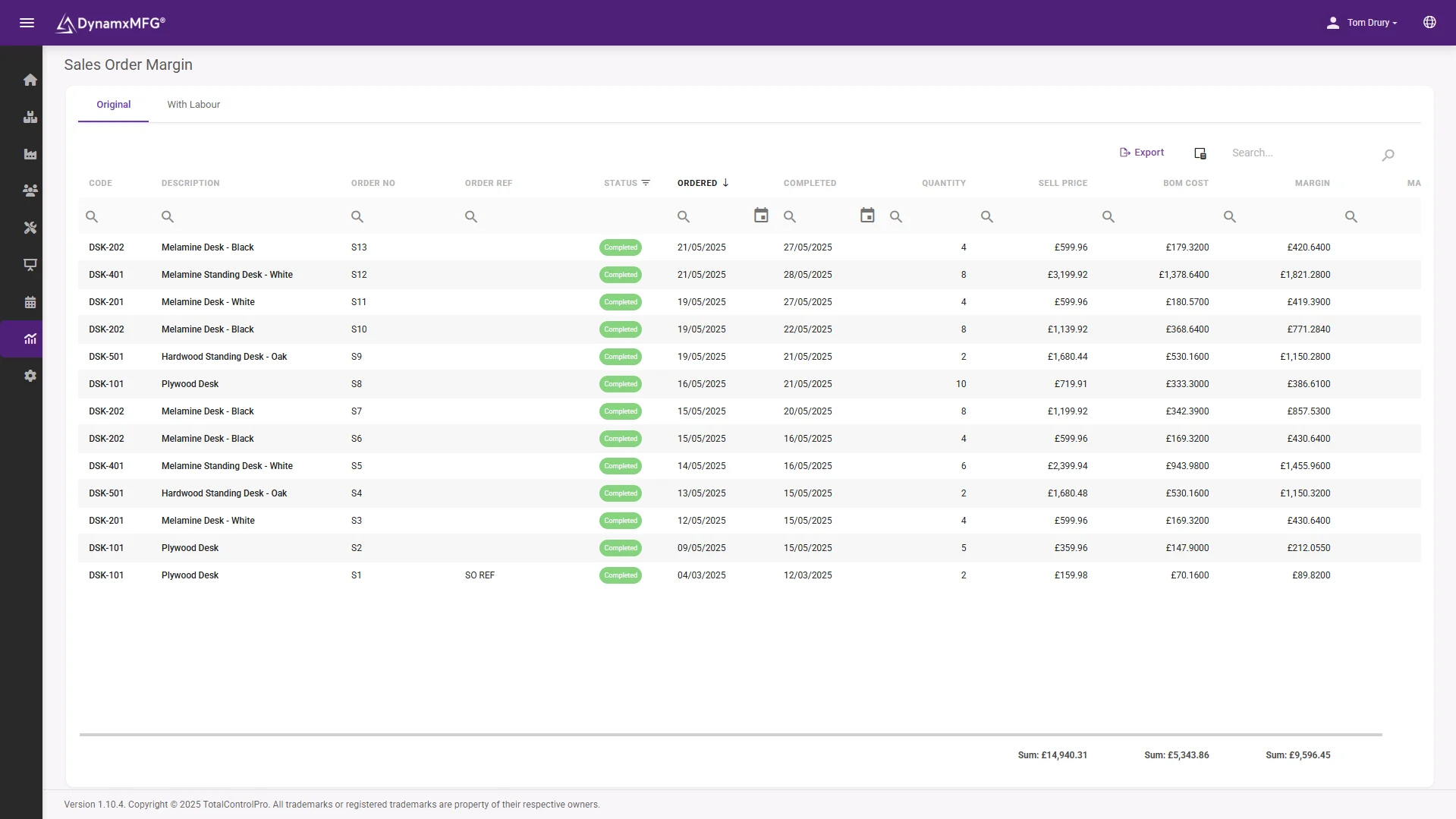
Margin you can see before invoicing
Every clocking and material issue lands against the job, so estimated versus actual cost is live for every works order. You see the job that is drifting while there is still time to act on it.
Costs push straight into Xero, Sage or QuickBooks, so the accounts tell the same story as the shop floor.
- Live cost against estimate per job
- Labour, material and overhead actuals
- Margin report per sales order
Planning
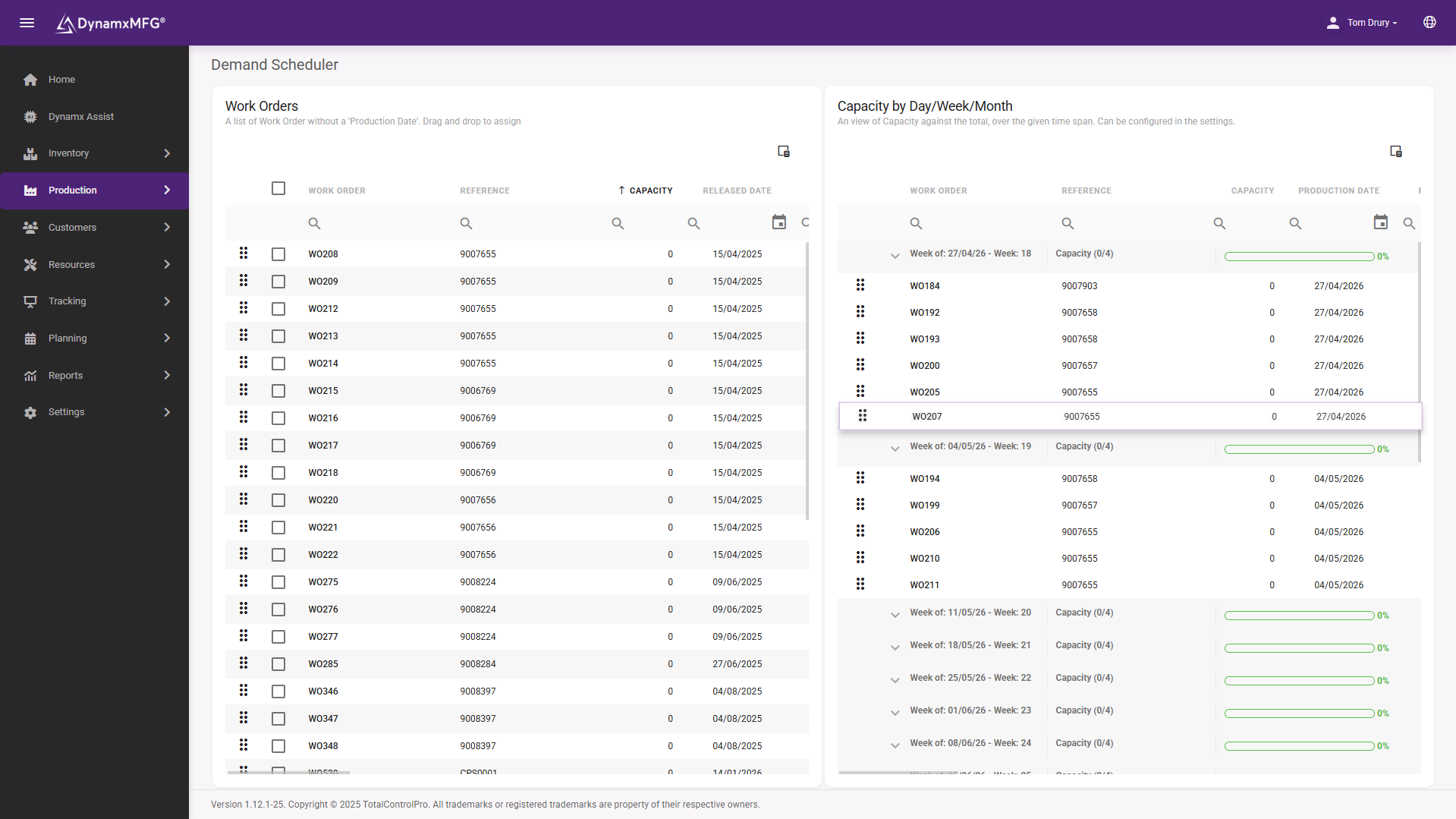
Scheduling linked to real capacity
The scheduler works from live capacity and actual job progress, not a plan that was true on Monday morning. When priorities change, the schedule moves with them.
Material requirements come from demand and bills of materials, so purchasing knows what is needed before the shortage appears.
- Drag and drop scheduling against capacity
- MRP driven by real demand
- Shortages flagged before they bite
Why manufacturers switch
Three differences that matter on the floor
Works orders, not stock lines
Routings, operations, operator clocking and downtime per job. Production is the record, not a side effect of a stock movement.
Cost of making, not holding
Unleashed knows landed cost. DynamxMFG knows what each job actually cost in labour, material and overhead, against what you quoted.
Inventory still included
Stock locations, batch tracking and purchasing are in DynamxMFG too, connected to live production rather than standing alone.
Customers
What manufacturers say
“DynamxMFG is an excellent choice for manufacturers looking to digitise operations without being overwhelmed by complexity.”
“As GMC has grown, it had become harder for me to have such a keen view on components to see if those parts were profitable or not. DynamxMFG enabled us to monitor the machine time and see whether we are making a profit or a loss on each component.”
“The ability to dynamically modify BOMs after release, adding or removing items from work orders, scrapping and reworking parts, has been the single biggest improvement for our business.”
Questions you may have
DynamxMFG vs Unleashed: your questions answered
Is Unleashed a manufacturing system?
It manages inventory with some assembly features. It is not a shop floor execution system with routings, clocking and live WIP.
Can DynamxMFG manage inventory too?
Yes. Stock locations, batch tracking and purchasing are included, connected to live production.
Can they work together?
In principle via integrations, but most SMEs consolidate. Which system leads depends on whether stock or production is your core.
Keep comparing
Other comparisons
See the difference on your own shop floor
Book a 30 minute walkthrough on your products, your order types and your factory layout.


