
Purchasing
Purchase order software for manufacturers
Raise purchase orders from what production actually needs, chase what is late before it stops a job, and know what you have committed to spend.
Definition
What is purchase order software?
Purchase order software creates, issues and tracks the orders you place with suppliers. In a manufacturing context it is tied to production: what you buy is driven by what you are making, and what arrives is booked into stock against the job that needs it.
The distinction matters. A general purchasing tool records that you ordered something. A manufacturing purchasing system knows which works order is waiting for it, and can tell you what stops if it is late.
Purchasing without a link to production is how factories end up with a stockroom full of the wrong things and a shortage of the one component holding up three jobs.
See it live
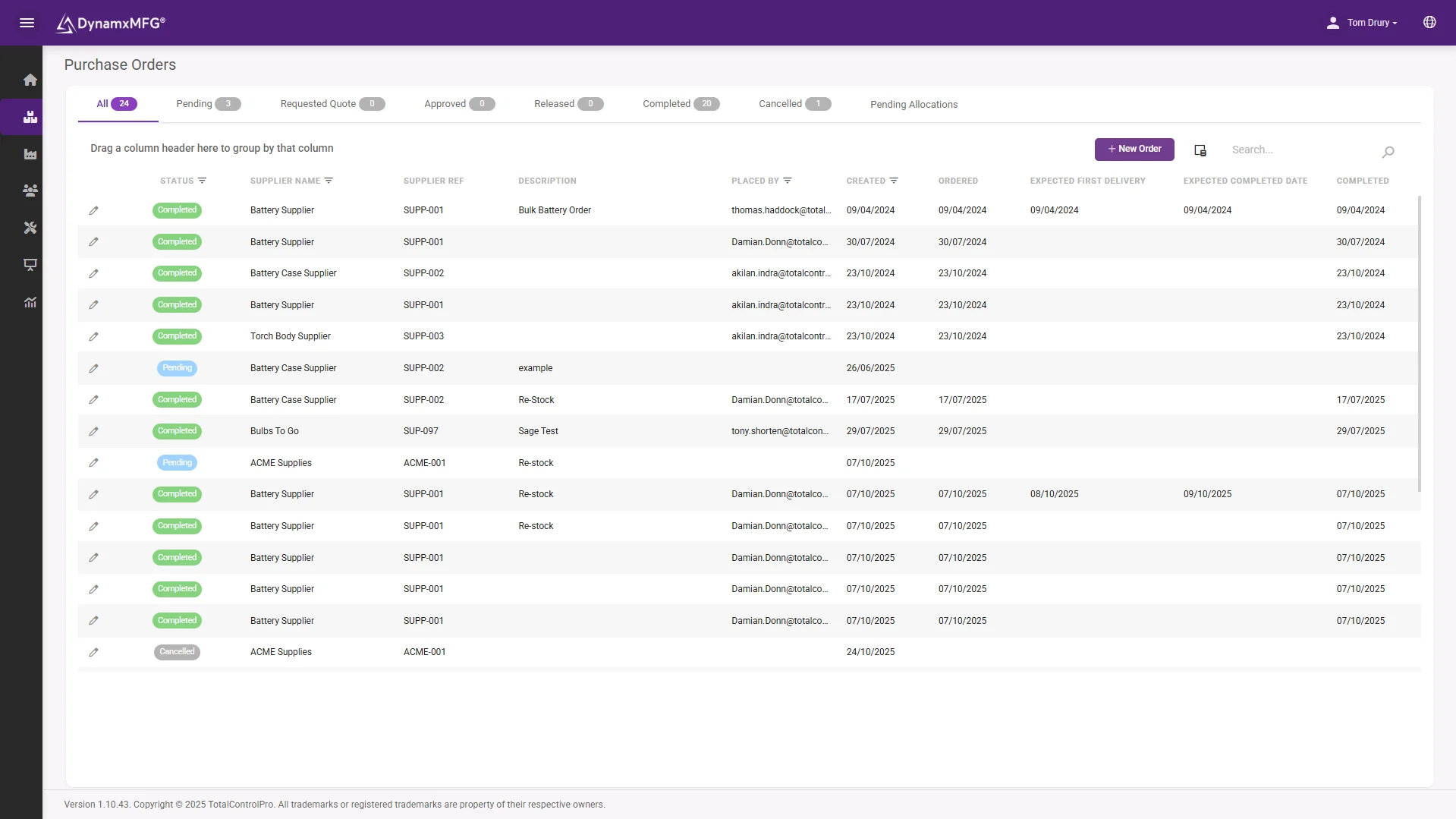
Orders raised from what production needs
Purchase orders come off the requirement calculation with the part, supplier, price and required date already attached. Buying by calculation, not by eye.
Open orders sit with their promised dates, so slippage is visible while it is still a phone call.
- Requirement-driven purchase suggestions
- Promised vs required dates tracked
- Approval trail on every order
How it works
How purchasing works in a factory
The order itself is the easy part. The value is in what happens either side of it.
Requirement is calculated
Planning nets demand against stock and open orders and produces a dated list of what needs buying, rather than somebody deciding by eye.
Order is raised and approved
A purchase order goes to the supplier with the part, quantity, price and required date, through whatever approval thresholds you set.
Delivery is tracked
Open orders are visible with their promised dates, so late deliveries are chased before they become production stoppages.
Goods are received
Material is booked in against the order, with batch numbers captured, quantities checked and any shortfall flagged for chasing.
Capabilities
What purchase order software handles
Requirement-driven ordering
Purchase suggestions generated from real production demand.
Approval workflow
Value thresholds and sign-off, with a record of who approved what.
Supplier pricing
Agreed prices, price breaks and lead times held per supplier and part.
Order acknowledgement
Promised dates recorded against expected dates, so slippage is visible.
Goods receipt
Booking in against the order with batch capture and shortfall handling.
Committed spend
What you have ordered but not yet received, which is real money already spent.
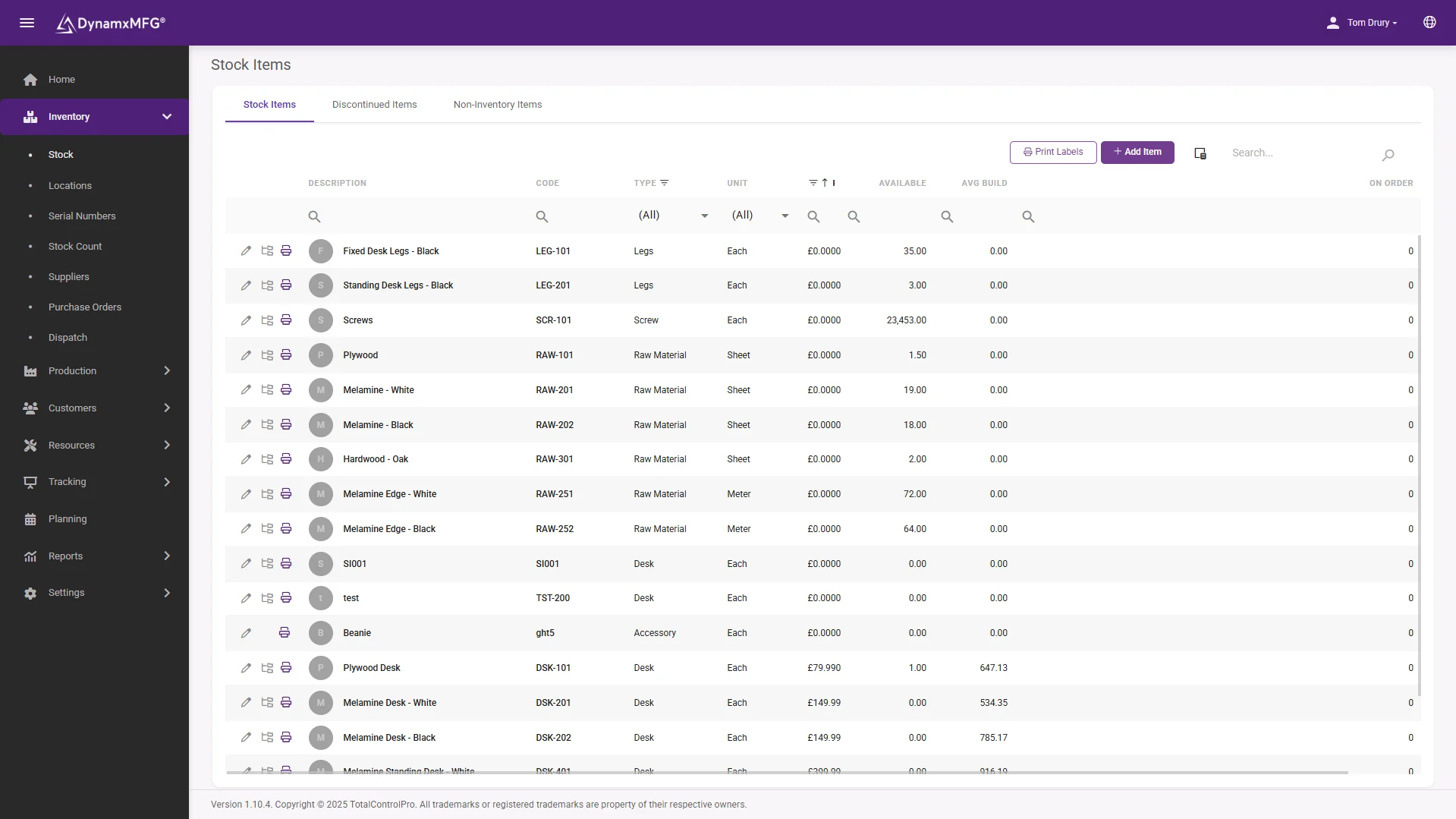
At goods in
Received, checked, batched, booked
Deliveries book in against the order with batch numbers captured at the door, updating free stock and the waiting jobs in one movement.
Short deliveries flag themselves for chasing, and supplier performance builds itself from promised against actual.
- Batch captured at receipt
- Free stock updated instantly
- Supplier performance from real receipts
Benefits
What better purchasing changes
Purchasing is where a surprising amount of a manufacturer's working capital and delivery performance is decided.
Fewer stopped jobs
Buying to a calculated requirement, with visible promised dates, removes most of the shortages that halt production mid-route.
Less money on the shelf
Ordering because a calculation says so, rather than because the shelf looks low, is usually where a stock reduction comes from.
Suppliers get managed
Recording promised against actual delivery dates turns supplier reviews from opinion into evidence.
Spend becomes visible
Knowing committed spend as well as invoiced spend gives a far more honest picture of cash than the purchase ledger alone.
Where it belongs
Purchasing in accounts or purchasing in production?
Most manufacturers end up doing both, and the split matters more than people expect.
| Production purchasing | Accounts purchasing | |
|---|---|---|
| Driven by | Works order and planning requirements | Invoices and payment terms |
| Knows | Which job is waiting for the part | What it costs and when it is due for payment |
| Tracks | Promised dates and shortages | Ledger, VAT and supplier balances |
| Goods receipt | Books material into stock with batch | Matches invoice to order |
| Cares about | Whether production stops | Whether the numbers reconcile |
| Best practice | Raise in production, pass to accounts | Receive the completed order, do not re-key it |
Right for you?
When you need purchasing in your production system
The tell is usually a stockroom that is simultaneously full and short.
- Purchase orders are raised in a spreadsheet or straight from an email, with no link to jobs.
- Nobody can say what is on order and when it is due without opening several files.
- Jobs stall waiting for material that was ordered late, or never ordered at all.
- You hold safety stock because supplier lead times are unreliable and unrecorded.
- Goods in are booked without batch numbers, so traceability starts broken.
- Supplier performance conversations are based on impressions rather than data.
DynamxMFG
Buying what production actually needs
In DynamxMFG purchasing is connected to the work. Requirements come out of planning against live stock, purchase orders are raised against them, and goods in are booked against both the order and the jobs waiting for the material.
That connection is what lets the system tell you something genuinely useful: not just that a delivery is late, but which works orders will stop if it stays late.
Driven by real demand
Requirements from live stock and open jobs. See production planning.
Receipt into stock
Booked in with batch capture. See stock control.
Passes to your ledger
Completed orders flow to Sage, Xero or QuickBooks. See integrations.
Integrations
Connects to what you already run
Raise the order in production, pay it in accounts. DynamxMFG passes completed purchase orders to Sage, Xero and QuickBooks for matching, so nothing is keyed twice.
See all 33 integrations →











Customers
What manufacturers say about DynamxMFG
“DynamxMFG is an excellent choice for manufacturers looking to digitise operations without being overwhelmed by complexity.”
“As GMC has grown, it had become harder for me to have such a keen view on components to see if those parts were profitable or not. DynamxMFG enabled us to monitor the machine time and see whether we are making a profit or a loss on each component.”
“The ability to dynamically modify BOMs after release, adding or removing items from work orders, scrapping and reworking parts, has been the single biggest improvement for our business.”
“We chose the system over competitors because of its ease of use, strong customer support and friendly delivery team. So far, everything has matched what was promised.”
“With DynamxMFG, all our production processes are tracked and the relevant data is captured. This increases our control over the business and helps us identify more opportunities to enhance efficiency and quality.”
“Our experience has been positive, and it was definitely worth switching. The support we have received has been extremely helpful. My favourite feature is the integration and automation capabilities.”
Questions
Purchase order questions, answered
Should purchase orders be raised in accounts or in production?
Raise them where the requirement is known, which is production, and pass the completed order to accounts for matching and payment. Raising them twice is the pattern that causes most reconciliation pain.
Can the system tell me what to order?
Yes, if your bills of materials and stock figures are accurate. That is the requirement calculation, and its output is only as good as those two inputs.
How do we handle blanket or call-off orders?
As an agreed quantity and price with scheduled releases against it. This is common for regularly consumed material and avoids raising an order every week.
What about approval limits?
Most systems support value thresholds routing to different approvers. The useful part is the audit trail, particularly if you are ISO certified.
Do we need to capture batch numbers at goods in?
If you have any traceability obligation, yes, and it must happen at receipt. Capturing it later means reconstructing which delivery a given piece of material came from, which usually cannot be done reliably.
How do we measure supplier performance?
Promised date against actual receipt date, and quantity ordered against quantity accepted. Both come free once purchasing and goods in are in the same system.
Related reading
Read next
Background reading on purchase order software from the DynamxMFG glossary and blog.
Connect buying to what you are building
Book a 30 minute call and we will show requirements, orders and goods in running against real jobs.


