
Feature · Inventory
The right materials,
in the right place, every time.
DynamxMFG manages your entire inventory: BOMs, stock locations, purchase orders and goods-in, all connected to production. When an order is released, materials are allocated and shortfalls are flagged automatically.
The problem
Inventory problems do not announce themselves until it is too late
Wrong materials pulled, stock allocated to the wrong job, purchase orders raised after a job has already started. These are not unusual events. They are the daily reality when inventory is managed separately from production.
Wrong materials pulled for jobs
Without a Manufacturing BOM tied to each operation, operators pick from memory or from a paper list. Costly errors only surface when the part fails inspection or the job needs rebuilding.
Purchase orders raised too late, or twice
Nobody knows what is genuinely short until a job is about to start. Two people raise orders for the same item, or nothing is raised at all and production waits.
No accurate stock value for the accounts
Stock is held in multiple locations with no consistent valuation basis. The number in the accounts bears no resemblance to what is actually on the shelves.
Two-layer BOMs
BOMs that connect design to the shop floor
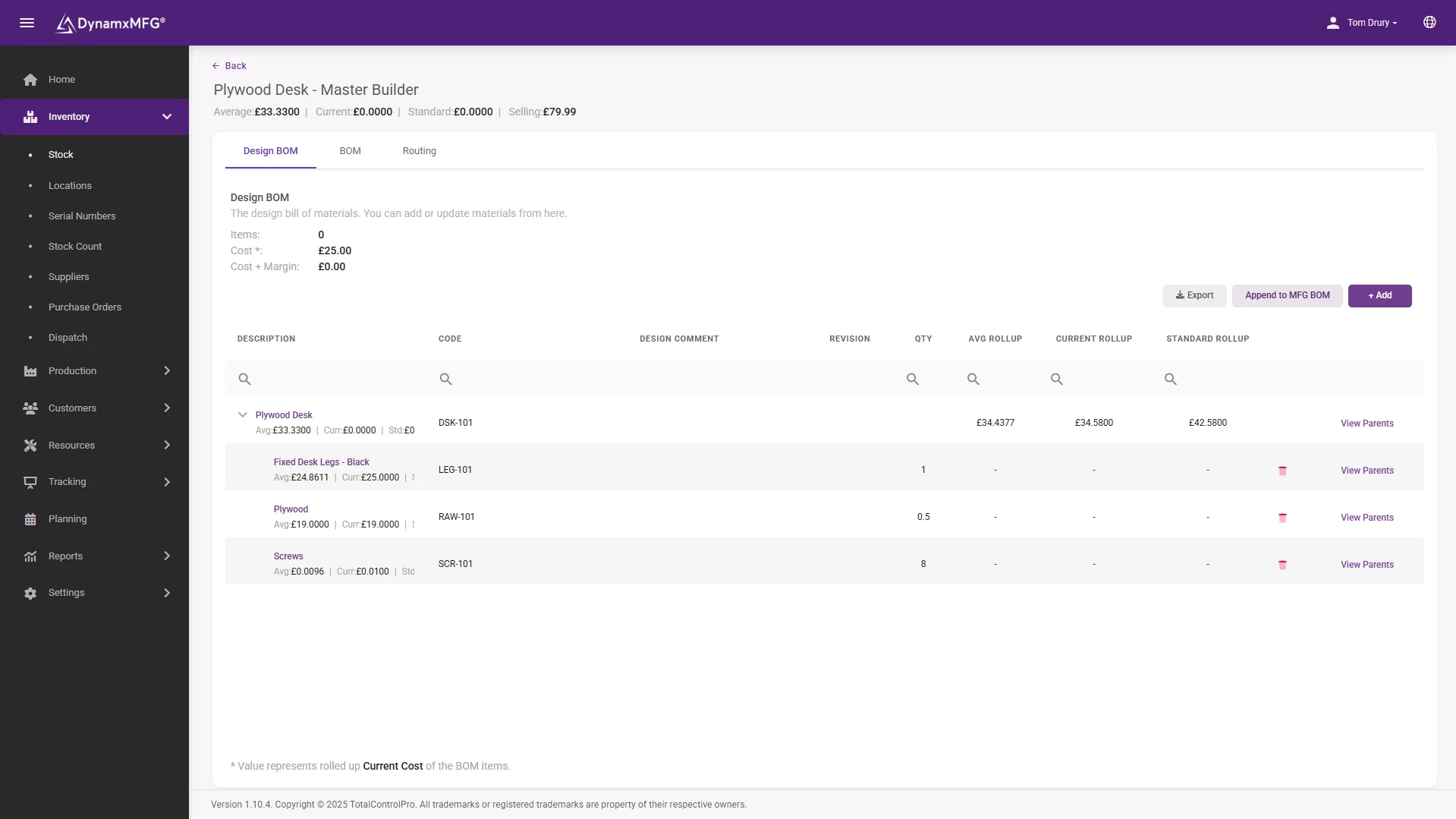
Every stock item has a Design BOM listing all the possible materials that might be used, and a Manufacturing BOM specifying exactly which materials are consumed at each routing operation. Operators see only what they need for the step they are on.
Build the Design BOM manually or import it from a spreadsheet. Build the Manufacturing BOM by assigning materials to each routing step with exact quantities. Changes deploy to all open work orders with a single click, without re-raising anything.
- Design BOM and Manufacturing BOM in one record
- Materials assigned per routing operation
- Deploy a change to open work orders in one click
Purchasing
Never miss a purchase order because you did not know you needed it
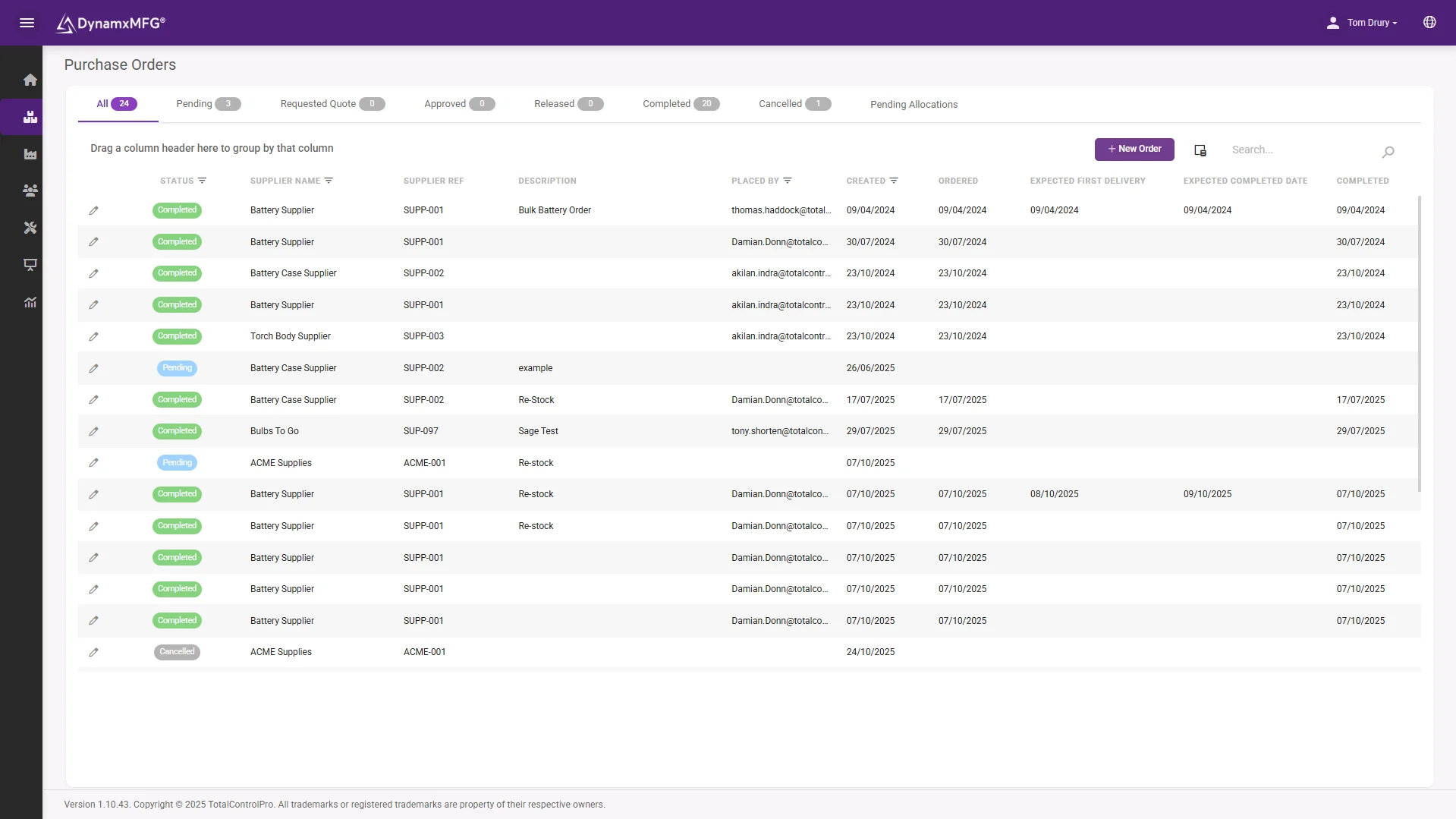
When a sales order is released and stock is insufficient, DynamxMFG raises purchase demand automatically. The Pending Allocations tab shows every outstanding shortfall in one place, with options to create a new purchase order, add to an existing one, or view what is already on order.
Purchase orders move through Pending, Requested Quote, Released and Complete statuses, and approval is recorded. Partial deliveries create a Part Received status so nothing gets lost, and stock is booked in through the Goods In interface on the shop floor.
- Purchase demand raised automatically on shortfall
- Every outstanding shortfall in one view
- Partial deliveries tracked so nothing is lost
Stock and costing
Every item, every location, every cost, always accurate
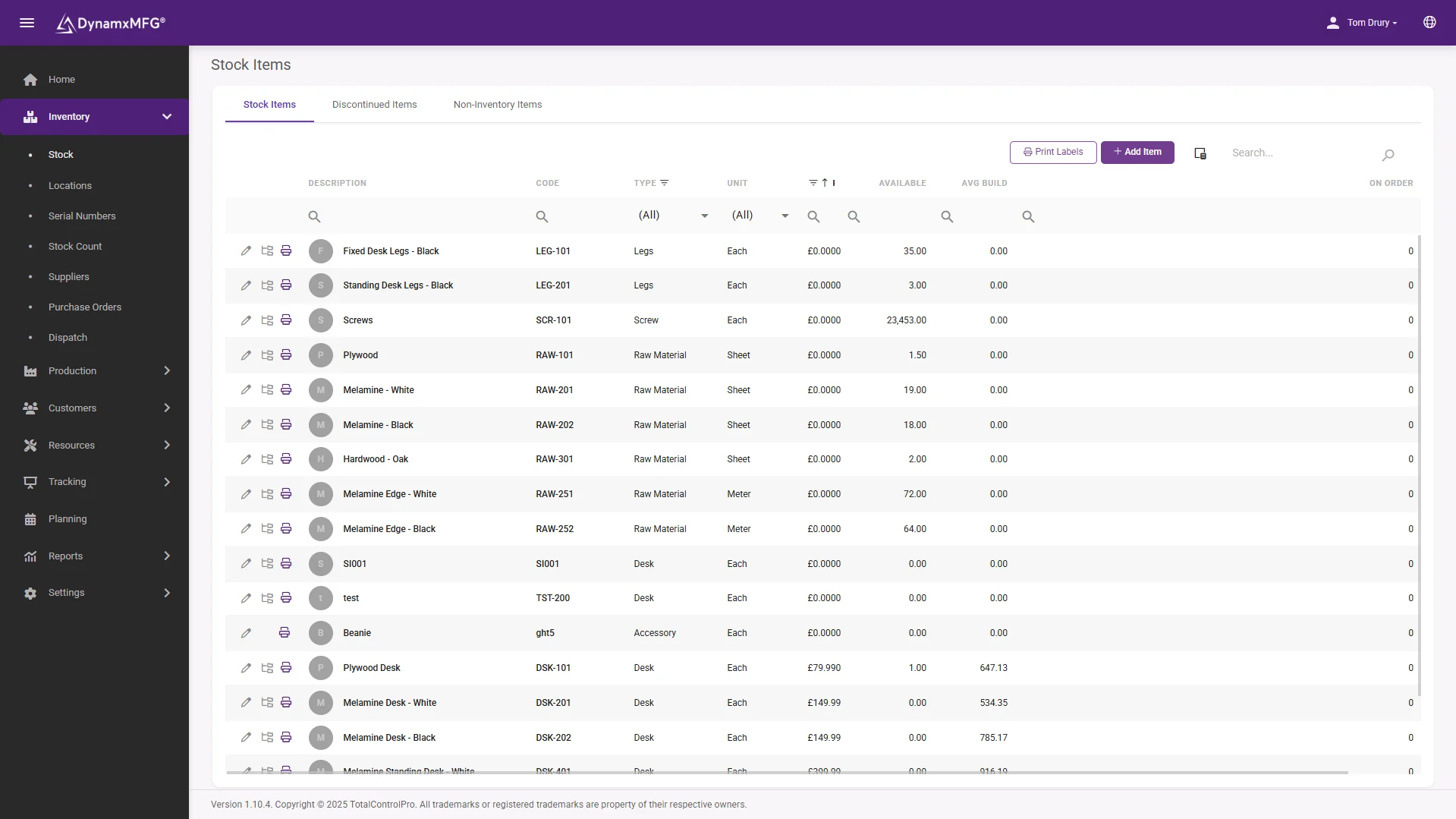
Stock is held across named locations: shelves, bays, work-in-progress areas and quarantine. Unavailable locations hold scrap and obsolete stock that cannot be allocated to jobs. Adjust quantities and costs against any location with a full audit reference.
DynamxMFG uses FIFO costing, so the oldest cost in stock is consumed first. Three BOM cost bases are available: average, standard or latest cost. Run a single recalculation to roll costs across all BOMs when input costs change.
- Named locations, including quarantine and scrap
- FIFO costing with a full audit trail
- Roll new costs across every BOM in one run
The detail
Everything else in inventory management
The details that keep your stock accurate and your costs honest.
Batch and serial tracking
Record batch numbers, serial numbers and bin locations on every goods-in event. Edit batch and bin references at any point from the Locations view.
Dispatch management
Create dispatch tasks, pick and pack through the Advanced Interface, and generate shipments with dispatch notes. Packing types nest from box to pallet.
Multi-currency purchasing
Raise purchase orders in any currency and set exchange rates per order. Costs convert correctly into your base currency for stock valuation and BOM costing.
Salvage and scrap
After a rework or remake, materials can be salvaged back to available stock or scrapped to an unavailable location, with a full audit trail throughout.
Data import
Import stock items, suppliers, BOMs, standard prices and stock transactions from spreadsheet templates. Migrate from your existing system without starting from zero.
Files per stock item
Attach drawings, datasheets and specifications to any stock item, and set whether files appear on purchase orders, sales orders or the shop floor interface.
Connected
Inventory that flows into your accounts automatically
DynamxMFG connects to Sage and Xero so stock movements, purchase invoices and goods received flow between systems without double entry. Suppliers and stock items sync in both directions.
The Print Connector links label printers directly to the Goods In interface, so you can book stock in and print a batch of QR labels in a single step. No manual label design and no reprinting.
See all integrations →











Questions
Inventory management FAQs
What is the difference between a Design BOM and a Manufacturing BOM?
The Design BOM lists every material that might go into a product. The Manufacturing BOM specifies exactly what is consumed at each routing operation, so operators only ever see what they need for the step they are on.
Does DynamxMFG raise purchase orders automatically?
It raises purchase demand automatically when a released order leaves you short. You keep control of the order itself: create a new purchase order, add the shortfall to an existing one, or check what is already on its way.
How is stock valued?
FIFO, so the oldest cost in stock is consumed first. BOMs can be costed on an average, standard or latest basis, and a single recalculation rolls new input costs across every BOM.
Can we track batch and serial numbers?
Yes. Batch numbers, serial numbers and bin locations are recorded on every goods-in event, and can be edited later from the Locations view, giving you traceability from delivery through to dispatch.
Will it work with our existing stock data?
Yes. Stock items, suppliers, BOMs, standard prices and stock transactions all import from spreadsheet templates, so you migrate from your current system rather than starting from zero.
Does it connect to Sage or Xero?
Yes, two-way. Stock movements, purchase invoices and goods received flow between systems without double entry, and suppliers and stock items sync in both directions.
Related
Explore further
The capability pages, definitions and reading that sit behind this part of DynamxMFG.
See your inventory running through DynamxMFG
Book a 15 minute demo. We will walk through your product structure, BOM setup and purchasing process, not a generic walkthrough.
Book a Demo

