
Sage 50 Manufacturing
The Sage 50 Manufacturing alternative
Sage stopped selling, supporting and developing Sage 50 Manufacturing in 2021. You do not have to leave Sage to replace it. Keep Sage 50 for the accounts, and run the factory on something built for the shop floor.
What happened
Sage 50 Manufacturing is gone. Your options are not.
In September 2021, Sage announced that Sage 50 Manufacturing, the Batch Controller and Manufacturing Controller modules thousands of UK factories ran on, would no longer be sold, supported or developed in the UK and Ireland. No more updates, no more fixes, no help desk when it breaks.
Sage pointed its manufacturing customers at reseller bolt-ons, principally Cim50, and moved on. Which leaves you running production on unsupported software, or facing a decision about what replaces it.
It is worth being precise about what actually needs replacing. Your accounts are not the problem. Sage 50 is a perfectly good ledger, your accountant knows it, and moving it would be cost without benefit. What died is the manufacturing layer, and that is the only part that needs a new home.
The mistake most companies make here is treating this as a Sage decision. It is not. It is a shop floor decision, and the shop floor deserves better than another back-office bolt-on.
See it live
What replaces the Manufacturing Controller
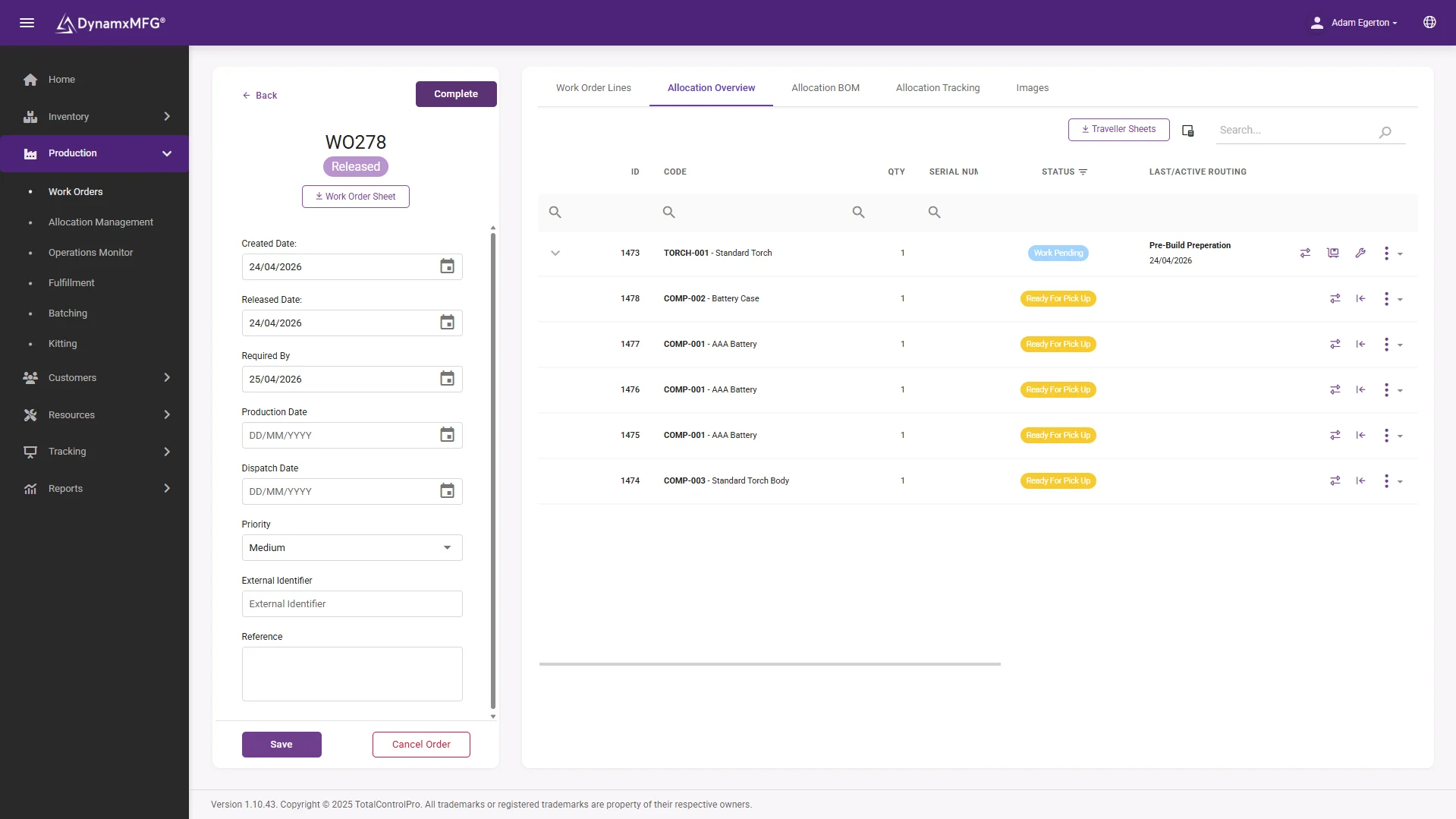
Works orders raised with their bill of materials and routing attached, issued straight to screens at each work centre. Everything the old module did, plus the part it never had: live capture from the floor as work happens.
Operators book on and off operations at the terminal, so progress, labour and material land against the job in real time rather than being typed in at the office.
- Works orders with BOMs and routings
- Live booking at the work centre
- Progress visible without walking the floor
The alternative
Keep Sage. Replace the manufacturing.
DynamxMFG is not another Sage bolt-on. It is a cloud manufacturing system that runs your production and connects to Sage 50, so the ledger keeps doing what it is good at and the factory finally gets software built for the factory.
That separation matters. A bolt-on lives inside Sage's world: desktop software, tied to Sage versions, upgraded when Sage upgrades. A system that stands beside Sage is independent of all of that, and it survives any future accounts decision you ever make.
Your accounts stay put
Sage 50 keeps the books. Invoicing, VAT, payroll and your accountant's workflow are untouched. Nothing about your financial world changes.
Production moves up a class
The factory gets works orders, shop floor capture, live tracking and real job costing, not a recreation of a 2005 back-office module.
The integration exists today
DynamxMFG already connects to Sage 50, along with Xero, QuickBooks and the rest of your stack. This is not a roadmap promise.
What you get
Everything the module did, and the things it never could
Sage 50 Manufacturing was a back-office product. Its replacement should not be.
Works orders and BOMs
Multi-level bills of materials, routings and versioned changes. See BOM software.
Shop floor data capture
Operators book at terminals, not on paper. See shop floor capture.
Real job costing
Actual against quoted from real bookings. See job costing.
Stock and purchasing
Batch-tracked stock and requirement-driven POs. See stock control.
Scheduling
Finite capacity sequencing the module never had. See scheduling.
Traceability
Batch and serial genealogy, searchable in seconds. See traceability.
The upgrade
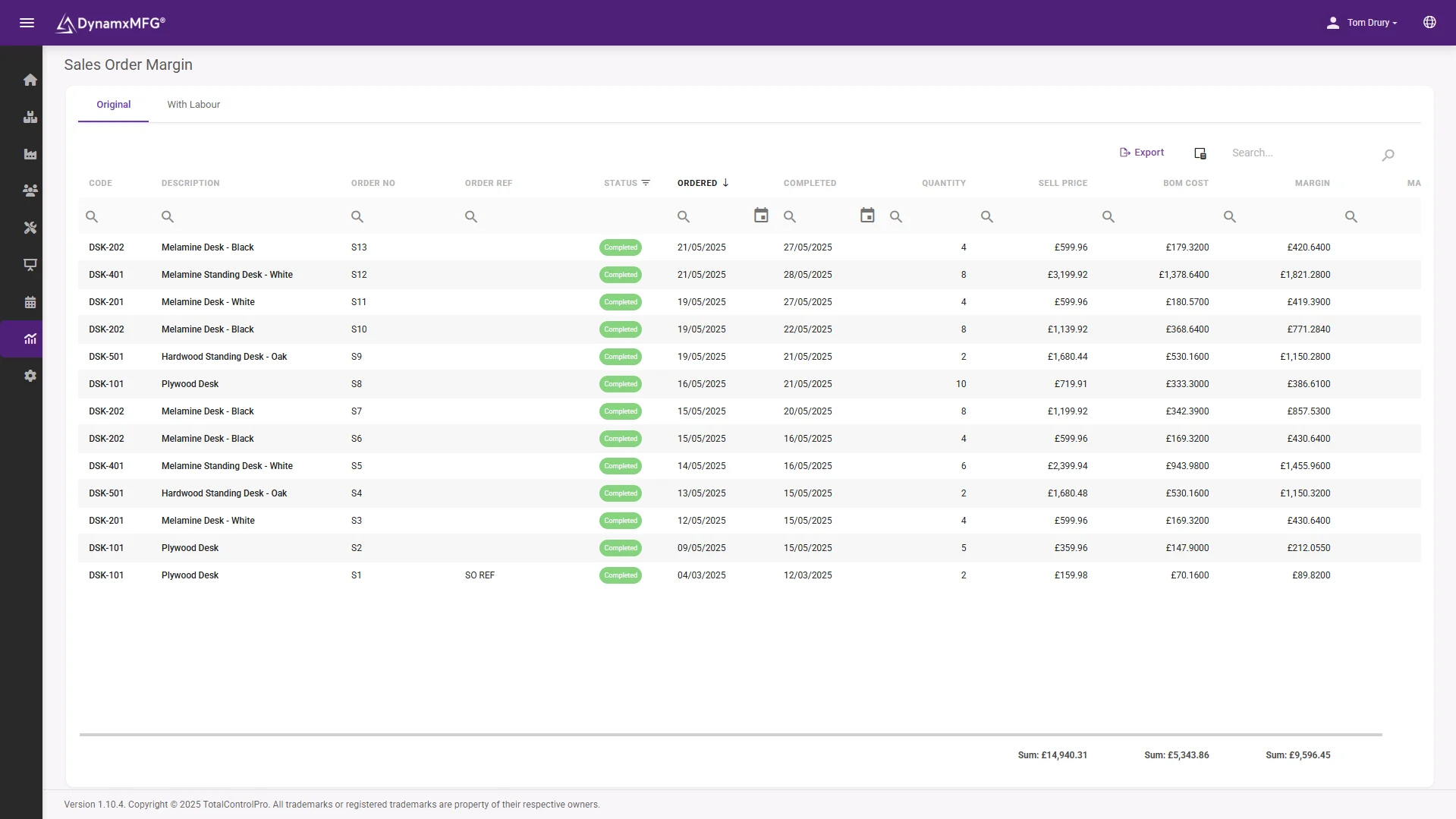
The report Sage 50 Manufacturing could never give you
Margin by sales order, built from hours and material booked on the shop floor. The old module costed jobs from what the office typed in. This costs them from what actually happened.
It is normally the first report that changes a quoting decision, and it usually arrives within weeks of go-live.
- Actual cost against quote, per job
- Margin by product and customer
- Built from live shop floor bookings
Side by side
DynamxMFG or another Sage bolt-on?
The bolt-on route recreates the old module inside the same model that just reached end of life. Worth comparing what you are actually buying.
| DynamxMFG + Sage 50 | A Sage 50 bolt-on | |
|---|---|---|
| Architecture | Cloud. Browser and shop floor terminals, any device | Desktop software installed alongside Sage 50 |
| Built around | The shop floor: operators booking live at the point of work | The back office: data entered at a desk after the fact |
| Tied to Sage releases | No. Connects through the integration and stands independent | Yes. Upgrades and compatibility move in step with Sage 50 |
| If you ever change ledger | Keep DynamxMFG, swap the accounts connection | Start the whole selection process again |
| Access away from the office | Anywhere. It is a cloud system | Remote desktop workarounds |
| Deployment | Live in 90 days, run by your team | Consultant-led install and configuration |
Getting started
Off the dead module in 90 days
This is a well-trodden migration, and none of it disturbs your accounts.
Weeks 1 and 2: lift the data
Item master, bills of materials and open works orders come across from Sage 50 Manufacturing. The structures map cleanly because the concepts are the same.
Weeks 3 to 6: connect and configure
The Sage 50 integration is switched on, routings are checked against reality, and terminals go in at the work centres that matter most.
Weeks 7 to 10: run it for real
Live jobs run through DynamxMFG while Sage 50 keeps the books. The old module stays readable for reference for as long as you want it.
Week 12: the module is history
Production runs on supported, developing software. Your accounts never noticed anything happened.
Is this you?
Who this page is for
If Sage 50 sits in your accounts office, and any of the following is true on your shop floor, this decision is already overdue.
- You are still running Sage 50 Manufacturing, unsupported, and hoping nothing breaks.
- You dropped the module years ago and production has been on spreadsheets ever since.
- You have been quoted for a Sage bolt-on and something about repeating the same model feels wrong.
- Your accountant is happy with Sage 50 and you have no appetite for a full ERP replacement.
- Customers are starting to ask for traceability and delivery evidence the old setup cannot produce.
- You want production software chosen on its own merits, not on what plugs into the ledger.
Integrations
Built to sit beside Sage
DynamxMFG connects to Sage 50 today, alongside Xero, QuickBooks, HubSpot and the rest of your stack. Job costs, stock movements and invoicing data flow to the ledger without rekeying, which is exactly the arrangement the old module pretended to be.
See the Sage 50 integration →









Customers
What manufacturers say about DynamxMFG
“DynamxMFG is an excellent choice for manufacturers looking to digitise operations without being overwhelmed by complexity.”
“As GMC has grown, it had become harder for me to have such a keen view on components to see if those parts were profitable or not. DynamxMFG enabled us to monitor the machine time and see whether we are making a profit or a loss on each component.”
“The ability to dynamically modify BOMs after release, adding or removing items from work orders, scrapping and reworking parts, has been the single biggest improvement for our business.”
“We chose the system over competitors because of its ease of use, strong customer support and friendly delivery team. So far, everything has matched what was promised.”
“With DynamxMFG, all our production processes are tracked and the relevant data is captured. This increases our control over the business and helps us identify more opportunities to enhance efficiency and quality.”
“Our experience has been positive, and it was definitely worth switching. The support we have received has been extremely helpful. My favourite feature is the integration and automation capabilities.”
Questions
Sage 50 Manufacturing questions, answered
Is Sage 50 Manufacturing still supported?
No. Sage announced in September 2021 that Sage 50 Manufacturing would no longer be sold, supported or developed in the UK and Ireland. Anyone still running it is doing so without updates or support.
Do I have to stop using Sage 50 itself?
No, and you should not. Sage 50 remains a supported, capable accounts package. Only the manufacturing module was discontinued, and DynamxMFG replaces that part while connecting to the Sage 50 you already run.
How does DynamxMFG connect to Sage 50?
Through an existing, built integration: customers, invoicing data, job costs and stock values flow between the systems without rekeying. See the Sage 50 integration page for the specifics.
What happens to the data in the old module?
Item masters, bills of materials and open orders migrate into DynamxMFG at the start of the 90-day deployment. Historic records stay readable in the old system for as long as you choose to keep it installed.
How is DynamxMFG different from Cim50?
Cim50 is the desktop bolt-on route: software installed beside Sage 50, built by a Sage reseller, moving in step with Sage versions. DynamxMFG is a cloud manufacturing system built around live shop floor capture that connects to Sage 50 rather than living inside it, and it survives any future change to your accounts package.
How long does switching take?
DynamxMFG deploys in 90 days, including data migration, the Sage 50 connection and shop floor terminals. Your accounts run uninterrupted throughout.
Stop running production on abandoned software
Book a 30 minute call. Bring a works order from the old module, and we will show you the same job running on something with a future.


